Your First Bounded Model Check
This tutorial is the last stop in the tutorial path. You should already know how to read an FCSTM model and a concrete Simulation trace. Here you will ask a different question: instead of choosing one event sequence and observing what happens, can a solver search all event choices allowed by the model up to a finite bound and find a safety violation for you?
The example is a door controller with a physical latch. One maintenance path opens the door without releasing that latch. You will state the intended safety property, let BMC find the path, read the counterexample, repair the model, and run the same property again.
The complete pipeline
Bounded model checking (BMC) converts a finite prefix of the state machine into
one symbolic formula. Z3 checks that formula. A SAT assignment is decoded into
a public trace and replayed with pyfcstm.simulate.SimulationRuntime
before the CLI reports a trusted trace.
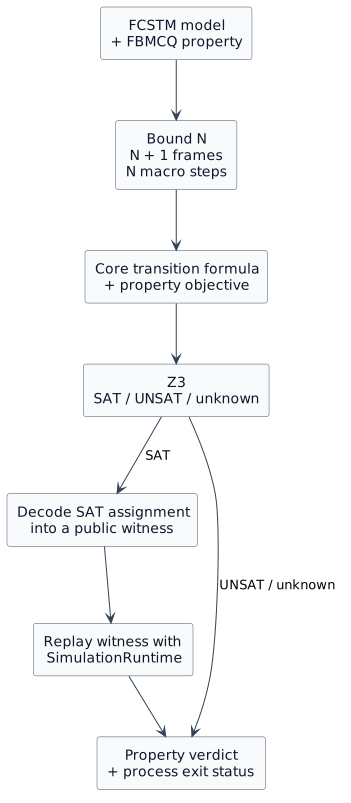
Keep the layers separate:
the FCSTM model defines the behaviors that are possible;
the FBMCQ property states the behavior you want to find or rule out;
the bound limits how many macro steps the symbolic search contains;
the solver status describes the formula, while the property verdict tells a user whether the stated property holds within that bound;
a SAT witness is a decoded satisfying trace; when it violates a safety property, that same trace is called a counterexample;
replay checks that the decoded trace agrees with the executable runtime.
1. Identify the safety rule
The controller records the physical latch separately from its logical state:
def int latch_engaged = 1;

state Locked;
state Unlocked;
state Open;

[*] -> Locked;
These focused declarations sit inside the complete model’s composite
state Door { ... }. That owner is why later paths are Door.Locked and
Door.Open; the excerpt is not intended as a standalone model.
The normal unlock path clears the latch before the door can open:
Locked -> Unlocked : Unlock effect {
    latch_engaged = 0;
}
Unlocked -> Open : OpenDoor;
The maintenance path is shorter, but wrong:
Locked -> Open : ServiceOverride;
The transition changes the logical state to Open and leaves
latch_engaged equal to 1. The dangerous condition is therefore not
merely “the door opens”; it is the combination “the door is open and the
physical latch is still engaged.”
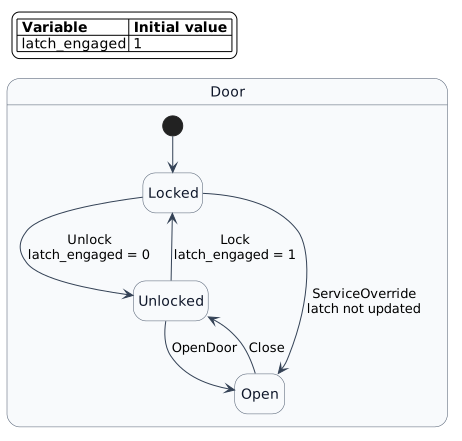
Download the complete faulty model rather than
reconstructing it from the three focused excerpts above.
2. State the property, not the solver result
The query uses forbid because the unsafe combination must never occur in
the searched prefix:
door_latch_safety.fbmcqcheck forbid <= 2:
active("Door.Open") && latch_engaged == 1;
Download the property into the same
directory as the model. The commands below use these short local file names,
so they work from that directory without repository-only paths.
Read it as:
For every execution represented within two macro steps, forbid any observed frame where
Door.Openis active whilelatch_engaged == 1.
forbid is a counterexample-polarity property. The solver does not try
to prove the English sentence directly. It searches for the opposite: one
allowed trace containing the forbidden condition. Consequently:
SAT means such a counterexample exists, so the property does not hold;
UNSAT means no such counterexample exists in the encoded prefix, so the property does hold within this bound.
This polarity mapping is why users should read the polarity-aware headline
before reading the solver status. WITNESS FOUND means that an existential
search found one execution; it is not a claim that every execution satisfies
the predicate. PROPERTY GUARANTEED is reserved for a counterexample search
that found no counterexample in the complete bounded horizon.
3. Turn bound 2 into frames and steps
A frame is one symbolic snapshot of the control state and every persistent variable. A step connects two neighboring frames. One BMC step represents one FCSTM macro step: the work performed by one runtime cycle from one observable boundary to the next, including the selected macro case (such as initial entry, an event transition, fallback, or termination absorption) and its ordered actions.
For bound \(N\), BMC allocates \(N+1\) frames and \(N\) steps:
Item |
Index |
Example observation |
Meaning |
|---|---|---|---|
Frame |
|
cold-init sentinel, |
Snapshot before the first encoded macro step. Its control value is the
|
Step |
|
initial entry |
Moves from cold initialization to |
Frame |
|
|
Snapshot after initial entry. |
Step |
|
|
Moves directly from |
Frame |
|
|
Final snapshot; the forbidden condition is true here. |
The off-by-one rule matters: <= 2 does not mean two snapshots. It means at
most two macro steps and therefore frames 0, 1, and 2. Nothing in
this query describes frame 3 or any later behavior.
4. Run the search
Run the faulty model and the safety property:
python -m pyfcstm bmc \
    -i first_check.fcstm \
    -q door_latch_safety.fbmcq \
    --color never
The live timing value varies, but the structure is stable:
BMC forbid <= 2: PROPERTY DOES NOT HOLD WITHIN BOUND; COUNTEREXAMPLE FOUND
Scenario: FEASIBLE
Property verdict: NOT SATISFIED WITHIN BOUND (COUNTEREXAMPLE FOUND)
Primary search: COUNTEREXAMPLE = SAT
Conclusion: At least one admissible execution violates the forbid property within 2 macro-steps.

Solver: SAT in ... ms
Replay: verified (3 frames, 2 steps).

Trace
  0: init -> Door.Locked [initial]
  1: Door.Locked -> Door.Open [transition; events=Door.ServiceOverride]
Interpret the lines in order:
PROPERTY DOES NOT HOLD WITHIN BOUND; COUNTEREXAMPLE FOUNDis the user-facing conclusion.SATsays the counterexample objective has a satisfying assignment.3 frames, 2 stepsconfirms the bound-two horizon.Replay: verifiedsays the decoded event sequence reproduced the public observations in the runtime; it is a consistency gate, not an unbounded proof.The trace identifies the defect: the solver selected
ServiceOverride.
The normal Unlock then OpenDoor route would require a third macro step
after cold initial entry. Bound 2 cannot include that route, while the direct
ServiceOverride route fits exactly; the trace therefore also demonstrates
how the chosen bound controls which counterexamples can be observed.
The command exits 1 because the property is false within the bound. That is
a valid BMC report, not a parse or CLI failure.
5. Repair the model and keep the property
Repair the transition, not the query:
Locked -> Open : ServiceOverride effect {
    latch_engaged = 0;
}
Download the repaired model, then run the
same property against it:
python -m pyfcstm bmc \
    -i first_check_fixed.fcstm \
    -q door_latch_safety.fbmcq \
    --color never
The result changes:
BMC forbid <= 2: PROPERTY GUARANTEED WITHIN BOUND; NO COUNTEREXAMPLE
Scenario: FEASIBLE
Property verdict: SATISFIED WITHIN BOUND (NO COUNTEREXAMPLE)
Primary search: COUNTEREXAMPLE = UNSAT
Conclusion: Every admissible execution within 2 macro-steps satisfies the forbid property.

Solver: UNSAT in ... ms
The formula is UNSAT because every encoded path to Door.Open now clears
the latch. The command exits 0. This proves only that the forbidden
combination has no trace of at most two macro steps under the modeled behavior.
It does not establish an unbounded invariant, validate omitted environment
behavior, or prove that the FCSTM model matches the physical door.
6. Save a short machine-readable result
Use --json for CI or another tool. The faulty property still exits 1,
so a shell must treat that value as an expected negative verdict rather than an
invocation failure:
python -m pyfcstm bmc \
    -i first_check.fcstm \
    -q door_latch_safety.fbmcq \
    --json -o /tmp/door-bmc.json || test $? -eq 1
The full JSON contains every frame and step. The four fields needed to classify this result are:
{
  "result": {
    "status": "sat",
    "outcome": "property_violated",
    "property_satisfied": false
  },
  "replay": {"ok": true},
  "exit_code": 1
}
Do not snapshot elapsed_ms; it is live timing. Do not infer the property
truth from status alone; consume outcome or property_satisfied.
7. Know the other non-success outcomes
The two runs above are decisive. Other reports require a different response:
Result |
Exit |
Meaning |
Next action |
|---|---|---|---|
|
|
Z3 exceeded a per-check time limit. |
Increase the timeout or simplify/reduce the bounded problem. |
|
|
Z3 did not return SAT or UNSAT and supplies a reason when available. |
Preserve the diagnostic; do not call the property true or false. |
|
|
A |
For SAT, increase the bound because solver time cannot create missing
frames. For |
replay mismatch |
|
A SAT witness was decoded, but runtime observations disagree. |
Treat the property verdict as untrusted and report an implementation consistency problem. |
Only response has the separate horizon formula that can produce
incomplete. The exact library-level unchecked state and exit-priority
matrix are listed in BMC CLI and Result Protocol Reference.
8. Ask why an impossible scenario is impossible
A SCENARIO INFEASIBLE report says no execution exists, which means the
property was never evaluated. That is easy to cause by accident – two
assumptions that cannot both hold, an initializer the machine cannot continue
from – and by itself the report does not say which clause is at fault.
Write a query that asks for the latch to hold two values at the same frame:
assume at 1: var("latch_engaged") == 0;
assume at 1: var("latch_engaged") == 1;
check reach <= 2: active("Door.Open");
Run it at the default depth first:
python -m pyfcstm bmc \
    -i first_check_fixed.fcstm \
    -q impossible_latch.fbmcq --color never
The verdict arrives, and nothing explains it:
BMC reach <= 2: SCENARIO INFEASIBLE; PROPERTY NOT EVALUATED
Scenario: INFEASIBLE
Property verdict: NOT EVALUATED (SCENARIO INFEASIBLE)
Evidence:
  Failure boundary: ASSUMPTIONS
Failure boundary: ASSUMPTIONS narrows it to the assume clauses, which is
already useful and still not a line number. Ask for the explanation:
python -m pyfcstm bmc \
    -i first_check_fixed.fcstm \
    -q impossible_latch.fbmcq \
    --explain-infeasibility proof --color never
Explanation: COMPLETE VERIFIED DOMAIN PROOF
Classification: the assumptions are internally inconsistent

Why no execution exists:
  1. At frame 1, latch_engaged must equal 0.
  2. At frame 1, latch_engaged must equal 1.
  3. Therefore one value cannot be two things at once. No execution satisfies
     these initialization and query requirements, and the property was not
     evaluated.

Conflict constraints:
  1. impossible_latch.fbmcq:1:1-1:40
     assume at 1: var("latch_engaged") == 0;
  2. impossible_latch.fbmcq:2:1-2:40
     assume at 1: var("latch_engaged") == 1;

The displayed core is sufficient for UNSAT and proven subset-minimal.
Core scope: assumptions_component
Reduction: subset_minimal
Subset minimality: proven
Three things in that block are worth reading carefully.
COMPLETE VERIFIED DOMAIN PROOF means every step behind those sentences was
checked – not that the tool is confident, but that a check ran. The JSON says
which:
python -m pyfcstm bmc \
    -i first_check_fixed.fcstm \
    -q impossible_latch.fbmcq \
    --explain-infeasibility proof --json -o /tmp/latch-proof.json
python -c "
import json
proof = json.load(open('/tmp/latch-proof.json'))['result']['feasibility']['explanation']['proof']
for node in proof['nodes']:
    print(node['stable_id'], node['kind'], node['verification_method'])
"
proof.input.0000 input core_binding
proof.input.0001 input core_binding
proof.step.0002 contradiction rule_checker
Each input was verified against the clause it restates; the conclusion was
re-derived by a checker that does not share code with the constructor. The
verification_method field is where that division is published.
proven subset-minimal means every listed clause is load bearing. Remove
either one and the scenario becomes feasible again – so both lines are worth
your attention, and neither is noise.
And the closing sentence says the property was not evaluated. This is not a
counterexample to reach. The exit status is 3, not 2: nothing was
proven about the door. Fix the assumptions, re-run, and only then read the
verdict.
If you ask for proof and the block says achieved formal, that is a
capability boundary rather than an error – the formal explanation is still
complete, and it tells you why it stopped there. The how-to guide covers what to
do next.
Vocabulary checkpoint
You should now be able to distinguish these pairs:
simulation / BMC: one selected execution / symbolic search over allowed executions up to a bound;
frame / step: one snapshot / the macro-step relation between snapshots;
property / objective: the user claim / the formula whose satisfying model the solver searches for;
SAT / polarity-aware conclusion: a formula has a model / the conclusion depends on whether the query searches for a witness or a counterexample;
witness / counterexample: any decoded SAT trace / a witness that disproves a counterexample-polarity property;
decode / replay: project solver values into a trace / execute that trace against runtime semantics.
Where to go next
Read the deeper material in concept order:
How FCSTM Becomes a Bounded Transition System explains frames, macro cases, the transition relation, and the bounded core formula.
Property Objectives, Definedness, and Bounds compares all seven property objectives, quantifiers, polarity, and definedness.
BMC solving, witnesses, and replay boundaries separates solving, witness decoding, runtime replay, and trust boundaries.
BMC Task Recipes gives repeatable task recipes after the mental model is in place.
FBMCQ Language Reference and BMC CLI and Result Protocol Reference provide exact syntax and result contracts.