DSL task guide
How to use this page
This page is not a syntax catalog. It is a set of recipes for authoring or repairing common FCSTM DSL shapes. Each recipe states when to use the feature, what to write, how to verify it, what diagnostics to expect, and where to read more.
A command that mentions a checked example is intended to run from the repository root.
Write a small valid model
Use this when you need a minimal sanity check before adding advanced features. Start with one root composite, one initial transition, and leaf states owned by that composite.
// First runnable thermostat model for the DSL tutorial.
// The temperature changes in lifecycle actions, so inspect reports no warnings.

def int temperature = 20;

state Thermostat {
    [*] -> Idle;

    state Idle {
        during {
            temperature = temperature - 1;
        }
    }

    state Heating {
        enter {
            temperature = temperature + 1;
        }
        during {
            temperature = temperature + 1;
        }
    }

    Idle -> Heating : if [temperature < 20];
    Heating -> Idle : if [temperature >= 22];
}
Verify it:
pyfcstm inspect -i docs/source/tutorials/dsl/first_thermostat.fcstm --format human --color never
Expected summary:
status: ok
root: Thermostat
diagnostics: 0 errors / 0 warnings / 0 infos
Common mistake: putting a transition before both endpoint states exist. Keep the state declarations and transitions inside the same owning composite unless the transition intentionally enters or exits that composite boundary.
Organize states and resolve targets
Use this when a transition says it cannot find a state, or when you are unsure where a transition should be declared.
Recommended complete pattern:
state Parent {
    [*] -> ChildA;
    state ChildA;
    state ChildB;
    ChildA -> ChildB;
}
ChildA -> ChildB belongs inside Parent because Parent owns both
names. From outside Parent, target Parent itself and let Parent use
its initial transition.
Common mistake: targeting a child owned by another composite from the outside.
state Root {
    [*] -> Outside;
    state Outside;
    state Parent {
        [*] -> ChildA;
        state ChildA;
        state ChildB;
    }
    Outside -> ChildB;  // invalid: ChildB is not owned by Root
}
The fix is either Outside -> Parent; or moving the child-targeting
transition inside Parent. Read State forms and
Ownership tree and name resolution for the exact rule.
If you save that bad model as /tmp/nested_target_invalid.fcstm, verify the
failure with:
pyfcstm inspect -i /tmp/nested_target_invalid.fcstm --format human --color never
Expected excerpt:
Invalid state machine model ... Unknown to state 'ChildB' of transition:
Outside -> ChildB; (line 9)
Verify a checked hierarchy example:
pyfcstm inspect -i docs/source/tutorials/dsl/hierarchy_execution.fcstm --format human --color never
Expected excerpt:
root: HierarchyDemo
diagnostics: 0 errors / 1 warnings / 1 infos
Pseudo states are route-only leaf helpers, not business states with lifecycle behavior. The legacy pseudo-state example is kept as a checked resource:
W_UNREFERENCED_VAR and three I_TRANSITION_NEVER_EVENT_TRIGGERED notes.// Pseudo State Example
// This example demonstrates the difference between normal and pseudo states
def int aspect_counter = 0;
state PseudoStateDemo {
// Aspect actions that apply to all descendant states
>> during before {
aspect_counter = aspect_counter + 1;
}
>> during after {
aspect_counter = aspect_counter + 100;
}
state NormalStates {
// Normal leaf state - WILL execute ancestor aspect actions
state RegularState {
during {
aspect_counter = aspect_counter + 10;
}
}
[*] -> RegularState;
RegularState -> [*];
}
state PseudoStates {
// Pseudo state - WILL NOT execute ancestor aspect actions
// Useful for special states that need to bypass aspect logic
pseudo state SpecialState {
during {
aspect_counter = aspect_counter + 10;
}
}
[*] -> SpecialState;
SpecialState -> [*];
}
[*] -> NormalStates;
NormalStates -> PseudoStates :: Switch;
PseudoStates -> [*];
}
Write event scopes
Use events for discrete external triggers. Choose the spelling by ownership:
Need |
Write |
Meaning |
|---|---|---|
Private event of the source state |
|
Event is local to |
Event owned by containing or named state |
|
Event resolves through the containing ownership chain. |
Root-owned event |
|
Event path starts below the root state. |
Checked examples:
W_UNREFERENCED_VAR for the demonstration counter.// Event Scoping Complete Example
// This example demonstrates all three event scoping mechanisms:
// 1. Local events (::) - scoped to source state
// 2. Chain events (:) - scoped to parent state
// 3. Absolute events (/) - scoped to root state
def int counter = 0;
state System {
state ModuleA {
state A1 {
during {
counter = counter + 1;
}
}
state A2 {
during {
counter = counter + 2;
}
}
[*] -> A1;
// Local event :: - scoped to source state (A1)
// Equivalent to: A1 -> A2 : /ModuleA.A1.LocalEvent
A1 -> A2 :: LocalEvent;
// Chain event : - scoped to parent state (ModuleA)
// Equivalent to: A2 -> A1 : /ModuleA.ChainEvent
A2 -> A1 : ChainEvent;
}
state ModuleB {
state B1 {
during {
counter = counter + 10;
}
}
state B2 {
during {
counter = counter + 20;
}
}
[*] -> B1;
// Local event :: - scoped to source state (B1)
// Equivalent to: B1 -> B2 : /ModuleB.B1.LocalEvent
// This is DIFFERENT from ModuleA.A1.LocalEvent
B1 -> B2 :: LocalEvent;
// Chain event : - scoped to parent state (ModuleB)
// Equivalent to: B2 -> B1 : /ModuleB.ChainEvent
// This is DIFFERENT from ModuleA.ChainEvent
B2 -> B1 : ChainEvent;
}
state SharedTarget {
during {
counter = counter + 100;
}
}
[*] -> ModuleA;
// Absolute event / - scoped to root state (System)
// Both transitions use the SAME event: System.GlobalEvent
ModuleA -> SharedTarget : /GlobalEvent;
ModuleB -> SharedTarget : /GlobalEvent;
// Absolute event can also be used within nested states
// This allows cross-module communication
SharedTarget -> ModuleA : /ResetToA;
SharedTarget -> ModuleB : /ResetToB;
}
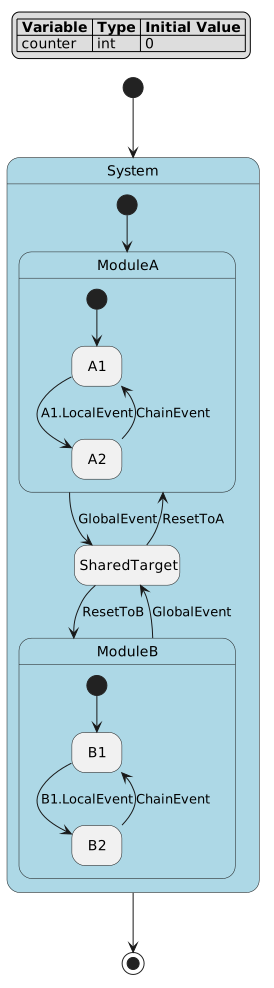
Read this diagram by asking who owns each signal. Edges written with ::
use source-local events, edges written with : Name use a containing or
named owner, and edges written with : /Name use the root event
namespace. Inspect events[].qualified_name and events[].scope to
confirm the same ownership that the diagram labels suggest.
Verify and inspect event ownership:
pyfcstm inspect -i docs/source/tutorials/dsl/event_scoping_complete.fcstm --format json
In JSON, check events[].qualified_name and events[].scope. For readability, prefer
: /Start because it separates the event-scope : token from the absolute
root path. The compact spelling :/Start is accepted by the current parser and
serializes to the same absolute event, but the spaced form is easier to teach,
search, and review.
Common mistake: do not move between :: and : only for aesthetics. The
spelling changes who owns the event, which can change import mapping,
simulation input names, and inspect events[].scope output.
Write guards, effects, and operation blocks
Use guards to decide whether a transition is enabled. Use effects for updates that happen after the source exits and before the target enters.
A complete operation-block example is checked in:
if / else if / else, empty statement, and ternary assignment; expected diagnostics: none.def int sensor = 0;
def int target = 10;
def int mode = 0;
def int alarm_count = 0;
def int led = 0;
state OperationBlocksComplete {
[*] -> Sampling;
state Sampling {
enter {
target = target + 0;
delta = abs(target - sensor);
if [delta > 5] {
mode = 2;
} else if [delta > 2] {
mode = 1;
} else {
mode = 0;
}
;
}
during {
sensor = sensor + 1;
}
}
state Done {
enter {
led = (alarm_count > 0) ? 1 : 0;
}
}
state Cooling {
during {
sensor = sensor - 1;
}
}
state Resetting {
enter {
alarm_count = 0;
}
}
Sampling -> Done : if [sensor >= target] effect {
next_sample = sensor + 1;
alarm_count = (next_sample > target) ? alarm_count + 1 : alarm_count;
led = (mode > 0) ? 1 : 0;
};
Done -> Cooling : if [led >= 0];
Cooling -> Resetting : if [sensor <= target];
Resetting -> Sampling : if [alarm_count == 0] effect {
sensor = 0;
};
}
Key points demonstrated by the file:
deltaandnext_sampleare block-local temporaries. They can be read only after assignment inside the same block.if [condition] { ... } else if [condition] { ... } else { ... }is legal inside operation blocks.A standalone
;is an accepted empty statement.Guard conditions and assignment expressions are different languages: guards use condition expressions; assignments use numeric expressions.
Verify it:
pyfcstm inspect -i docs/source/tutorials/dsl/operation_blocks_complete.fcstm --format human --color never
Expected diagnostic count is zero. Common mistake: if you see E_UNDEFINED_VAR with
refs.is_temporary=true, the usual fix is to assign the temporary before its
first read in the same block.
Use expressions safely
Use this when an expression parses in one place but not another. FCSTM has three expression contexts:
Context |
Accepts |
Does not accept |
|---|---|---|
|
literals, |
runtime variable reads, ternary expressions |
|
runtime variables, arithmetic, bitwise, math functions, numeric ternary |
condition-only operators outside a parenthesized ternary condition |
|
comparisons, |
numeric assignment statements |
Checked expression examples:
def int x = 1;
def int y = 2;
def int flag = 0;
def int score = 0;
def float wave = 0.0;

state ExpressionConditionTernary {
    [*] -> Checking;

    state Checking {
        enter {
            x = x + 0;
            y = y + 0;
            wave = sin(pi / 2.0) + log2(8.0);
            score = (x < y) ? 10 : 20;
            flag = ((x < y) && !(flag > 0)) ? 1 : 0;
        }
    }

    state Matched {
        during {
            score = score + 1;
        }
    }

    state Blocked {
        during {
            score = score - 1;
        }
    }

    Checking -> Matched : if [((x < y && flag == 1) || (x == y)) && ((x > 0 => y > 0) && ((x < y) xor (flag == 0)))];
    Checking -> Blocked : if [(x > y) iff false];
    Matched -> [*] : if [score >= 0 && ((x < y) ? true : false)];
    Blocked -> [*] : if [not (x < y) || wave >= 0.0];
}
A smaller fragment showing the most common spelling traps:
// Good: boolean xor is the word "xor".
A -> B : if [(left > 0) xor (right > 0)];

// Good: implication is "=>" or "implies" in a condition.
A -> B : if [request > 0 => ready > 0];

// Good: numeric bitwise xor remains "^".
flags = flags ^ 0x01;
Do not use -> for implication; it is transition syntax. Do not use ^ as
boolean xor. See Expression reference and
Guard, effect, and expression separation for precedence and design rationale.
Verify the checked expression example:
pyfcstm inspect -i docs/source/tutorials/dsl/expression_condition_ternary.fcstm --format human --color never
Expected excerpt:
root: ExpressionConditionTernary
diagnostics: 0 errors / 0 warnings / 0 infos
Write lifecycle hooks, refs, and abstract hooks
Use concrete lifecycle actions when the model itself owns the behavior. Use
abstract when generated code should call a user-provided hook. Use ref
when multiple states should reuse a named lifecycle action.
Fragment pattern (not a complete checked file; the checked complete file follows):
state Device {
    enter SharedInit {
        ready = 1;
    }

    state Idle {
        enter ref /SharedInit;
        during abstract PollHardware;
    }
}
ref points to a named lifecycle action, not to a state and not to an event.
Common mistake: enter ref /Idle tries to reference a state path, not a named
lifecycle action; name the action first, then reference that action path.
The checked example below shows concrete, abstract, doc-comment abstract, and
reference forms:
I_UNREFERENCED_VAR_MAYBE_ABSTRACT entries and one I_TRANSITION_NEVER_EVENT_TRIGGERED note.// Abstract and Reference Actions Example
// This example demonstrates abstract function declarations and action references
def int init_flag = 0;
def int cleanup_flag = 0;
state AbstractReferenceDemo {
// Root-level abstract functions that can be referenced
enter abstract GlobalInit /*
Global initialization function.
TODO: Implement in generated code framework
*/
exit abstract GlobalCleanup /*
Global cleanup function.
TODO: Implement in generated code framework
*/
state BaseState {
// Abstract actions - must be implemented in generated code
enter abstract HardwareInit /*
Initialize hardware peripherals and sensors.
This function must be implemented in the target platform.
TODO: Implement in generated code framework
*/
enter {
init_flag = 1;
cleanup_flag = 0;
}
exit abstract HardwareCleanup /*
Clean up hardware resources before exit.
TODO: Implement in generated code framework
*/
exit {
cleanup_flag = 1;
init_flag = 0;
}
}
state DerivedState1 {
// Reference global abstract functions
enter ref /GlobalInit;
exit ref /GlobalCleanup;
// Can also have its own abstract actions
during abstract ProcessData /*
Process sensor data in DerivedState1.
TODO: Implement in generated code framework
*/
}
state DerivedState2 {
// Can reference the same global functions
enter ref /GlobalInit;
exit ref /GlobalCleanup;
during abstract ProcessData /*
Process sensor data in DerivedState2.
Different implementation from DerivedState1.
TODO: Implement in generated code framework
*/
}
[*] -> BaseState;
BaseState -> DerivedState1 :: Start;
DerivedState1 -> DerivedState2 :: Switch;
DerivedState2 -> [*];
}
Review the diagrams when you need lifecycle ordering:
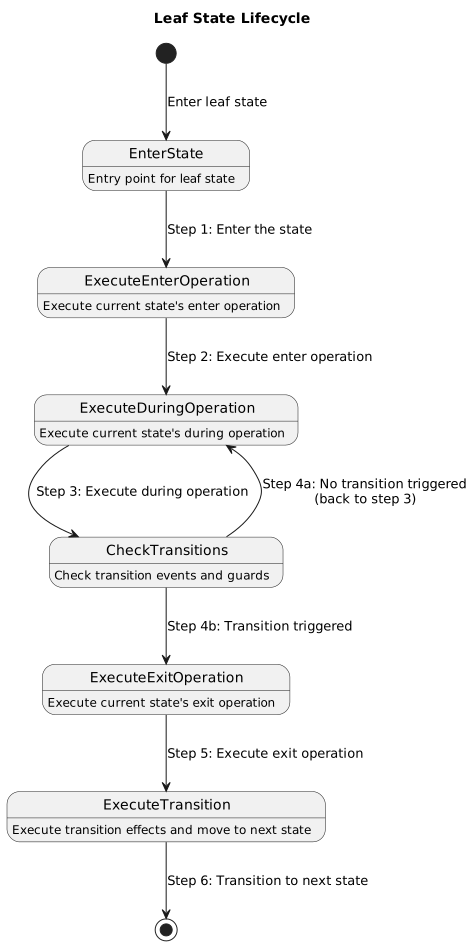
A leaf state can run enter when it becomes active, during while it
stays active, and exit before it is left. This is authored behavior, not
generated relay machinery.
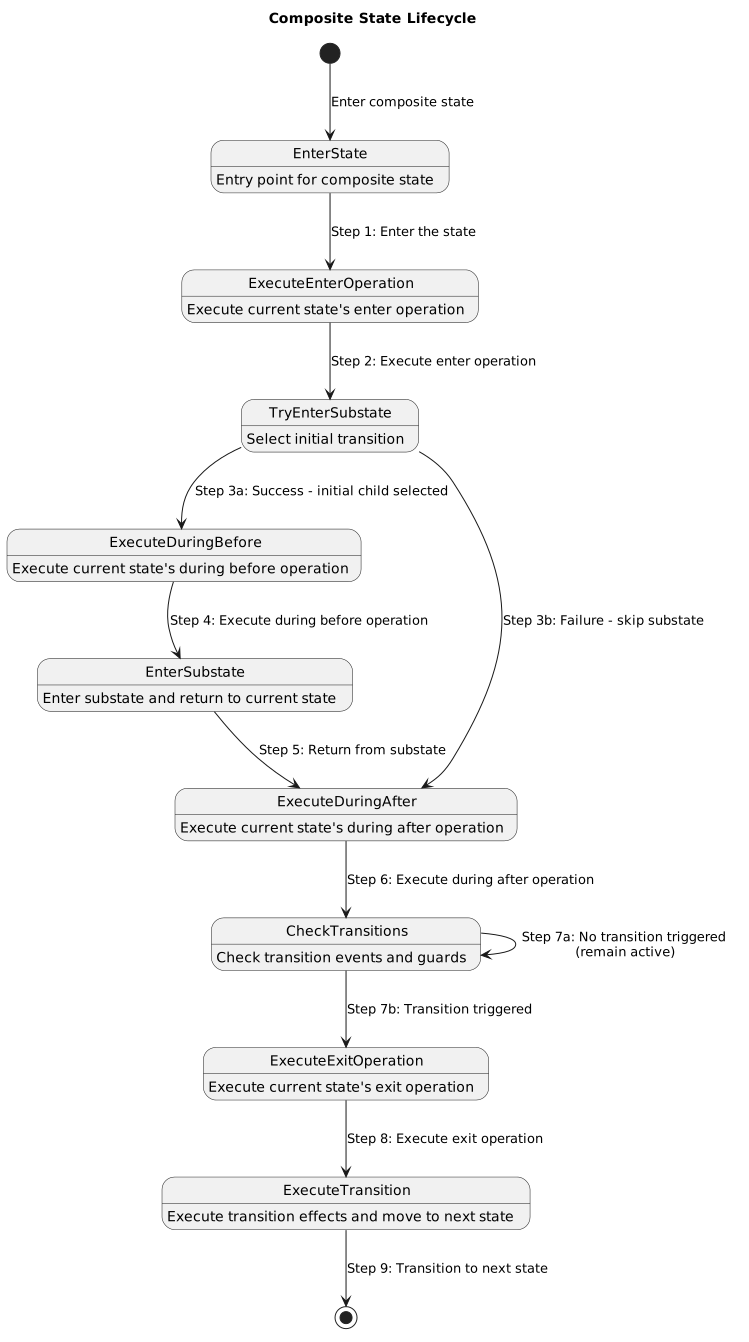
A composite state is a boundary around child selection. Its ordinary
during before / during after actions are boundary actions; they are
not the same as ancestor >> during aspects and they do not observe every
combo relay hop.
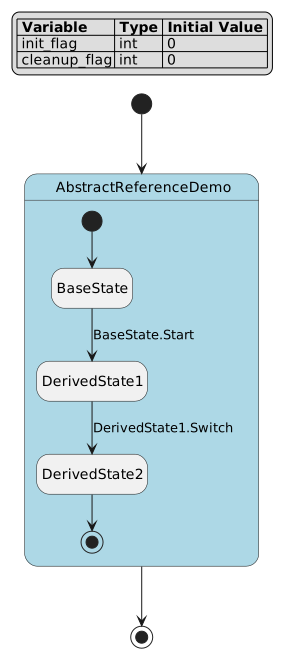
This diagram is useful for checking that action paths and state paths are
different concepts. ref reuses a named lifecycle action; it does not call
a state or an event. Inspect the generated action list and references when a
ref path looks surprising.
Verify the checked lifecycle example:
pyfcstm inspect -i docs/source/tutorials/dsl/abstract_reference_demo.fcstm --format human --color never
Expected excerpt:
root: AbstractReferenceDemo
diagnostics: 0 errors / 0 warnings / 3 infos
Use during aspects
Use >> during before and >> during after on an ancestor when monitoring
or logging should wrap descendant leaf-state active cycles. Do not confuse them
with plain during before / during after actions on a composite.
W_UNREFERENCED_VAR and I_TRANSITION_NEVER_EVENT_TRIGGERED for demonstration-only model parts.// Hierarchical Execution Order Example
// This example demonstrates how aspect actions execute in hierarchical state machines
def int execution_log = 0;
state HierarchyDemo {
// Root-level aspect actions apply to ALL descendant leaf states
>> during before {
execution_log = execution_log + 1000; // Step 1: Root aspect before
}
>> during after {
execution_log = execution_log + 9000; // Step 5: Root aspect after
}
state Parent {
// Composite state's during before/after execute ONLY on entry/exit
// NOT during child-to-child transitions!
during before {
execution_log = execution_log + 100; // Only on [*] -> Child entry
}
during after {
execution_log = execution_log + 900; // Only on Child -> [*] exit
}
// Parent-level aspect actions also apply to all descendant leaf states
>> during before {
execution_log = execution_log + 10; // Step 2: Parent aspect before
}
>> during after {
execution_log = execution_log + 90; // Step 4: Parent aspect after
}
state ChildA {
// Leaf state's during action
during {
execution_log = execution_log + 1; // Step 3: Leaf during
}
}
state ChildB {
during {
execution_log = execution_log + 2;
}
}
[*] -> ChildA;
ChildA -> ChildB :: Switch; // during before/after NOT triggered
ChildB -> [*] :: Exit;
}
[*] -> Parent;
Parent -> [*];
}
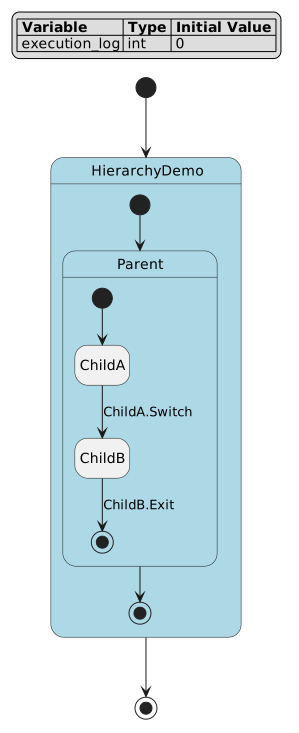
The figure separates authored hierarchy from runtime ordering. Parent and child states are authored DSL nodes; aspect actions are not drawn as business states. Use inspect lifecycle/action fields together with the diagram to confirm whether behavior is attached to a boundary or to descendant leaf cycles.
Interpretation:
ancestor
>> during beforeruns before the active leafduring;ancestor
>> during afterruns after the active leafduring;plain composite
during before/during afteris part of composite entry/exit semantics and does not wrap child-to-child transitions;aspect actions do not run inside combo pseudo relay states.
Common mistake: do not use an aspect to observe combo relay hops. Combo relay pseudo states are generated routing machinery, so business logging belongs on authored states or transition effects.
See During before/after and aspects for the detailed boundary.
Verify the checked aspect example:
pyfcstm inspect -i docs/source/tutorials/dsl/hierarchy_execution.fcstm --format human --color never
Expected excerpt:
root: HierarchyDemo
diagnostics: 0 errors / 1 warnings / 1 infos
Write forced transitions
Use forced transitions when one declaration should expand over many source states. Forced transitions are expansion shorthand, not a way to hide shared side effects.
W_UNREFERENCED_VAR warnings for demonstration-only variables.// Forced Transitions Example
// This example demonstrates forced transitions - a syntactic sugar that
// automatically expands to multiple normal transitions
def int error_code = 0;
def int recovery_attempts = 0;
state System {
// Forced transitions - syntactic sugar that expands to multiple transitions
// These generate NORMAL transitions - exit actions WILL execute
! * -> ErrorHandler :: CriticalError; // From ANY state to ErrorHandler
!Running -> SafeMode :: EmergencyStop; // From Running (and all its substates) to SafeMode
state Initializing {
exit {
// This exit action WILL execute when transitioning via CriticalError
error_code = 0;
}
}
state Running {
exit {
// This exit action WILL execute when transitioning
recovery_attempts = 0;
}
state Processing {
during {
error_code = error_code + 1;
}
exit {
// This exit action WILL also execute
error_code = 0;
}
}
state Waiting;
[*] -> Processing;
Processing -> Waiting :: Done;
Waiting -> Processing :: Continue;
}
state SafeMode {
enter {
recovery_attempts = recovery_attempts + 1;
}
}
state ErrorHandler {
enter {
// Handle critical error
recovery_attempts = 0;
}
}
[*] -> Initializing;
Initializing -> Running :: Start;
Running -> [*] :: Shutdown;
SafeMode -> Running :: Recovered;
ErrorHandler -> [*] :: FatalError;
}
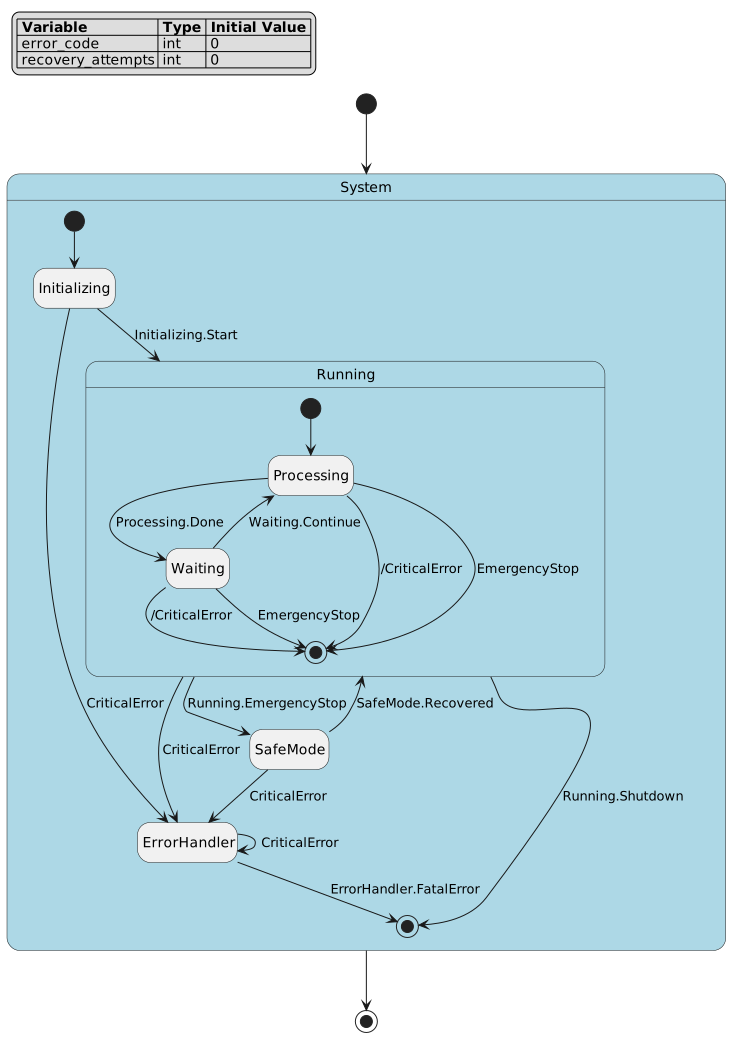
The authored DSL has only two forced declarations, but the inspected model
contains multiple ordinary expanded transitions carrying forced_origin.
!* expands over applicable sources in the owner scope, while
!Running contributes exits from the Running boundary and related
child paths. The expansion still follows ordinary exit and target-entry
semantics.
Rules:
!State -> Target :: Event;expands from the named source and its reachable nested sources.!* -> Target :: Event;expands from all applicable sources in the owner scope.A forced transition may have one local, chain/root, or guard trigger.
It cannot have a combo
+chain and cannot have aneffectblock.
If you need shared side effects, put them in the target state’s enter block
or write explicit normal transitions with visible effect blocks. See
Forced transition expansion for why the DSL keeps this restriction.
Common mistake: !* -> Target :: Event effect { ... }; is invalid. Forced
transitions expand to many ordinary transitions, so cloning side effects would
hide behavior; write explicit normal transitions when effects are required.
Verify the expansion size:
pyfcstm inspect -i docs/source/tutorials/dsl/forced_transitions.fcstm --format human --color never
Expected excerpt:
root: System
transitions: 17
diagnostics: 0 errors / 2 warnings / 0 infos
Write combo transitions
Use combo triggers when one transition should require an ordered chain of event terms and guard terms in the same cycle. Combo transitions expand into pseudo relay states during model construction; simulation, inspect, generation, and PlantUML consume the expanded model.
def int ready = 1;
def int accepted = 0;
def int retries = 0;
def int boot_seen = 0;

state ComboTransitions {
    event Abort;

    state Session {
        enter {
            ready = ready + 0;
        }

        [*] -> Waiting;
        [*] -> Booted :: Start + [ready > 0] effect {
            boot_seen = 1;
        }

        state Waiting;
        state Booted;
        state Accepted {
            enter {
                accepted = accepted + 1;
            }
        }
        state Retrying {
            enter {
                retries = retries + 1;
            }
        }

        Waiting -> Accepted :: Request + [ready > 0] + Confirm effect {
            accepted = accepted + 1;
        }
        Waiting -> Retrying : [ready == 0] + /Abort effect {
            retries = retries + 1;
        }
        Retrying -> Waiting : if [ready > 0 || retries > 0];
        Accepted -> Waiting : if [accepted > 0];
        Booted -> Waiting : if [boot_seen > 0];
    }

    [*] -> Session;
}
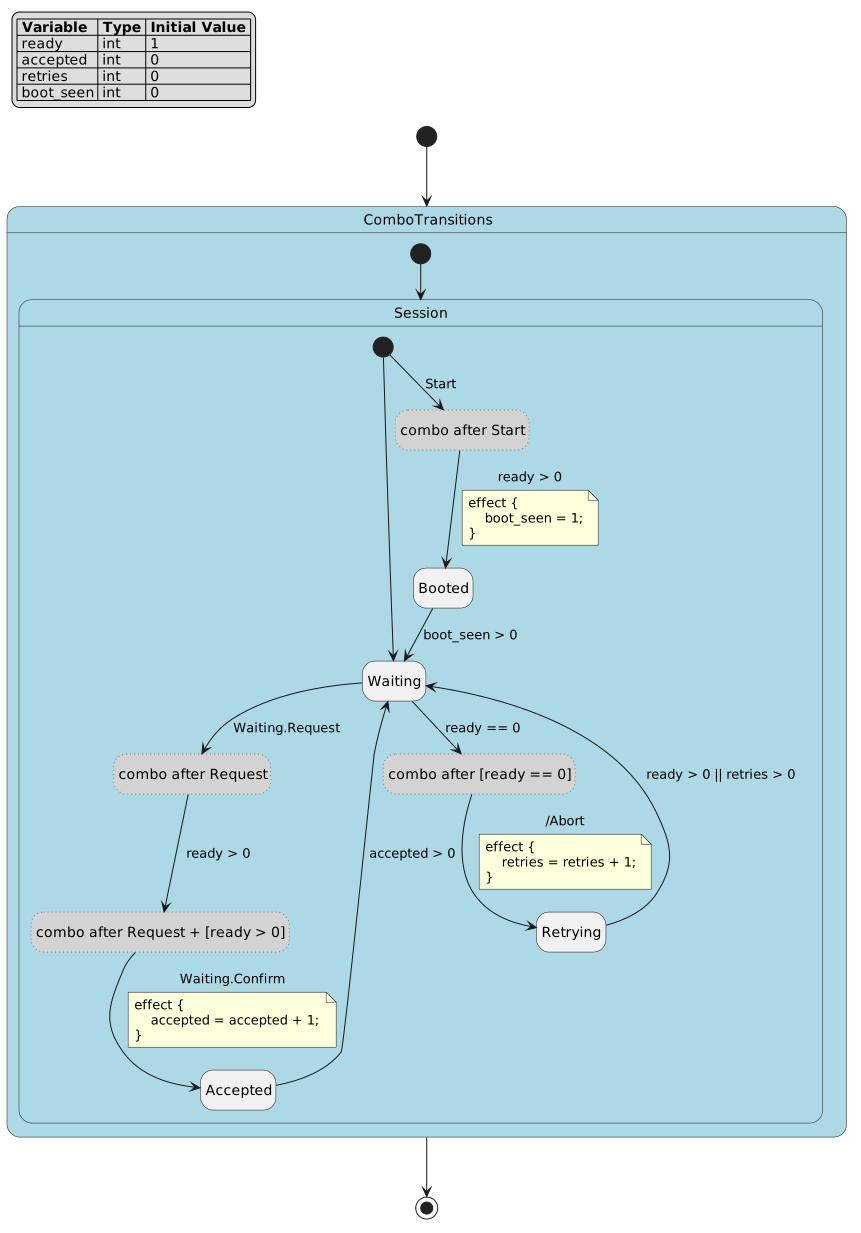
Nodes whose names start with __combo_ are generated pseudo relay states,
not authored business states. For
Waiting -> Accepted :: Request + [ready > 0] + Confirm, the diagram
shows one event edge, one guard edge, and one final event edge into
Accepted. The original effect belongs only to the final hop.
Verify the expansion:
pyfcstm inspect -i docs/source/tutorials/dsl/combo_transitions.fcstm --format json
Useful JSON fields:
combo_originskeeps the author-written trigger and each term.combo_transitionslists generated edges that carry provenance back to the original combo.statesincludes generated pseudo states withis_pseudo=trueand names beginning with__combo_.
Conceptual expansion:
// Authored form.
Waiting -> Accepted :: Request + [ready > 0] + Confirm effect {
    accepted = accepted + 1;
}

// Conceptual expansion. Real relay names include a hash and must not be hand-written.
Waiting -> __combo_waiting_request :: Request;
__combo_waiting_request -> __combo_waiting_ready : if [ready > 0];
__combo_waiting_ready -> Accepted :: Confirm effect {
    accepted = accepted + 1;
}
Trigger term |
Expanded edge |
What to inspect |
|---|---|---|
|
Business state to first pseudo relay event edge. |
The corresponding |
|
Guard edge between pseudo relays. |
If the guard is false, the chain does not reach the target state. |
|
Final hop into the business target. |
The original |
|
Generated pure routing node. |
It is pseudo, action-free, and not an aspect execution point. |
Repair examples:
// Bad ordinary syntax: event suffix plus separate guard suffix.
A -> B :: Go if [ready > 0];

// Good combo syntax: event term plus bracketed guard term.
A -> B :: Go + [ready > 0];
Repeated event terms are legal but suspicious. The checked warning example is:
W_COMBO_DUPLICATE_EVENT and I_TRANSITION_NEVER_EVENT_TRIGGERED.state ComboDuplicateEvent {
state A;
state B;
[*] -> A;
A -> B :: Go + Go;
B -> [*];
}
Assemble imports
Use imports when a composite state should include another FCSTM module as a child. Imports are parsed in the DSL, then path resolution and assembly run in the Python model/import layer.
Basic import:
W_UNREFERENCED_VAR warnings.state System {
import "./import_worker.fcstm" as Worker;
[*] -> Worker;
}
Mapping import:
W_UNREFERENCED_VAR warnings.def int left_sensor_input = 0;
def int plant_speed = 0;
state System {
event Start;
event Stop;
import "./import_worker.fcstm" as LeftWorker named "Left Worker" {
def sensor_* -> left_$1;
def speed -> plant_speed;
event /Start -> Start named "Shared Start";
event /Stop -> Stop named "Shared Stop";
}
[*] -> LeftWorker;
}
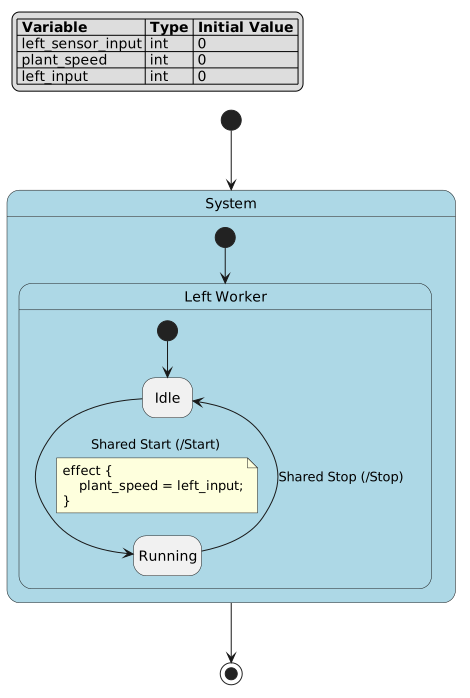
The host model attaches the imported module under an alias. The mapping block is not a text-replacement script; it rewrites variables and event paths during model assembly. Check both the diagram’s state tree and inspect’s variable, event, and transition paths when validating an import.
Imported worker:
W_UNREFERENCED_VAR warnings.def int sensor_input = 0;
def int speed = 0;
state WorkerModule named "Worker Module" {
event Start named "Worker Start";
event Stop named "Worker Stop";
state Idle;
state Running;
[*] -> Idle;
Idle -> Running : /Start effect {
speed = sensor_input;
}
Running -> Idle : /Stop;
}
Directory entry import:
main.fcstm entry file; expected diagnostics: W_UNUSED_EVENT, W_DEADLOCK_LEAF, and W_UNREFERENCED_VAR for demonstration-only imported resources.state Factory {
import "./import_line/main.fcstm" as Line;
[*] -> Line;
}
Mapping facts:
def speed -> plant_speed;maps one imported variable to one host variable.def sensor_* -> left_$1;captures the wildcard suffix and inserts it into the target template.def * -> prefix_$0;is a fallback mapping;$0is the whole imported variable name.event /Start -> Start;maps an imported root event to a host event.Directory projects must import a concrete entry file such as
./import_line/main.fcstm; a bare directory is not a DSL file.
Common mistakes: a bare directory path is not loaded as DSL source; an out-of-range
placeholder such as $2 in def sensor_* -> left_$2; reports an import
mapping validation error. Use $0 for the whole imported name and $1 /
${1} for the first wildcard capture.
Preamble forms such as name = value; and name := value; are parser-helper
entry points used by import assembly tests and helpers. They are not ordinary
root-level def declarations in a normal state_machine_dsl file. See
Import preamble forms for the exact boundary.
Verify the mapped import from the repository root:
pyfcstm inspect -i docs/source/tutorials/dsl/import_host_mapped.fcstm --format human --color never
Expected excerpt:
root: System
variables: 3
diagnostics: 0 errors / 3 warnings / 0 infos
Verify the directory-entry import:
pyfcstm inspect -i docs/source/tutorials/dsl/import_host_directory.fcstm --format human --color never
Expected excerpt:
root: Factory
diagnostics: 0 errors / 3 warnings / 0 infos
Diagnose and repair DSL errors
Use inspect diagnostics as a repair loop:
pyfcstm inspect -i docs/source/tutorials/dsl/combo_duplicate_event.fcstm --format json
A diagnostic has a code, severity, human message, source span, and
refs payload. Many diagnostics also carry a suggested fix.
Example |
Expected code |
Repair direction |
|---|---|---|
|
|
Check whether the second event term is a typo. Keep it only if the explicit two-hop relay is intentional. |
|
|
Add the missing lifecycle/effect write, or simplify the guard if an initial-value-only guard is intentional; the exit transition info is expected for this minimal warning fixture. |
|
|
Move one-time initialization to |
|
|
Treat it as a C/C++ deployment-profile warning for |
Minimal bad syntax example kept as a text fixture because it is intentionally not parseable as *.fcstm:
Unexpected token 'if'.def int ready = 1;
state BadEventGuardMixed {
state A;
state B;
[*] -> A;
A -> B :: Go if [ready > 0];
}
It fails because ordinary event syntax and ordinary guard syntax are two separate transition forms. Repair it as combo syntax:
A -> B :: Go + [ready > 0];
For code-level details, read Diagnostics code reference.
Verify the intentional warning file:
pyfcstm inspect -i docs/source/tutorials/dsl/combo_duplicate_event.fcstm --format human --color never
Expected excerpt:
W_COMBO_DUPLICATE_EVENT
diagnostics: 0 errors / 1 warnings / 1 infos