Visualization tasks
Use this guide when you need diagram source or rendered diagram files. For the complete option table, see Visualization options reference. For a first diagram walkthrough, see First diagram.
Concrete input and visual evidence
The concrete examples below use
docs/source/tutorials/visualization/example.fcstm. The visualization
tutorial already generates output_minimal.puml.svg, output_normal.puml.svg,
and output_full.puml.svg from that source, so this how-to can point to real
rendered artifacts instead of asking readers to trust option names.
Before comparing rendered images, export PlantUML source:
pyfcstm plantuml -i docs/source/tutorials/visualization/example.fcstm -o /tmp/example.puml
Success means /tmp/example.puml exists, starts with @startuml, and
contains the expected state names. If source export fails, fix DSL/model errors
before changing renderer settings. Rendering options cannot repair invalid
PlantUML source.
Choose source or rendered output
Need |
Use |
Why |
|---|---|---|
Reviewable diagram source |
|
Produces deterministic |
Image or PDF artifact |
|
Builds the same PlantUML source and renders |
CI without GUI |
|
Avoids desktop viewer dependence. |
Private diagrams |
|
Avoids sending PlantUML source to a remote service. |
Visualization task acceptance cards
Use these cards when deciding whether a diagram step is ready for a tutorial, review note, or CI job.
Task |
Command |
Success signal |
Side effect |
First troubleshooting step |
|---|---|---|---|---|
Review diagram source. |
|
|
Writes only the requested source file. |
Run |
Compare detail presets. |
|
The full source includes lifecycle/action details that the minimal preset hides. |
Writes a second source file for review. |
Check Visualization options reference before mixing preset and |
Check renderer availability. |
|
Reports either a usable local/remote backend or a concrete backend error. |
No diagram file is written. |
Decide whether privacy requires |
Render without GUI dependence. |
|
|
Writes the rendered file and may populate renderer cache. |
If the file is missing but the backend reported success, treat that as a renderer failure, not a DSL failure. |
Verify a documented figure. |
Build HTML after regenerating the source diagram. |
The figure is legible at the documented width and its caption states the claim it proves. |
Updates generated image files when diagram sources changed. |
Inspect the rendered HTML; source reST alone does not prove visual quality. |
Export PlantUML source
PlantUML source is the safest first artifact because it is text, deterministic, and easy to diff:
pyfcstm plantuml -i machine.fcstm -o machine.puml
Use a detail preset before adding individual overrides:
pyfcstm plantuml -i machine.fcstm -l full -o machine.full.puml
Add repeated -c key=value only for a specific reading goal:
pyfcstm plantuml -i machine.fcstm \
  -c show_events=true \
  -c max_depth=2 \
  -o machine.events-depth2.puml
Compare detail preset outputs
The same model can be shown with different detail levels for different readers. The examples below reuse generated artifacts from the visualization tutorial.
Preset |
Intended reader |
What is hidden first |
Existing source |
|---|---|---|---|
|
Architecture discussion and non-implementation readers. |
Lifecycle actions and pseudo-state styling. |
|
|
General documentation and code review. |
Lifecycle action bodies. |
|
|
Debugging, semantic review, and implementation discussion. |
Nothing from the preset-level switches. |
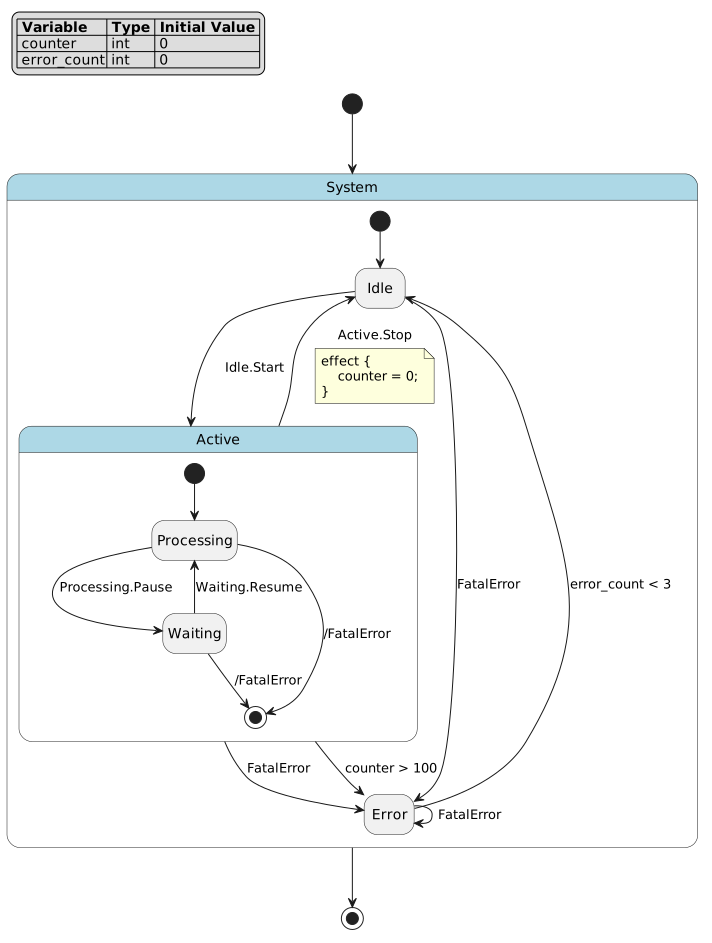
minimal keeps the shape readable when the audience only needs structure.
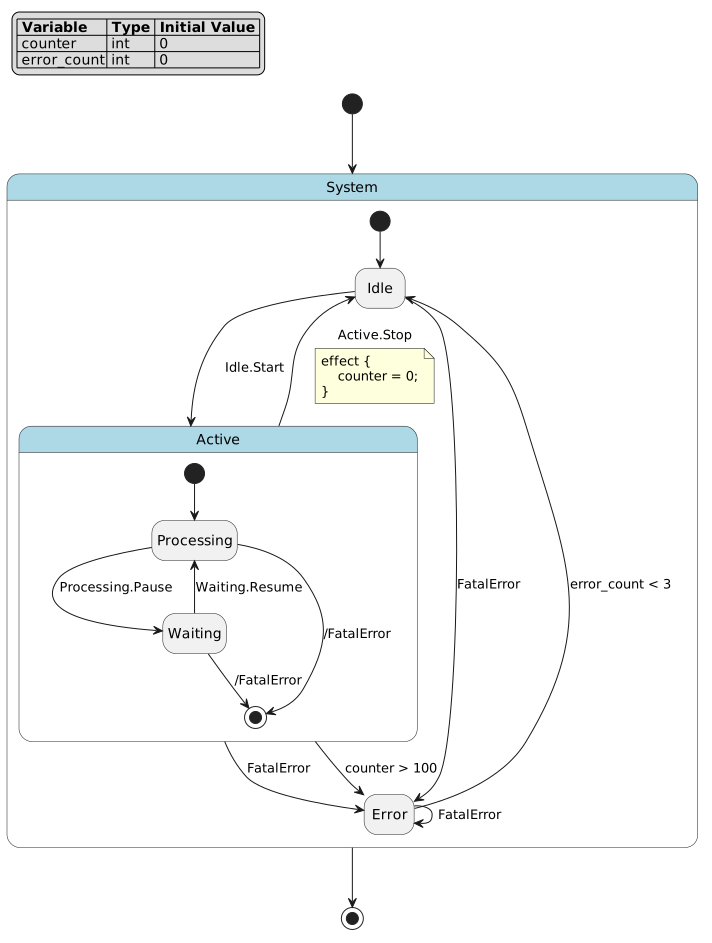
normal is the default compromise for documentation and review.
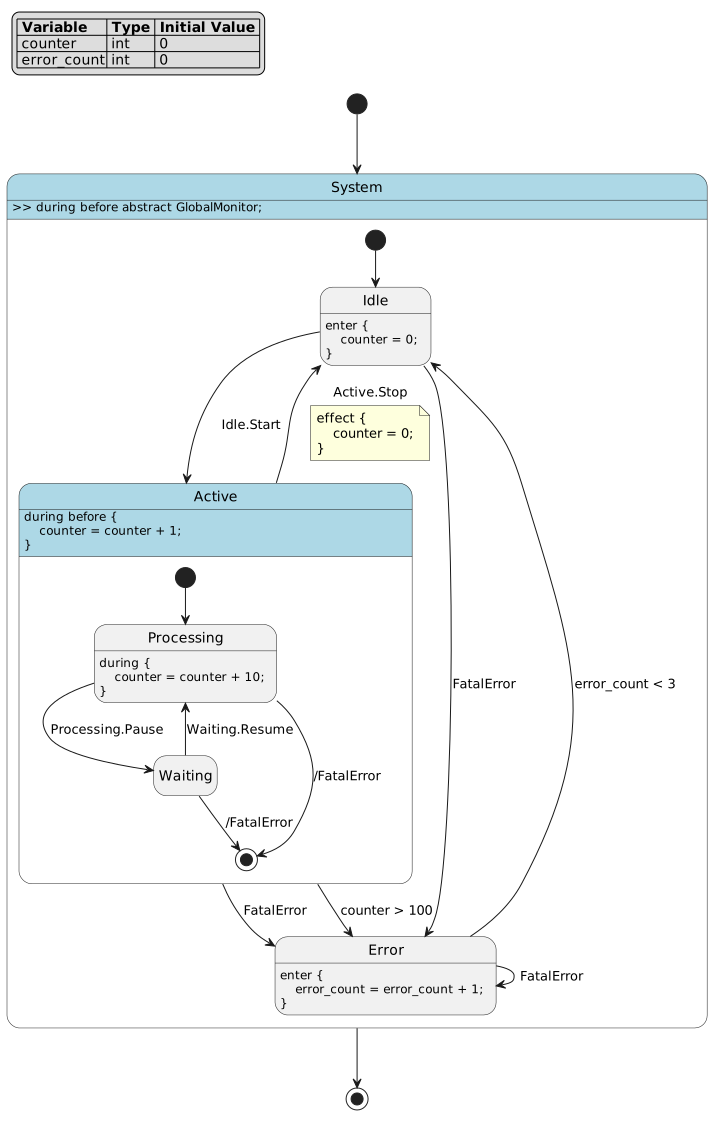
full is useful when action and transition details are part of the review.
Focus a large model
For large machines, reduce the question before adding visual detail. Good focused diagrams usually answer one of these questions:
What is the state hierarchy?
Which events move the model?
Which guards and effects control a transition family?
Which lifecycle hooks are integration points?
Which subtree should be discussed in this review?
Useful command patterns:
# Limit hierarchy depth.
pyfcstm plantuml -i machine.fcstm -c max_depth=2 -o machine.depth2.puml

# Hide event names when structure is the main topic.
pyfcstm plantuml -i machine.fcstm -c show_events=false -o machine.structure.puml

# Show event grouping when event flow is the topic.
pyfcstm plantuml -i machine.fcstm \
  -c event_visualization_mode=both \
  -o machine.events.puml

# Show only a compact implementation view.
pyfcstm plantuml -i machine.fcstm \
  -l full \
  -c max_action_lines=3 \
  -c transition_effect_mode=inline \
  -o machine.compact-full.puml
Render a final file directly
Use visualize after deciding that the environment should own rendering:
pyfcstm visualize -i machine.fcstm -t svg -o machine.svg --no-open
Check renderer availability without reading a DSL file:
pyfcstm visualize --check --renderer auto
Choose a renderer mode deliberately:
Mode |
Command shape |
Use when |
|---|---|---|
|
|
Local development where either local or remote rendering is acceptable. |
|
|
Diagrams are private or builds must avoid network dependence. |
|
|
A configured PlantUML service is allowed and easier than local Java setup. |
Keep CI diagram jobs stable
A CI diagram job should not depend on a desktop viewer:
pyfcstm plantuml -i machines/main.fcstm -o build/main.puml
pyfcstm visualize -i machines/main.fcstm -t svg -o build/main.svg --no-open
If rendering is optional in CI, split source export from rendered export. Source export proves pyfcstm can parse and emit PlantUML; rendered export additionally proves the renderer backend works.
Use Python API when CLI values are not enough
The CLI supports scalar and tuple values. Use the Python API for object-valued configuration such as event color dictionaries:
from pyfcstm.model.plantuml import PlantUMLOptions

options = PlantUMLOptions(
    event_visualization_mode='color',
    custom_colors={'System.Start': '#00AA00'},
)
plantuml_text = model.to_plantuml(options)
For complete runnable examples, download
python_basic.demo.py
and
python_options.demo.py.
Concrete visualization recipes
Each recipe below names the reader goal first. Start with source export when reviewability matters, then render only when an image artifact is required.
Reader goal |
Command |
Expected artifact |
Boundary |
|---|---|---|---|
Review hierarchy only. |
|
Compact |
Does not check any renderer. |
Review state/event flow. |
|
Source contains event-oriented labels/legend/color facts. |
Event coloring can make large diagrams visually dense. |
Review lifecycle hooks. |
|
Abstract hooks remain visible while concrete bodies are hidden. |
Good for integration discussions, not for operation-body audits. |
Review a large subtree. |
|
Deep descendants are collapsed after depth 2. |
Hidden descendants still exist in the model. |
Produce an image in CI. |
|
SVG file appears at the requested path. |
Requires a configured local or remote renderer. |
Check renderer before rendering. |
|
Backend availability report. |
Does not parse the DSL and does not prove diagram content. |
Visual review checklist
Before accepting a new or changed diagram in documentation, inspect the rendered HTML and ask these questions:
Are labels readable at the configured width?
Does the caption state what the figure proves?
Is the diagram source traceable to
.fcstmor.pumlinput?Is a dense
fullview really needed, or wouldnormalplus one override be clearer?If remote rendering was used, is it acceptable that PlantUML source left the local machine?
Worked task cards
The recipes above are short command choices. The cards below expand each common task into the full how-to contract: starting input, command, expected signal, side effect, and first repair step. Keep new visualization tasks at this level of specificity instead of adding bare command lists.
Task |
Start from |
Command |
Expected signal and side effect |
First repair if it fails |
|---|---|---|---|---|
Review the hierarchy only |
|
|
Text file starts with |
If the command fails before writing, run |
Explain events and guards |
A model whose transitions use events or guards. |
|
Source labels should show the event names and guard conditions used by the transition family. |
If labels are missing, confirm the transition syntax actually contains events/guards and that no override hides them. |
Show integration hooks |
A model with abstract lifecycle actions. |
|
The source emphasizes abstract hooks while suppressing implementation bodies. |
If the diagram is still too dense, add |
Produce a CI SVG artifact |
A CI job with pyfcstm and an approved PlantUML backend. |
|
The SVG file exists; stdout reports the renderer and output path; no desktop viewer is required. |
If renderer discovery fails, run |
Keep a private diagram local |
A confidential model and a local PlantUML jar. |
|
The PNG is written without sending PlantUML source to a remote service. |
If local rendering fails, fix Java/JAR paths; do not switch to |
Diagnose an option parse error |
A command using |
|
The command should name the invalid key/value instead of writing misleading source. |
Replace the value with an integer or remove the override. |
Visual acceptance examples
After producing a diagram, review the actual rendered HTML or image, not only the source command. Use this short acceptance rubric:
The caption states the question answered by the diagram.
The selected preset matches that question:
minimalfor hierarchy,normalfor transitions,fullonly when lifecycle/action detail is the point.Text is readable at the documentation width. If not, reduce detail before increasing image size.
The rendering path is acceptable for the data: local for private models, remote only when source text may leave the machine.
The page links to Visualization options reference for every option that is not self-evident.
Troubleshoot visualization
Symptom |
Check |
Likely fix |
|---|---|---|
|
|
Fix DSL syntax or model diagnostics before diagram export. |
|
Output suffix and |
Align suffix and type, or omit suffix and let pyfcstm add it. |
Local rendering fails |
|
Configure Java and |
Remote rendering fails |
|
Check network, proxy, or |
Viewer launch is skipped |
|
Use |
Diagram is too dense |
Detail level and visibility options |
Start with |