First diagram
This tutorial shows the shortest path from an FCSTM model to a PlantUML diagram source file and rendered example. For export recipes, see Visualization tasks; for option facts, see Visualization options reference.
Example state machine
def int counter = 0;
def int error_count = 0;

state System {
    >> during before abstract GlobalMonitor;

    [*] -> Idle;
    !* -> Error :: FatalError;

    state Idle {
        enter {
            counter = 0;
        }
    }

    state Active {
        during before {
            counter = counter + 1;
        }

        state Processing {
            during {
                counter = counter + 10;
            }
        }

        state Waiting;

        [*] -> Processing;
        Processing -> Waiting :: Pause;
        Waiting -> Processing :: Resume;
    }

    state Error {
        enter {
            error_count = error_count + 1;
        }
    }

    Idle -> Active :: Start;
    Active -> Idle :: Stop effect {
        counter = 0;
    };
    Active -> Error : if [counter > 100];
    Error -> Idle : if [error_count < 3];
}
Generate PlantUML source
Use plantuml when you want deterministic text output:
#!/bin/bash
# Basic CLI visualization example

# Generate PlantUML with default settings
pyfcstm plantuml -i example.fcstm -o output_cli_basic.puml

echo "PlantUML diagram generated: output_cli_basic.puml"
Expected feedback:
PlantUML diagram generated: output_cli_basic.puml
Rendered example
The documentation resource build renders the generated PlantUML source into an SVG artifact:
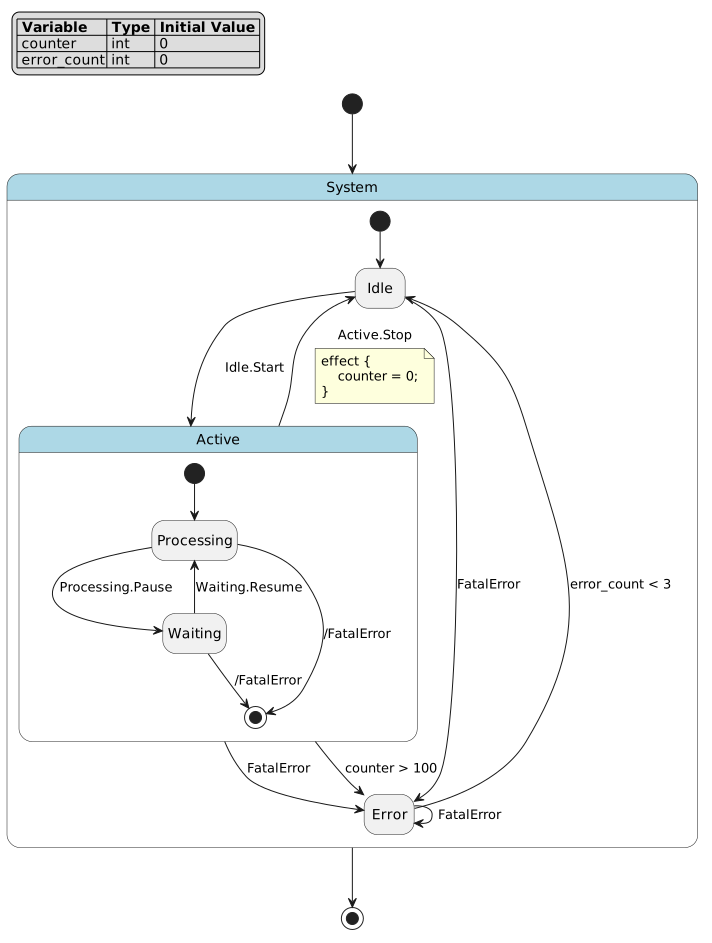
PlantUML diagram generated with CLI default settings.
Try detail presets
Use -l for the built-in detail presets:
pyfcstm plantuml -i example.fcstm -l minimal -o output_minimal.puml
pyfcstm plantuml -i example.fcstm -l normal -o output_normal.puml
pyfcstm plantuml -i example.fcstm -l full -o output_full.puml
The option reference explains which facts each preset affects.
Where to go next
Visualization tasks shows PlantUML source export and direct rendered-file export tasks.
Visualization options reference lists
PlantUMLOptionsand CLI-cfacts.Quick Start includes visualization in the shortest end-to-end path.