Write your first FCSTM DSL model
What this tutorial covers
This page is the first-success path for the FCSTM DSL. It builds one small thermostat model, runs it, and shows how to read the first inspect report. It intentionally stays narrow: once you have the first model working, use the other DSL pages for breadth.
DSL task guide answers concrete authoring questions with recipes, examples, commands, expected diagnostics, and repair steps.
DSL reference is the syntax reference and coverage index.
DSL semantics explanation explains runtime meaning, ownership, combo expansion, forced expansion, and import assembly.
Diagnostics code reference explains diagnostic codes and target-profile warnings.
All commands below are meant to be copied from the repository root.
Step 1: create the smallest shape
A normal .fcstm file starts with persistent variables and then exactly one
root state. A practical root is usually composite because it owns child
states and an initial transition.
def int temperature = 20;

state Thermostat {
    [*] -> Idle;
    state Idle;
}
The def line allocates model state. It is not a block-local variable. The
root state then becomes the ownership tree for child states, events, transitions,
lifecycle actions, and imports.
Step 2: add another leaf and guards
A leaf state ends with ;. A transition written in Thermostat can use the
child names owned directly by Thermostat.
def int temperature = 20;

state Thermostat {
    [*] -> Idle;
    state Idle;
    state Heating;

    Idle -> Heating : if [temperature < 20];
    Heating -> Idle : if [temperature >= 22];
}
The guard after : if is a condition expression. The variable
temperature is a numeric expression; the comparisons turn it into a
condition.
Step 3: add lifecycle actions
A leaf during action runs on an ordinary active cycle. An enter action
runs when the state is entered. This version changes temperature so both
guards can eventually change truth value.
Patch fragment: replace the two leaf declarations from Step 2 with the two
state blocks below. This snippet is not a complete .fcstm file by itself;
Step 4 shows the checked complete model.
state Idle {
    during {
        temperature = temperature - 1;
    }
}

state Heating {
    enter {
        temperature = temperature + 1;
    }
    during {
        temperature = temperature + 1;
    }
}
Operation blocks contain statements such as assignments and if blocks. A
name assigned inside a block before it is declared as def is a temporary for
that block only; the how-to page shows this in a complete example.
Step 4: inspect the complete file
The complete tutorial model is checked in as first_thermostat.fcstm:
docs/source/tutorials/dsl/first_thermostat.fcstm// First runnable thermostat model for the DSL tutorial.
// The temperature changes in lifecycle actions, so inspect reports no warnings.
def int temperature = 20;
state Thermostat {
[*] -> Idle;
state Idle {
during {
temperature = temperature - 1;
}
}
state Heating {
enter {
temperature = temperature + 1;
}
during {
temperature = temperature + 1;
}
}
Idle -> Heating : if [temperature < 20];
Heating -> Idle : if [temperature >= 22];
}
The diagram gives the same model shape visually:
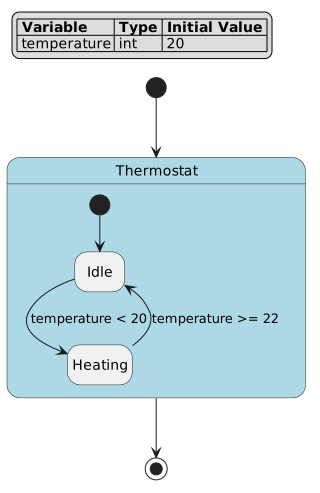
Thermostat is the authored root composite state. Idle and
Heating are authored leaf states, and the guarded edges come directly
from Idle -> Heating and Heating -> Idle in the DSL. The initial
edge [*] -> Idle selects the first active leaf. This first diagram has
no generated states, which makes it a useful baseline before you study
combo or forced expansion.
Inspect it from the repository root:
pyfcstm inspect -i docs/source/tutorials/dsl/first_thermostat.fcstm --format human --color never
Expected short output:
[OK] FCSTM Inspect Report: docs/source/tutorials/dsl/first_thermostat.fcstm

Summary
  status: ok
  root: Thermostat
  states: 3 total / 2 leaf
  transitions: 3
  variables: 1
  diagnostics: 0 errors / 0 warnings / 0 infos

No diagnostics.
If this command reports errors, fix those before trying simulation or code generation. Warnings and infos are still worth reading because they usually say which target profile, transition, variable, or source span needs attention.
Step 5: run two cycles
Run a short batch simulation:
pyfcstm simulate -i docs/source/tutorials/dsl/first_thermostat.fcstm --no-color -e "cycle; cycle; current"
The important lines are:
Cycle: 1
Current State: Thermostat.Idle
Variables:
  temperature = 19

Cycle: 2
Current State: Thermostat.Heating
Variables:
  temperature = 21
The first cycle enters Idle and runs its during action. On the second
cycle the Idle -> Heating guard is true, so the transition fires and
Heating.enter runs.
Step 6: repair one deliberate syntax error
Inspect is also the fastest way to repair a small DSL mistake. Ordinary event syntax and ordinary guard syntax are separate transition forms, so this intentionally bad fixture fails:
Unexpected token 'if'.def int ready = 1;
state BadEventGuardMixed {
state A;
state B;
[*] -> A;
A -> B :: Go if [ready > 0];
}
Run it as a normal input file:
pyfcstm inspect -i docs/source/tutorials/dsl/event_guard_mixed_invalid.fcstm.txt --format human --color never
The useful excerpt is:
Syntax error at line 7, column 17, near 'if': Unexpected token 'if'
Repair it by using combo syntax when both an event term and a guard term are part of the same trigger:
A -> B :: Go + [ready > 0];
That is the minimal loop to practice on every future model change: run
pyfcstm inspect, read the code and source span, then repair the DSL form
that the diagnostic points to.
Step 7: learn the next DSL feature deliberately
Do not jump from this tutorial straight into a giant model. Add one DSL feature at a time and verify the inspect output after each change.
Goal |
Start with |
Why |
|---|---|---|
Add source-local, parent, or root events |
Event scope changes who owns and reuses the event name. |
|
Add effects, temporaries, and |
Effects mutate variables at transition time, not while guards are being tested. |
|
Use the full expression language |
Numeric expressions, condition expressions, and ternary forms have different legal contexts. |
|
Reuse lifecycle behavior |
|
|
Model multi-term triggers |
Combo transitions expand into pseudo relay states while preserving authored semantics. |
|
Apply one declaration to many sources |
Forced transitions are expansion shorthand and intentionally have no effect block. |
|
Split a model across files |
Imports assemble state-machine modules and rewrite variables/events according to mappings. |
|
Repair diagnostics |
Inspect diagnostics include code, severity, source span, refs, and suggested fixes. |