Inspect tasks
Use these recipes when you already know what you want pyfcstm inspect to
do. The tutorial at First inspect report shows the walkthrough;
this page is the task desk for CI, triage, repair handoffs, suffix warnings,
and structural/SMT-local verify integration.
The recipes use docs/source/tutorials/inspect/inspect_diagnostics.fcstm. It
is valid FCSTM DSL and intentionally contains suspicious but inspectable design
facts. A command failure means the input could not become a report; a successful
report can still contain warnings and infos.
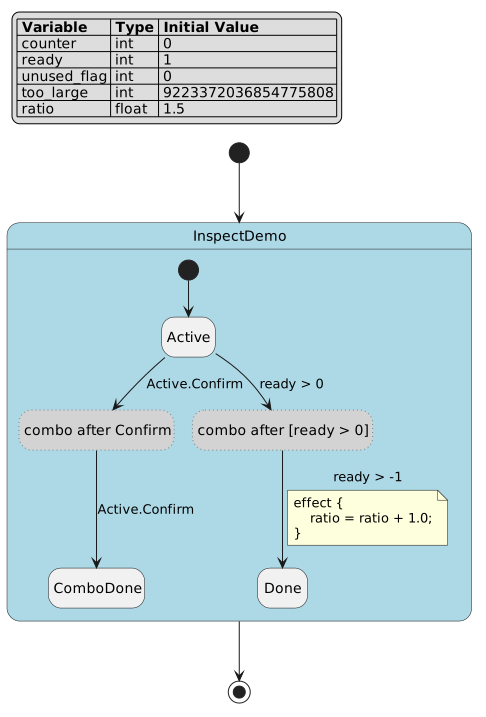
The figure proves the authored machine is small but not trivial: combo triggers expand into pseudo relay states while diagnostics still point back to authored transitions and relay provenance.
1. Choose the report format
Input. A valid FCSTM file and a known consumer: a person, a script, or a repair prompt.
Command or code. Compare the four public formats:
pyfcstm inspect -i docs/source/tutorials/inspect/inspect_diagnostics.fcstm
pyfcstm inspect -i docs/source/tutorials/inspect/inspect_diagnostics.fcstm --format json
pyfcstm inspect -i docs/source/tutorials/inspect/inspect_diagnostics.fcstm --format llm-json
pyfcstm inspect -i docs/source/tutorials/inspect/inspect_diagnostics.fcstm --format llm-md
Expected signal. human starts with a checker-style summary, json
contains root_state_path and structural arrays, llm-json starts with
schema_version pyfcstm.inspect.llm.v1, and llm-md starts with a
Markdown heading.
File side effect. None unless -o is used; all four commands write to
stdout by default.
First failure check. Run python -m pyfcstm inspect --help and confirm
that --format still lists human|json|llm-json|llm-md.
Reference link. Format contracts live in Inspect report reference.
2. Read a human report during local triage
Input. The diagnostic-heavy tutorial file.
Command or code. Disable color when the report will be pasted into an issue or review comment:
pyfcstm inspect -i docs/source/tutorials/inspect/inspect_diagnostics.fcstm --color never | sed -n '1,22p'
Expected signal. The checked demo begins with:
[WARN] FCSTM Inspect Report: docs/source/tutorials/inspect/inspect_diagnostics.fcstm

Summary
  status: warning
  root: InspectDemo
  states: 6 total / 3 leaf
  transitions: 5
  variables: 5
  diagnostics: 0 errors / 9 warnings / 4 infos
The first warning is W_DURING_CONST_ASSIGN and includes a source excerpt,
why text, suggested fix shapes, and do-not guidance.
File side effect. None; the pipeline reads one file and writes plain text to stdout.
First failure check. If the first line is colorized escape text, add
--color never. If no report appears, check stderr for read, parse, or
model-validation failure before debugging diagnostics.
Reference link. Diagnostic-code meaning and repair metadata live in Diagnostics code reference.
3. Save a human report and control color
Input. A report you want to attach as a plain text artifact.
Command or code. Write the human renderer to a file:
pyfcstm inspect -i docs/source/tutorials/inspect/inspect_diagnostics.fcstm \
    --format human --color never -o /tmp/inspect-human.txt
sed -n '1,5p' /tmp/inspect-human.txt
Expected signal. The file starts with [WARN] FCSTM Inspect Report and
contains no ANSI escapes. Color is always disabled for file output.
File side effect. /tmp/inspect-human.txt is created or overwritten with
UTF-8 text.
First failure check. If the file is empty, check whether the output
directory exists; pyfcstm inspect reports write failures as CLI errors.
Reference link. Color and output-file rules are listed in Inspect report reference.
4. Write full JSON for CI or tooling
Input. A valid model and a CI job that needs exact counts or graph facts.
Command or code. Save the full ModelInspect payload:
pyfcstm inspect -i docs/source/tutorials/inspect/inspect_diagnostics.fcstm \
    --format json -o /tmp/inspect.json
python - <<'PY'
import json
from pathlib import Path

report = json.loads(Path('/tmp/inspect.json').read_text())
print(report['root_state_path'])
print(len(report['states']), len(report['transitions']))
print(len(report['diagnostics']))
PY
Expected signal. The checked example prints InspectDemo, then 6 5,
then 13. The full JSON also contains combo_origins,
reachability_graph, var_dataflow, and metrics.
File side effect. /tmp/inspect.json is created or overwritten.
First failure check. If json.loads fails, confirm the command used
--format json. A human report saved with a .json suffix is still text.
Reference link. Full top-level and nested fields are described in Inspect report reference.
5. Fail a CI gate from JSON severity
Input. A full JSON report generated by task 4 at /tmp/inspect.json.
Command or code. Count severities instead of matching message text:
import json
from pathlib import Path

report = json.loads(Path('/tmp/inspect.json').read_text())
errors = [item for item in report['diagnostics'] if item['severity'] == 'error']
warnings = [item for item in report['diagnostics'] if item['severity'] == 'warning']
if errors:
    raise SystemExit('inspect found blocking diagnostics')
print('warnings:', len(warnings))
Expected signal. The tutorial file has zero errors and nine warnings, so a
warning-only policy prints warnings: 9 and exits successfully.
File side effect. None; the snippet only reads the JSON file.
First failure check. If the gate fails on this fixture, print the offending
code values first. Do not compare localized prose or source excerpts.
Reference link. Stable diagnostic object keys are in Diagnostics code reference.
6. Write llm-json for an automated repair prompt
Input. A valid model and an LLM repair loop that needs a compact packet.
Command or code. Create the compact repair packet:
pyfcstm inspect -i docs/source/tutorials/inspect/inspect_diagnostics.fcstm \
    --format llm-json -o /tmp/inspect.llm.json
python - <<'PY'
import json
from pathlib import Path

report = json.loads(Path('/tmp/inspect.llm.json').read_text())
first = report['diagnostics'][0]
print(report['schema_version'])
print(sorted(first.keys()))
print(len(first['recommended_actions']), len(first['do_not']))
PY
Expected signal. The schema version is pyfcstm.inspect.llm.v1. The
first diagnostic includes source_excerpt, refs, recommended_actions,
and do_not; the final count line is 2 1.
File side effect. /tmp/inspect.llm.json is created or overwritten.
First failure check. If the packet lacks repair guidance, check whether the
code exists in codes.yaml and whether the renderer can see source text.
Reference link. LLM report fields are listed in Inspect report reference.
7. Write llm-md for a human repair handoff
Input. The same model, but the consumer wants a readable Markdown note.
Command or code. Export Markdown and show only the header:
pyfcstm inspect -i docs/source/tutorials/inspect/inspect_diagnostics.fcstm \
    --format llm-md -o /tmp/inspect.llm.md
sed -n '1,7p' /tmp/inspect.llm.md
Expected signal. The checked demo begins with:
# FCSTM Inspect Report

- Schema: `pyfcstm.inspect.llm.v1`
- Schema status: `stable`
- Status: `warning`
- Input: `docs/source/tutorials/inspect/inspect_diagnostics.fcstm`
- Diagnostics: 0 errors / 9 warnings / 4 infos
File side effect. /tmp/inspect.llm.md is created or overwritten.
First failure check. If a JSON-looking file appears, confirm the command
used --format llm-md and not --format llm-json.
Reference link. The shared LLM contract is in Inspect report reference; repair philosophy is in Diagnostics explanation.
9. Understand output suffix warnings
Input. A requested format and an output filename whose extension may imply a different format.
Command or code. This command is legal but suspicious:
pyfcstm inspect -i docs/source/tutorials/inspect/inspect_diagnostics.fcstm \
    -o /tmp/report.json 2> /tmp/inspect-suffix.err
sed -n '1p' /tmp/inspect-suffix.err
Expected signal. Stderr says the file looks like JSON but the format is
human. The command still writes human text; explicit JSON output to a
Markdown suffix also warns about suffix-vs-format mismatch.
File side effect. /tmp/report.json contains human text, not JSON;
/tmp/inspect-suffix.err contains the warning in this example.
First failure check. If downstream JSON parsing fails, inspect the first line of the file before changing the parser.
Reference link. Suffix and color behavior is part of the report reference: Inspect report reference.
10. Separate invalid input from successful diagnostics
Input. A file that may be syntactically invalid, model-invalid, or valid with warnings.
Command or code. Treat non-zero exit status as a process failure, not as a normal report:
pyfcstm inspect -i bad.fcstm --format json
Expected signal. A syntax error exits with status 1 and writes stderr
similar to Failed to parse input DSL file. A duplicate state model error
starts with Invalid state machine model. The valid tutorial fixture exits
with status 0 even though its report status is warning.
File side effect. A failed command does not produce a successful
diagnostics array. If -o was requested, do not trust a stale file from a
previous run.
First failure check. Print the shell exit status and stderr before opening
diagnostics[]. Invalid-input checks belong at the process boundary.
Reference link. Failure boundaries are summarized in Inspect report reference and the diagnostic explanation page Diagnostics explanation.
11. Enable structural and SMT-local verify diagnostics
Input. A valid model and a reason to include inspect-eligible verification algorithms.
Command or code. Opt in explicitly:
pyfcstm inspect -i docs/source/tutorials/inspect/inspect_diagnostics.fcstm \
    --enable-verify --format json -o /tmp/inspect-verify.json
python - <<'PY'
import json
from pathlib import Path

codes = [item['code'] for item in json.loads(Path('/tmp/inspect-verify.json').read_text())['diagnostics']]
print('W_TOPOLOGICAL_NOEXIT' in codes)
print('I_TOPOLOGICAL_NON_TERMINATING' in codes)
PY
Expected signal. The tutorial fixture prints True for both topological
checks when verify integration is enabled.
File side effect. /tmp/inspect-verify.json is created or overwritten.
First failure check. If no verify-backed codes appear, confirm
--enable-verify was present. Raising --max-complexity-tier can allow
additional model-derived structural or SMT-local algorithms. It does not load
pyfcstm.bmc or parse a .fbmcq query.
Reference link. Verify tier meaning is explained in Diagnostics explanation; code details are in Diagnostics code reference.
12. Keep target and deployment warnings precise
Input. A task-4 full JSON report and a diagnostic whose message mentions a target family or generated runtime profile.
Command or code. Read the numeric warning refs:
python - <<'PY'
import json
from pathlib import Path

report = json.loads(Path('/tmp/inspect.json').read_text())
item = next(d for d in report['diagnostics'] if d['code'] == 'W_NUMERIC_LITERAL_OUT_OF_TARGET_RANGE')
print(', '.join(item['refs']['target_templates']))
print(item['refs']['runtime_note'])
PY
Expected signal. The target templates are c, c_poll, cpp, cpp_poll.
The runtime note says the risk is tied to the C/C++ default integer profile;
Python generated runtimes may not carry the same fixed-width risk.
File side effect. None; the snippet reads a previously saved JSON report.
First failure check. If a review comment says “Python overflow”, compare it
against refs.target_templates before acting. The same diagnostic can be a
real deployment risk without applying to every target.
Reference link. Target-specific numeric diagnostics are cataloged in Diagnostics code reference.
Troubleshooting quick reference
This table is supplementary; it is not one of the thirteen task cards.
Symptom |
Likely boundary |
First action |
|---|---|---|
No output file appears |
CLI read, parse, model, policy, or write failure |
Check exit status and stderr before reading a stale file. |
JSON parser sees |
Human report was saved with a JSON-looking suffix |
Re-run with |
ANSI escapes appear in a paste |
Human renderer color was enabled for stdout |
Re-run with |
Verify codes are absent |
Static inspect ran without optional verify integration |
Add |
A warning seems target-specific |
Diagnostic refs carry deployment scope |
Read |
LLM edit looks too broad |
Repair prompt ignored diagnostic provenance |
Use |
Verification evidence for this page
The short excerpts above are grounded in checked tutorial resources:
inspect_human.demo.sh.txt for human output, inspect_formats.demo.sh.txt
for JSON/LLM shape, inspect_cli_edges.demo.sh.txt for color/suffix behavior,
and inspect_invalid.demo.sh.txt for parse failure. Re-run scripts only when
those source resources change.