State Machine Code Generator Template Tutorial
Introduction
What is a State Machine Code Generator?
A state machine code generator is a template-based automation tool that automatically generates target code (such as C code) based on state machine definitions (typically using a Domain Specific Language - DSL). By separating the state machine’s logical structure from code templates, it achieves decoupling of logic and implementation, improving code maintainability and reusability.
Core Principle: Separate the abstract description of the state machine (states, transitions, events, etc.) from the concrete code implementation. The state machine model serves as data, templates serve as blueprints for code, and the rendering engine combines both to generate the final code.
Why Use a Template System?
Consistency: Ensures generated code follows uniform coding standards
Maintainability: Modifying templates affects all generated code
Flexibility: Supports multiple output formats and programming languages
Automation: Reduces errors from manual repetitive coding
System Architecture Overview
The following diagram illustrates the complete architecture of the state machine code generation system, showing how different components interact to transform DSL definitions into executable code:
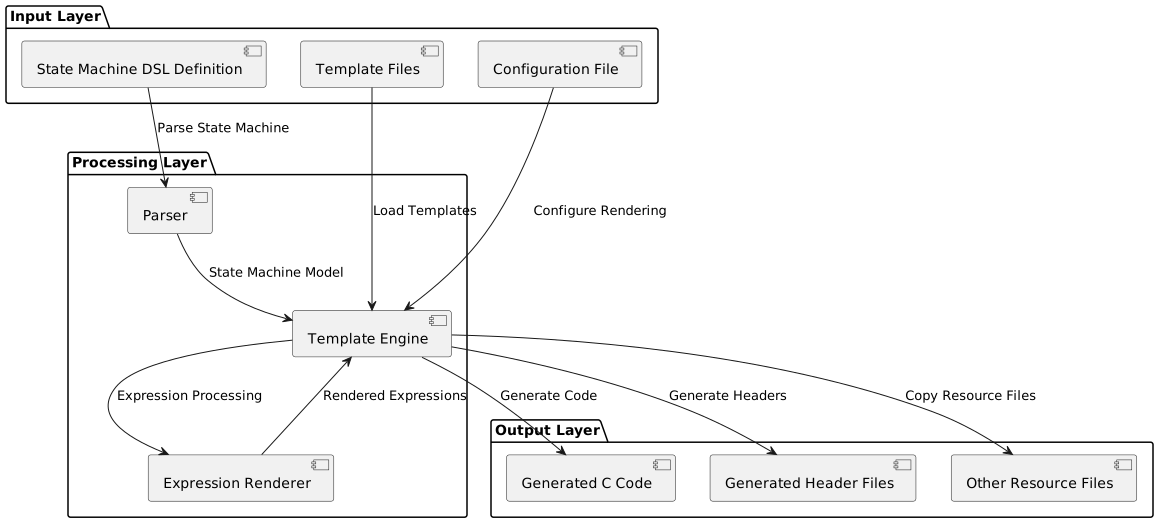
This architecture demonstrates the clear separation between input processing, template rendering, and output generation, providing a modular and extensible foundation for code generation.
Template System Architecture Details
Template Directory Structure Principle
The template directory follows a flexible “convention over configuration” principle that balances structure with flexibility:
template_directory/
├── config.yaml          # Required: System configuration file
├── *.j2                 # Optional: Jinja2 template files
├── *.c                  # Optional: Direct copy C files
├── *.h                  # Optional: Direct copy header files
└── subdir/              # Optional: Subdirectories (structure preserved)
    ├── *.j2
    └── *.c
Working Principle Analysis:
config.yamlis the system’s “brain”, defining rendering rules and behavior.j2files are “smart templates” that dynamically generate content based on the state machine modelOther files are “static resources” copied directly to target locations
Directory structure is completely preserved in output, ensuring project structure consistency
This structure allows for both dynamic template processing and static resource management within the same framework.
Detailed Rendering Flow Analysis
The rendering process follows a systematic workflow that ensures consistent and reliable code generation:
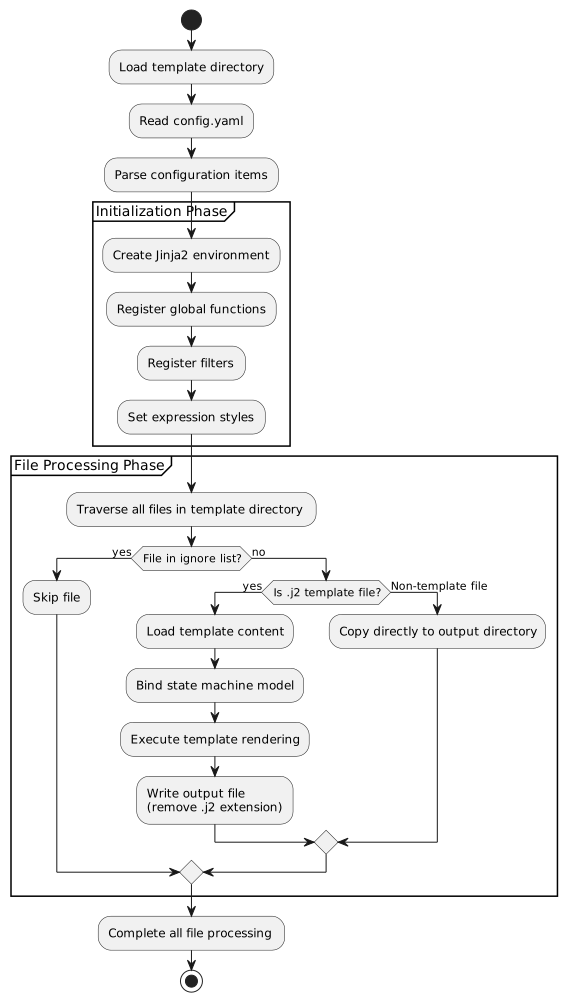
This flowchart details the step-by-step process from template loading to final output generation, highlighting the key decision points and processing stages.
Core Component Interaction
Understanding how the core components interact is crucial for extending or customizing the system:
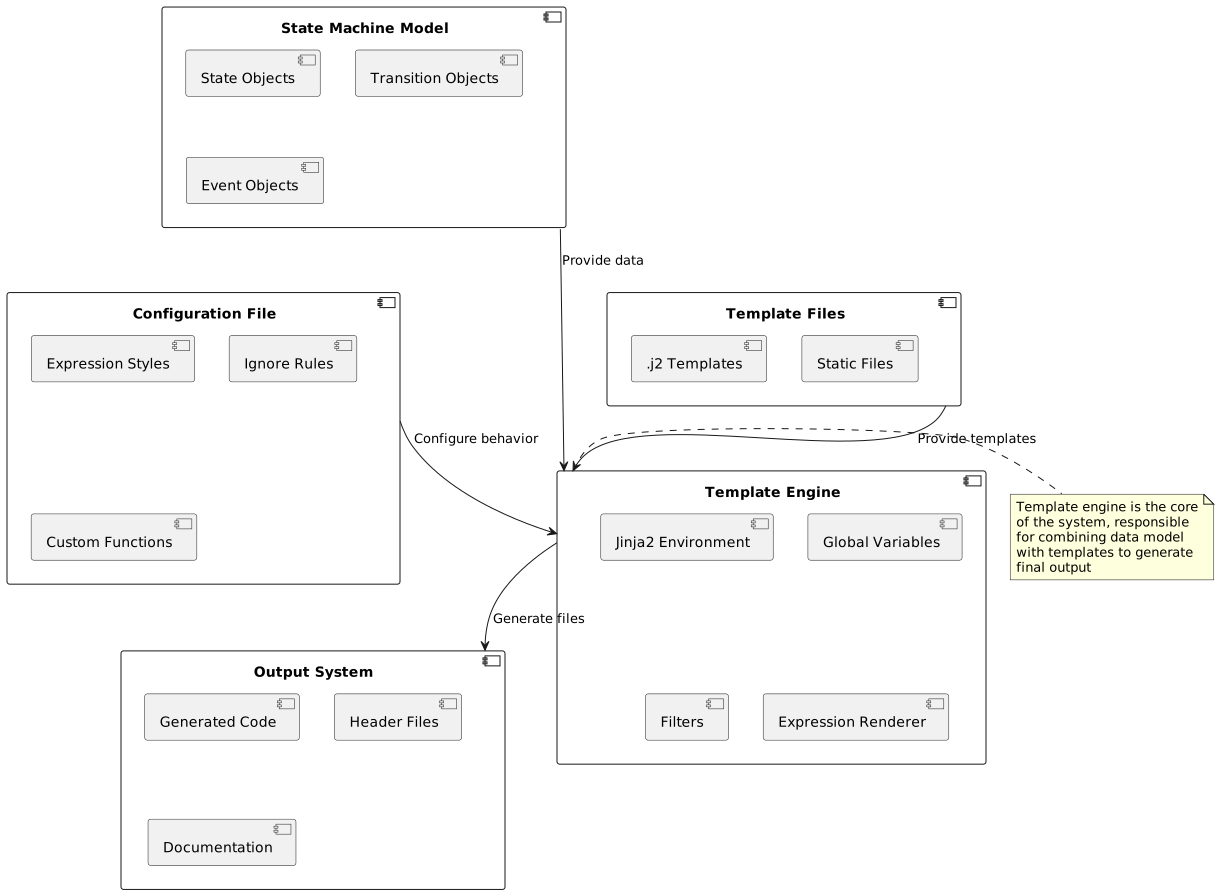
This diagram shows the relationships between major system components and how data flows between them during the rendering process.
Configuration File Deep Analysis
Expression Styles (expr_styles) Principle
The expression style system provides a powerful mechanism for customizing how expressions are rendered across different programming languages:
expr_styles:
  default:                    # Base style
    base_lang: c             # Inherit C language base templates
    Name: LX_Vars.{{ node.name }}  # Override variable name rendering rules

  python_style:              # Custom style
    base_lang: python        # Inherit Python base templates
    BinaryOp(&&): '{{ node.expr1 | expr_render }} and {{ node.expr2 | expr_render }}'
Inheritance Mechanism Principle:
Each style inherits from a base language style
Can override rendering rules for specific node types
Supports operator-level fine-grained control
This inheritance system allows for creating specialized rendering styles while maintaining consistency across similar language families.
Global Variable System
Global variables provide a way to define reusable values and functions that are accessible throughout all templates:
globals:
  # Method 1: Direct value
  global_prefix: 'FSM_'

  # Method 2: Template function
  get_state_name_safe:
    type: template
    params: ['state']
    template: '{{ state.path | join("_") }}'

  # Method 3: Import external function
  math_sqrt:
    type: import
    from: math.sqrt

  # Method 4: Fixed value
  version:
    type: value
    value: '1.0.0'
Lifecycle: Global variables are created when Jinja2 environment initializes and remain unchanged throughout the rendering process.
The four definition methods provide flexibility for different use cases, from simple constants to complex template functions.
Filter System Principle
Filters transform data within templates and are essential for data formatting and manipulation:
{# Using filters #}
{{ state | get_state_name_safe }}
{{ expression | expr_render(style='c') }}
Implementation Mechanism:
Filters receive the left-side value as the first parameter
Can accept additional parameters
Return processed value for continued use in templates
Filters enable clean separation of data transformation logic from presentation logic in templates.
Ignore Rules System
The ignore system prevents unnecessary files from being processed or copied to the output directory:
ignores:
  - '.git'           # Ignore .git directory
  - '*.tmp'          # Ignore all .tmp files
  - 'build/'         # Ignore build directory
  - '**/test_*'      # Ignore all test_ prefixed files
Matching Principle: Uses pathspec library to implement the same pattern matching algorithm as git.
This system ensures that version control files, temporary files, and other non-essential files don’t clutter the generated output.
Template Syntax Deep Analysis
Variable Output Mechanism
Variable output is the fundamental building block of template rendering:
{# Basic variable output #}
{{ variable }}

{# Object attribute access #}
{{ state.name }}
{{ state.parent.name }}

{# Dictionary key access #}
{{ dict['key'] }}
{{ dict.key }}      {# Equivalent syntax #}

{# Method calls #}
{{ obj.method() }}
Rendering Principle: Jinja2 automatically resolves variable paths during rendering, accessing object attributes according to Python’s attribute lookup rules.
These syntax patterns provide flexible access to the state machine model’s data structure.
Control Structure Details
Conditional Statements
Conditional statements enable dynamic content generation based on the state machine’s structure:
{# Basic conditions #}
{% if state.is_leaf_state %}
  // Leaf state processing
{% elif state.is_root_state %}
  // Root state processing
{% else %}
  // Normal state processing
{% endif %}

{# Complex conditions #}
{% if state.transitions and state.transitions|length > 0 %}
  // State with transitions
{% endif %}

{# Test functions #}
{% if variable is defined %}
  {{ variable }}
{% endif %}
These conditional patterns allow templates to adapt their output based on the specific characteristics of each state.
Loop Iteration
Loop constructs enable processing collections of states, transitions, and other model elements:
{# Basic loop #}
{% for state in model.walk_states() %}
  // Process {{ state.name }}
{% endfor %}

{# Loop with index #}
{% for transition in state.transitions_from %}
  // Transition {{ loop.index }}: {{ transition.from_state }} -> {{ transition.to_state }}
  {% if loop.first %}...{% endif %}
  {% if loop.last %}...{% endif %}
{% endfor %}

{# Loop control #}
{% for item in list %}
  {% if loop.index > 10 %}{% break %}{% endif %}
  {{ item }}
{% endfor %}
The loop variable provides access to iteration metadata, enabling sophisticated loop control and formatting.
Template Inheritance and Inclusion
Macro Definitions (Functional Templates)
Macros provide reusable template components that can be parameterized:
{# Define macro #}
{% macro render_state(state) %}
state {{ state.name }} {
    {% for substate in state.substates.values() %}
    {{ render_state(substate) }}
    {% endfor %}
}
{% endmacro %}

{# Use macro #}
{{ render_state(model.root_state) }}
This recursive macro demonstrates how complex rendering logic can be encapsulated and reused.
File Inclusion
File inclusion enables modular template design and code reuse:
{# Include other template files #}
{% include 'header.j2' %}

{# Dynamic inclusion #}
{% include template_name %}
Inclusion mechanisms support both static and dynamic template composition patterns.
State Machine Model Objects Detailed
Object Relationship Model
The state machine model follows a hierarchical object structure that mirrors the state machine’s logical organization:
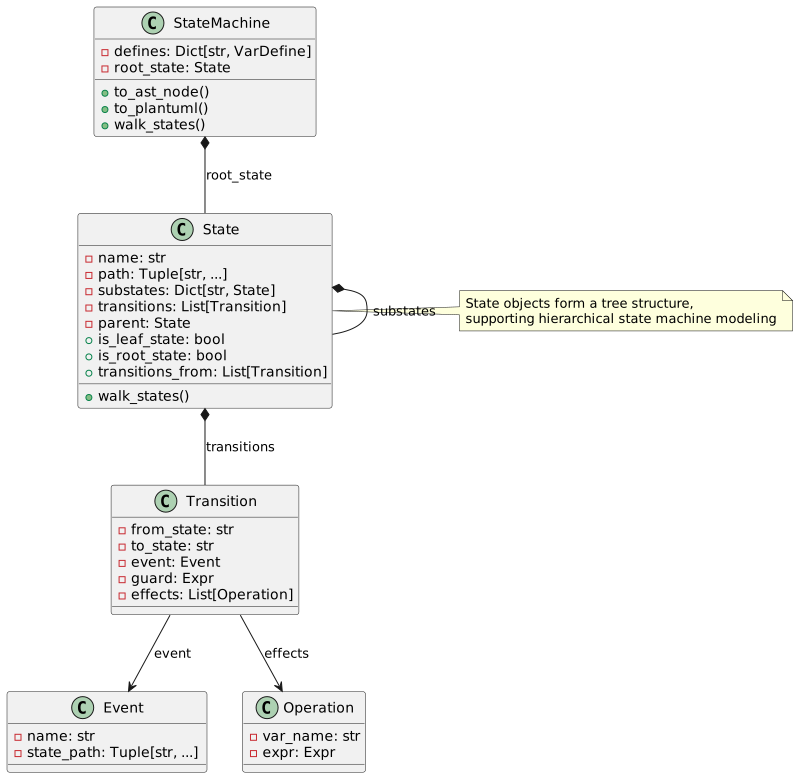
This class diagram illustrates the key objects and their relationships within the state machine model.
State Object Detailed API
Attribute Access
State objects provide comprehensive attribute access for template rendering:
{# Basic information #}
{{ state.name }}              {# State name #}
{{ state.path }}              {# Complete path #}
{{ state.path|join('.') }}    {# Dot-separated path #}

{# Type checking #}
{{ state.is_leaf_state }}     {# Is leaf state #}
{{ state.is_root_state }}     {# Is root state #}
{{ state.parent.name }}       {# Parent state name #}
These attributes provide access to both the state’s identity and its position within the state hierarchy.
Collection Access Methods
Collection methods enable iteration over state relationships and components:
{# Traverse substates #}
{% for name, substate in state.substates.items() %}
  // Substate: {{ name }}
{% endfor %}

{# Get transitions #}
{% for transition in state.transitions %}
  {{ transition.from_state }} -> {{ transition.to_state }}
{% endfor %}

{# Get outgoing transitions #}
{% for transition in state.transitions_from %}
  // Transitions from this state
{% endfor %}

{# Get incoming transitions #}
{% for transition in state.transitions_to %}
  // Transitions to this state
{% endfor %}
These collection access patterns support both internal and external state relationships.
Action Query Methods
Action queries provide access to state lifecycle behaviors and transitions:
{# Entry actions #}
{% for id, enter in state.list_on_enters(with_ids=True) %}
  // Entry action {{ id }}: {{ enter.name }}
{% endfor %}

{# During actions (with filtering) #}
{% for during in state.list_on_durings(is_abstract=false, aspect='before') %}
  // Pre-during actions
{% endfor %}

{# Exit actions #}
{% for id, exit in state.list_on_exits(with_ids=True) %}
  // Exit action {{ id }}
{% endfor %}
The filtering capabilities allow templates to target specific types of actions based on their characteristics.
Transition Object Detailed API
Transition objects encapsulate the logic for moving between states:
{% for transition in state.transitions %}
  {# Transition basic information #}
  From: {{ transition.from_state }}
  To: {{ transition.to_state }}

  {# Trigger conditions #}
  {% if transition.event %}
    Event: {{ transition.event.name }}
    Event Path: {{ transition.event.path|join('.') }}
  {% endif %}

  {# Guard conditions #}
  {% if transition.guard %}
    Condition: {{ transition.guard.to_ast_node() }}
  {% endif %}

  {# Effect operations #}
  {% for operation in transition.effects %}
    Operation: {{ operation.var_name }} = {{ operation.expr.to_ast_node() }}
  {% endfor %}
{% endfor %}
This comprehensive API supports rendering both simple and complex transition logic.
Expression Rendering System
Expression Type Support
The expression rendering system supports a wide range of expression types commonly found in state machine definitions:
{# Literals #}
{{ 42 | expr_render }}           {# Integer #}
{{ 3.14 | expr_render }}         {# Float #}
{{ true | expr_render }}         {# Boolean #}

{# Variable references #}
{{ variable_name | expr_render }}

{# Operators #}
{{ (a + b * 2) | expr_render }}
{{ (x > 0 && y < 10) | expr_render }}

{# Function calls #}
{{ func_name(arg1, arg2) | expr_render }}

{# Conditional expressions #}
{{ (condition ? value1 : value2) | expr_render }}
This comprehensive expression support enables accurate rendering of complex state machine logic.
Multi-language Style Support
C Language Style
The C language style adapts expressions to C syntax and conventions:
{{ expression | expr_render(style='c') }}
Characteristics:
Uses C language operators and syntax
Boolean values converted to 1/0
Power operations converted to pow() function calls
This style ensures generated C code follows language-specific conventions and limitations.
Python Style
The Python style renders expressions using Python syntax and idioms:
{{ expression | expr_render(style='python') }}
Characteristics:
Uses Python operators (and, or, not)
Function calls use math module
Supports Python ternary expression syntax
This style is particularly useful for generating Python code or for debugging purposes.
DSL Style
The DSL style preserves the original domain-specific language syntax:
{{ expression | expr_render(style='dsl') }}
Characteristics: - Maintains original DSL syntax - Used for debugging and documentation generation
This style is valuable for verifying that expressions are correctly parsed from the original DSL.
Custom Expression Rendering
Custom expression rendering enables adaptation to specialized requirements or domain-specific conventions:
expr_styles:
  my_style:
    base_lang: c
    BinaryOp(&&): '{{ node.expr1 | expr_render }} AND {{ node.expr2 | expr_render }}'
    UFunc(sqrt): 'SQRT({{ node.expr | expr_render }})'
    Name: 'vars.{{ node.name }}'
This customization capability allows the system to adapt to various coding standards and platform requirements.
Practical Examples: Complete Template Analysis
State Variable Declaration Template
This template demonstrates how state variables are declared in the generated code:
{% for state in model.walk_states() %}
{# Generate variable declaration for each state #}
CST_FSM_Para_Base {{ state | get_state_id }};  // {{ state | get_state_name }}
{% endfor %}
Generated Result Example:
CST_FSM_Para_Base FSM_Root_L1;  // Root
CST_FSM_Para_Base FSM_Root_SubState1_L2;  // Root.SubState1
CST_FSM_Para_Base FSM_Root_SubState2_L2;  // Root.SubState2
This pattern ensures each state has a corresponding variable with a unique, meaningful identifier.
State Entry Function Template
Entry functions handle state initialization and setup logic:
{% for state in model.walk_states() %}
void {{ state | get_state_entry_hook_name }}(XXX_FSM_PARAS_DECLARE)
{
    // Entry Processes Current State {{ state | get_state_name }}
    {% for id, enter in state.list_on_enters(with_ids=True) %}
    {{ get_enter_fn_name(state, enter, id) }}(pPara_io, XXX_FSM_PARAS);
    {% endfor %}
}
{% endfor %}
Generation Logic Analysis:
Traverse all states
Generate entry hook function for each state
Call all entry actions of that state within the function
Use naming conventions to ensure unique function names
This approach ensures consistent entry behavior across all states while maintaining clear separation of concerns.
Transition Processing Template
Transition processing handles the logic for moving between states based on events and conditions:
{% for id, transition in enumerate(state.transitions_from) %}
INT32S {{ get_state_event_hook_name(state, id) }}(XXX_FSM_PARAS_DECLARE)
{
    {% if transition.event %}
    if ({{ get_event_trigger_fn_name(state, transition.event) }}(pPara_io, XXX_FSM_PARAS) == BTRUE)
    {
        return {{ get_exit_to_x(state, transition) }};
    }
    return EVENT_NOT_TRIGGERED;
    {% elif transition.guard %}
    if ({{ transition.guard.to_ast_node() | expr_render }})
    {
        return {{ get_exit_to_x(state, transition) }};
    }
    return EVENT_NOT_TRIGGERED;
    {% else %}
    return {{ get_exit_to_x(state, transition) }};
    {% endif %}
}
{% endfor %}
Condition Processing Logic:
With event: Check event trigger condition
With guard: Evaluate guard expression
Unconditional: Execute transition directly
This pattern handles the full range of transition types, from simple unconditional transitions to complex conditional ones.
Advanced Techniques and Best Practices
Template Debugging Techniques
Output Debug Information
Debug output helps identify issues during template development and troubleshooting:
{# Debug output #}
// DEBUG: State = {{ state.name }}
// DEBUG: Path = {{ state.path }}
// DEBUG: Is Leaf = {{ state.is_leaf_state }}

{# Conditional debugging #}
{% if debug_mode %}
// Debug Information: {{ state | tojson }}
{% endif %}
These techniques provide visibility into template execution and data state during development.
Using Temporary Comments
Temporary comments enable controlled testing and incremental development:
{# Temporarily disable code blocks #}
{% if false %}
    {% for item in large_list %}
        // This code won't execute temporarily
    {% endfor %}
{% endif %}
This approach is particularly useful for isolating issues or testing alternative implementations.
Performance Optimization
Avoid Repeated Calculations
Optimizing calculation patterns can significantly improve template rendering performance:
{# Poor: Calculate every loop iteration #}
{% for transition in state.transitions %}
    {% if state.is_leaf_state %}...{% endif %}
{% endfor %}

{# Recommended: Pre-calculate #}
{% set is_leaf = state.is_leaf_state %}
{% for transition in state.transitions %}
    {% if is_leaf %}...{% endif %}
{% endfor %}
This optimization reduces redundant computations, especially important for complex state machines.
Use Caching
Caching expensive operations improves performance for complex template logic:
{# Cache complex calculations in variables #}
{% set state_actions = state.list_on_during_aspect_recursively() %}
{% for action in state_actions %}
    // Use cached result
{% endfor %}
Caching is particularly beneficial for recursive operations or complex data transformations.
Template Maintenance
Modular Design
Modular design promotes reuse and maintainability across template code:
{# macro_library.j2 #}
{% macro render_transition(transition) %}
    // Transition rendering logic
{% endmacro %}

{% macro render_state(state) %}
    // State rendering logic
{% endmacro %}
This approach encapsulates common patterns and reduces code duplication.
Configuration File Organization
Well-organized configuration improves maintainability and discoverability:
# Group configuration by functionality
globals:
  naming:
    global_prefix: 'FSM_'
    state_prefix: 'State_'

  rendering:
    default_style: 'c'
    indent_size: 4

filters:
  naming:
    get_state_id: ...
    get_state_name: ...

  rendering:
    expr_render: ...
Functional grouping makes it easier to locate and modify related configuration items.
Common Issues and Solutions
Template Syntax Errors
Proper syntax is essential for successful template rendering:
Problem: TemplateSyntaxError: unexpected '%'
Cause: Jinja2 tags not properly closed or nested incorrectly
Solution:
{# Error example #}
{% if condition %}
    {{ variable }
{% endif %}

{# Correct example #}
{% if condition %}
    {{ variable }}
{% endif %}
Careful attention to tag matching and nesting prevents these common syntax issues.
Undefined Variable Errors
Safe variable access patterns prevent runtime errors:
Problem: UndefinedError: 'variable' is undefined
Solution:
{# Safe access #}
{% if variable is defined %}
    {{ variable }}
{% else %}
    // Use default value
    {{ default_value }}
{% endif %}
Defensive programming practices ensure templates handle missing data gracefully.
Performance Issues
Optimization strategies address rendering performance concerns:
Problem: Template rendering too slow
Solution:
Reduce complex calculations in templates
Use cache variables for repeatedly used results
Optimize state machine model, avoid deep nesting
Performance optimization focuses on reducing computational complexity and redundant operations.
Custom Functions Not Working
Proper configuration ensures custom functions work as expected:
Problem: Custom global functions or filters not taking effect
Solution:
Check if config.yaml syntax is correct
Verify function parameters match
Confirm functions are defined in correct scope
Systematic troubleshooting addresses the most common configuration issues.
Extension Development Guide
Adding New Expression Styles
Creating custom expression styles enables language-specific adaptations:
Define new style in configuration file:
expr_styles:
  my_custom_style:
    base_lang: c
    BinaryOp(&&): '{{ node.expr1 | expr_render }} ANDALSO {{ node.expr2 | expr_render }}'
Use in templates:
{{ expression | expr_render(style='my_custom_style') }}
This extension mechanism supports adaptation to specialized requirements or new programming languages.
Creating Custom Filters
Custom filters extend template transformation capabilities:
Define in configuration file:
filters:
  my_custom_filter:
    type: template
    params: ['value', 'prefix']
    template: '{{ prefix }}_{{ value | upper }}'
Use in templates:
{{ state.name | my_custom_filter('PREFIX') }}
Filters provide reusable data transformation logic that can be applied throughout templates.
Integrating External Tools
External integration extends system capabilities with existing libraries and tools:
globals:
  datetime_now:
    type: import
    from: datetime.datetime.now
  json_dumps:
    type: import
    from: json.dumps
This integration approach leverages the rich Python ecosystem within template rendering.
Summary
Through this tutorial, you should have gained a deep understanding of all aspects of the state machine code generator template system:
Architecture Principles: Understand the three-layer architecture of data-template-rendering
Configuration System: Master configuration methods for expression styles, global variables, and filters
Template Syntax: Proficiently use various Jinja2 control structures and expressions
State Machine Model: Understand usage of core objects like states, transitions, events
Practical Techniques: Learn methods for debugging, optimizing, and maintaining templates
The main advantages of this system are:
Separation of Concerns: State machine logic separated from code implementation
High Configurability: Supports multiple output styles and coding standards
Easy Extensibility: Can easily add new templates and rendering rules
Consistency Guarantee: Automatically ensures generated code complies with standards
Start creating your own templates and enjoy the efficiency improvements from automated code generation!