PyFCSTM Command Line Interface Guide
pyfcstm is a powerful state machine DSL tool that provides a command-line interface for parsing, visualizing, and generating code from hierarchical finite state machines.
Installation
Installation Methods
1. pip Installation (Recommended):
pip install pyfcstm
After installation, you can use the pyfcstm command directly.
2. Module Execution:
python -m pyfcstm
3. Pre-compiled Executable:
Download pre-compiled versions from GitHub Releases: https://github.com/HansBug/pyfcstm/releases
Verifying Installation
Check the installed version:
#!/bin/bash

# Check pyfcstm version
pyfcstm --version
Output:
Pyfcstm, version 0.3.0.
Developed by HansBug (hansbug@buaa.edu.cn).
Getting Help
The CLI provides comprehensive help for all commands:
#!/bin/bash

# Show main help
echo "=== Main Help ==="
pyfcstm --help

echo ""
echo "=== PlantUML Command Help ==="
pyfcstm plantuml --help

echo ""
echo "=== Generate Command Help ==="
pyfcstm generate --help
This will show:
=== Main Help ===
Usage: pyfcstm [OPTIONS] COMMAND [ARGS]...

  A Python framework for parsing finite state machine DSL and generating
  executable code in multiple target languages.

Options:
  -v, --version  Show pyfcstm's version information.
  -h, --help     Show this message and exit.

Commands:
  generate  Generate code with template of a given state machine DSL code.
  plantuml  Create Plantuml code of a given state machine DSL code.
  simulate  Interactive state machine simulator

=== PlantUML Command Help ===
Usage: pyfcstm plantuml [OPTIONS]

  Create Plantuml code of a given state machine DSL code.

Options:
  -i, --input-code TEXT           Input code file of state machine DSL.
                                  [required]
  -o, --output TEXT               Output file for PlantUML code, output to
                                  stdout when not assigned.
  -l, --level [minimal|normal|full]
                                  Detail level preset (minimal/normal/full).
                                  Default: normal.
  -c, --config TEXT               Configuration options in key=value format.
                                  Can be specified multiple times. Example: -c
                                  show_events=true -c max_depth=2
  -h, --help                      Show this message and exit.

=== Generate Command Help ===
Usage: pyfcstm generate [OPTIONS]

  Generate code with template of a given state machine DSL code.

Options:
  -i, --input-code TEXT       Input code file of state machine DSL.
                              [required]
  -t, --template-dir TEXT     Template directory of the code generation.
                              [required]
  -o, --output-dir TEXT       Output directory of the code generation.
                              [required]
  --clear, --clear-directory  Clear the destination directory of the output
                              directory.
  -h, --help                  Show this message and exit.
Command Reference
plantuml Command
Convert state machine DSL code to PlantUML format for visualization.
Syntax:
pyfcstm plantuml -i <input_file> [-o <output_file>]
Parameters:
-i, --input-code: Path to input state machine DSL file (required)-o, --output: Path to output PlantUML file (optional, outputs to stdout if not specified)
Example 1: Simple State Machine
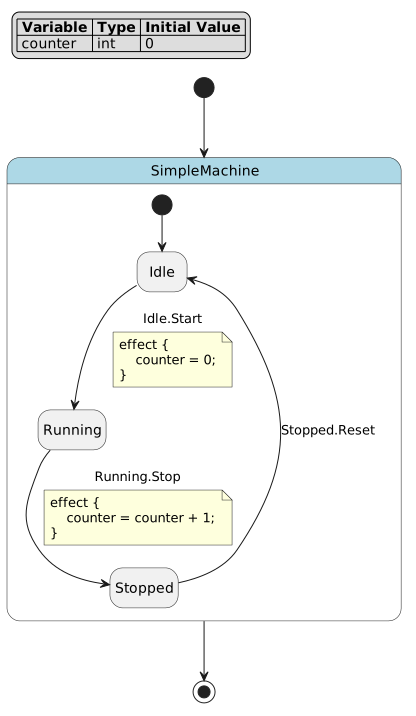
Let’s start with a simple state machine:
def int counter = 0;

state SimpleMachine {
    state Idle;
    state Running;
    state Stopped;

    [*] -> Idle;

    Idle -> Running :: Start effect {
        counter = 0;
    };

    Running -> Stopped :: Stop effect {
        counter = counter + 1;
    };

    Stopped -> Idle :: Reset;
}
Generate PlantUML diagram:
pyfcstm plantuml -i simple_machine.fcstm -o simple_machine.puml
The generated PlantUML file can be rendered using:
Online: Visit https://www.plantuml.com/plantuml/uml/ and paste the code
Local: Install PlantUML (https://plantuml.com/) and run:
plantuml simple_machine.puml
Generated State Diagram:
Example 2: File Download Manager
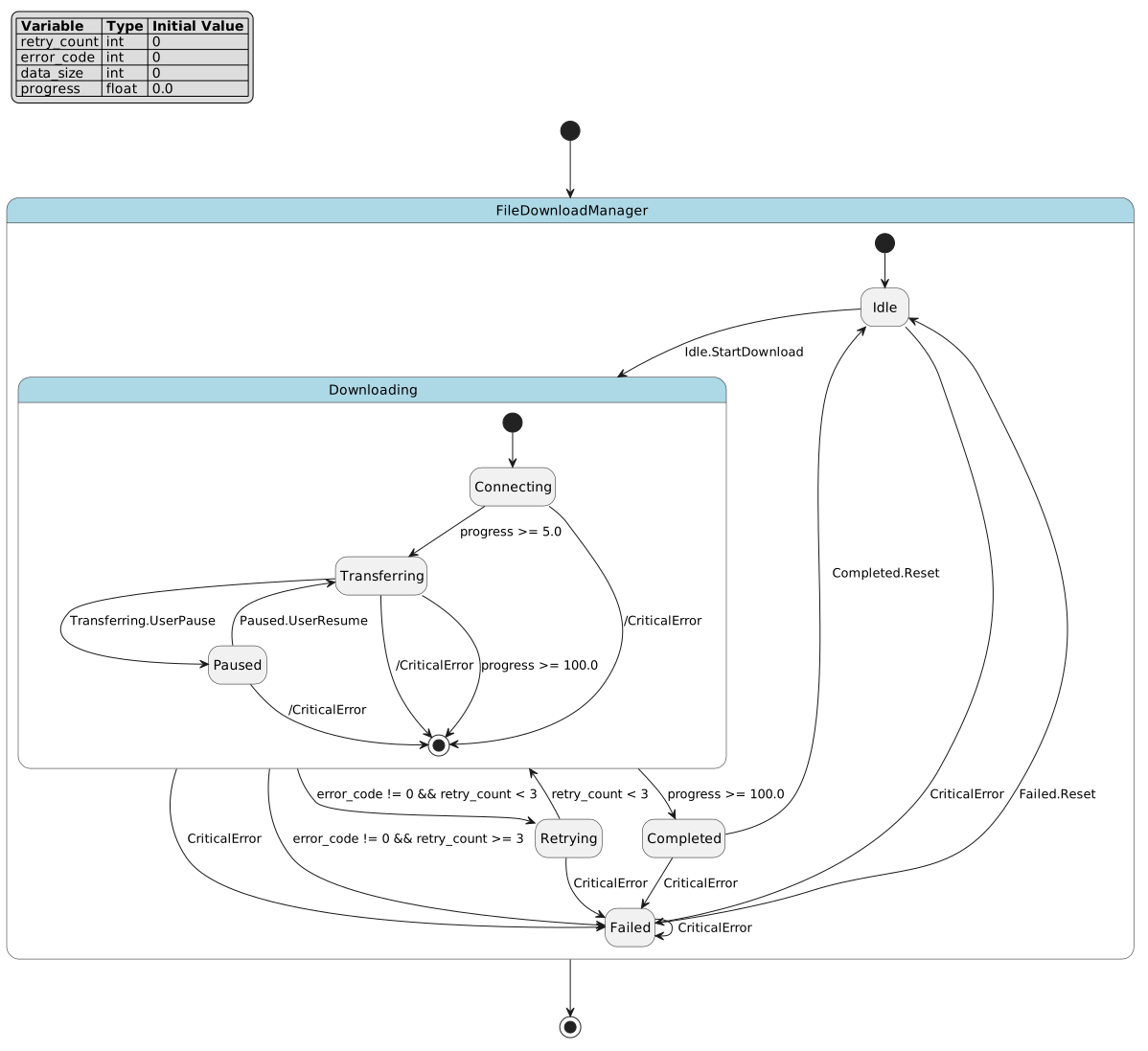
Here’s a more complex example with hierarchical states, retry logic, and error handling:
def int retry_count = 0;
def int error_code = 0;
def int data_size = 0;
def float progress = 0.0;

state FileDownloadManager {
    state Idle {
        enter {
            retry_count = 0;
            error_code = 0;
            data_size = 0;
            progress = 0.0;
        }
    }

    state Downloading {
        state Connecting {
            enter {
                progress = 0.0;
            }

            during {
                progress = progress + 0.1;
            }
        }

        state Transferring {
            during {
                data_size = data_size + 1024;
                progress = progress + 1.0;
            }
        }

        state Paused {
            enter {
                error_code = 0;
            }
        }

        [*] -> Connecting;
        Connecting -> Transferring : if [progress >= 5.0];
        Transferring -> Paused :: UserPause;
        Paused -> Transferring :: UserResume;
        Transferring -> [*] : if [progress >= 100.0];
    }

    state Retrying {
        enter {
            retry_count = retry_count + 1;
            error_code = 0;
        }
    }

    state Completed {
        enter {
            progress = 100.0;
        }
    }

    state Failed {
        enter {
            error_code = 1;
        }
    }

    [*] -> Idle;
    Idle -> Downloading :: StartDownload;

    Downloading -> Retrying : if [error_code != 0 && retry_count < 3];
    Downloading -> Failed : if [error_code != 0 && retry_count >= 3];

    Retrying -> Downloading : if [retry_count < 3];
    Downloading -> Completed : if [progress >= 100.0];

    Completed -> Idle :: Reset;
    Failed -> Idle :: Reset;

    !* -> Failed :: CriticalError;
}
This example demonstrates:
Hierarchical states:
Downloadingcontains nested substates (Connecting,Transferring,Paused)Retry logic: Automatic retry with counter tracking when errors occur
Guard conditions:
Downloading -> Retrying : if [error_code != 0 && retry_count < 3]with complex conditional logicLifecycle actions:
enterandduringactions for state initialization and continuous processingForced transitions:
!* -> Failed :: CriticalErrorcreates emergency exit paths from all substatesProgress tracking: Variables track download progress, data size, and error states
Generate the diagram:
pyfcstm plantuml -i file_download.fcstm -o file_download.puml
Generated State Diagram:
Output to Console
You can also output PlantUML directly to the console for quick inspection:
pyfcstm plantuml -i simple_machine.fcstm
This is useful for:
Quick verification of DSL syntax
Piping output to other tools
Integration with CI/CD pipelines
generate Command
Generate executable code from state machine DSL using customizable templates.
Syntax:
pyfcstm generate -i <input_file> -t <template_dir> -o <output_dir> [--clear]
Parameters:
-i, --input-code: Path to input state machine DSL file (required)-t, --template-dir: Path to template directory (required)-o, --output-dir: Output directory for generated code (required)--clear: Clear output directory before generation (optional)
How It Works
The generate command uses a template-based code generation system:
Parse DSL: Reads and parses the
.fcstmfile into an internal modelLoad Templates: Reads Jinja2 templates from the template directory
Render Code: Processes templates with the state machine model as context
Output Files: Writes generated code to the output directory
Template Structure
A template directory must contain:
config.yaml: Configuration file defining expression styles, filters, and globals*.j2: Jinja2 template files for code generationStatic files: Copied directly to output (preserve directory structure)
Example: Generating C Code
# Generate C code from traffic light state machine
pyfcstm generate -i traffic_light.fcstm -t ./templates/c -o ./output

# Clear output directory before generating
pyfcstm generate -i traffic_light.fcstm -t ./templates/c -o ./output --clear
Example: Generating Python Code
# Generate Python code
pyfcstm generate -i simple_machine.fcstm -t ./templates/python -o ./output
Template Context
Templates have access to the complete state machine model:
model: Root state machine objectmodel.variables: Variable definitionsmodel.walk_states(): Iterator over all statesstate.name,state.is_leaf_state,state.transitionstransition.from_state,transition.to_state,transition.guard
Expression Rendering
Use the expr_render filter to convert DSL expressions to target language syntax:
// C-style expression
{{ expr | expr_render(style='c') }}

# Python-style expression
{{ expr | expr_render(style='python') }}
Common Use Cases
Workflow 1: DSL to Diagram
Visualize your state machine design:
# 1. Write your state machine DSL
vim my_machine.fcstm

# 2. Generate PlantUML
pyfcstm plantuml -i my_machine.fcstm -o my_machine.puml

# 3. Render diagram (online or local)
plantuml my_machine.puml
Workflow 2: DSL to Code
Generate executable code for embedded systems:
# 1. Design state machine
vim controller.fcstm

# 2. Generate C code
pyfcstm generate -i controller.fcstm -t ./templates/c -o ./src/generated --clear

# 3. Integrate with your project
make build
Workflow 3: Validation and Testing
Validate DSL syntax before committing:
# Quick syntax check (generates PlantUML)
pyfcstm plantuml -i machine.fcstm > /dev/null && echo "Syntax OK"

# Generate test code
pyfcstm generate -i machine.fcstm -t ./templates/test -o ./tests/generated
Workflow 4: CI/CD Integration
Automate code generation in your build pipeline:
#!/bin/bash
# build.sh

# Validate all DSL files
for file in src/machines/*.fcstm; do
    echo "Validating $file..."
    pyfcstm plantuml -i "$file" > /dev/null || exit 1
done

# Generate code
pyfcstm generate -i src/machines/main.fcstm -t templates/ -o generated/ --clear

# Build project
make all
Best Practices
DSL File Organization
Use descriptive filenames:
traffic_light.fcstm,user_auth.fcstmKeep related state machines in a dedicated directory:
src/machines/Version control your
.fcstmfiles alongside code
Template Management
Maintain separate template directories for each target language
Use
config.yamlto define language-specific expression stylesTest templates with sample state machines before production use
Code Generation
Always use
--clearflag in automated builds to ensure clean outputReview generated code before committing (add to
.gitignoreif regenerated)Document which DSL files generate which output files