PyFCSTM DSL Syntax Tutorial
Overview
The PyFCSTM Domain Specific Language (DSL) provides a comprehensive syntax for defining hierarchical finite state machines (Harel Statecharts) with expressions, conditions, and lifecycle actions. This tutorial covers all language constructs, semantic rules, execution models, and best practices for writing correct and efficient DSL programs.
What You’ll Learn
Complete DSL syntax and grammar rules
How hierarchical state machines execute
Event scoping and namespace resolution
Expression system and operators
Lifecycle actions and aspect-oriented programming
Real-world examples and design patterns
Language Structure
Program Organization
A complete DSL program consists of optional variable definitions followed by a single root state definition:
program ::= def_assignment* state_definition EOF
The top-level structure ensures every state machine has exactly one root state that may contain nested substates and transitions.
Note
The parser processes your DSL file in multiple phases:
Lexical Analysis: Tokenizes the input into keywords, identifiers, operators, and literals
Syntactic Analysis: Builds an Abstract Syntax Tree (AST) following the grammar rules
Semantic Validation: Validates variable references, state names, and type consistency
Model Construction: Converts the AST into an executable state machine model
Variable Definitions
Syntax
Variable definitions declare typed variables with initial values using the def keyword:
def_assignment ::= 'def' ('int'|'float') ID '=' init_expression ';'
Important
Variables are global to the entire state machine and can be accessed from any state, transition, or expression. The DSL supports two primitive types:
int: 32-bit signed integers, supporting decimal (
42), hexadecimal (0xFF), and binary (0b1010) literalsfloat: Double-precision floating-point numbers, supporting standard (
3.14) and scientific notation (1e-6)
All variables must be initialized at declaration time. The initial expression can include:
Literal values (
0,3.14,0xFF)Mathematical constants (
pi,E,tau)Arithmetic expressions (
3.14 * 2,10 + 5)Mathematical functions (
sin(0),sqrt(16))
Correct Usage
Integer Variables:
def int counter = 0;              // Simple initialization
def int max_attempts = 5;         // Constant value
def int flags = 0xFF;             // Hexadecimal literal
def int mask = 0b11110000;        // Binary literal
def int computed = 10 * 5 + 3;    // Expression initialization
Float Variables:
def float temperature = 25.5;     // Decimal notation
def float pi_value = pi;          // Mathematical constant
def float ratio = 3.14 * 2;       // Expression initialization
def float scientific = 1.5e-3;    // Scientific notation
def float computed = sqrt(16.0);  // Function call
Annotated Example:
// System state variables
def int system_state = 0;         // 0=init, 1=running, 2=error
def int error_count = 0;          // Track error occurrences

// Sensor readings
def float temperature = 20.0;     // Current temperature in Celsius
def float target_temp = 22.0;     // Desired temperature

// Control outputs
def int heating_power = 0;        // Heating power (0-100%)
def int fan_speed = 0;            // Fan speed (0-3)

// Bit flags for system status
def int status_flags = 0x00;      // Bit 0: heating, Bit 1: cooling
                                  // Bit 2: fan, Bit 3: error
Semantic Rules
Variable definitions must follow these semantic constraints:
Unique Names: Each variable name must be unique within the program scope
Type Consistency: Initial expressions must evaluate to values compatible with the declared type
Expression Validity: Initial expressions can only reference mathematical constants and literals (not other variables)
Declaration Order: Variables must be declared before the root state definition
Tip
Why These Rules?
Unique Names: Prevents ambiguity in variable references throughout the state machine
Type Consistency: Ensures type safety and prevents runtime errors in generated code
Expression Validity: Simplifies initialization and ensures deterministic startup state
Declaration Order: Maintains clear separation between data definitions and behavior definitions
Common Errors
Incorrect Usage:
// ERROR: Duplicate variable names
def int x = 1;
def float x = 2.0;  // Semantic error: 'x' already defined

// ERROR: Undefined reference in initialization
def int y = unknown_var;  // Semantic error: 'unknown_var' not defined

// ERROR: Referencing another variable
def int a = 10;
def int b = a;  // Semantic error: cannot reference variables in initialization
Correct Alternative:
// Use unique names
def int x_int = 1;
def float x_float = 2.0;

// Initialize with literals or constants
def int y = 0;

// Assign variable values in state actions
def int a = 10;
def int b = 0;

state Init {
    enter {
        b = a;  // Assign in lifecycle action
    }
}
State Definitions
Note
A finite state machine (FSM) is a computational model that can be in exactly one state at any given time. The machine transitions between states in response to events, executing actions during these transitions. Hierarchical state machines (Harel Statecharts) extend this concept by allowing states to contain nested substates, enabling modular and scalable designs.
Syntax Types
The DSL supports two fundamental types of state definitions:
state_definition ::= leafStateDefinition | compositeStateDefinition
leafStateDefinition ::= ['pseudo'] 'state' ID [named STRING] ';'
compositeStateDefinition ::= ['pseudo'] 'state' ID [named STRING] '{' state_inner_statement* '}'
Tip
Key Differences:
Leaf States: Terminal states with no internal structure; represent atomic operational modes
Composite States: Container states with nested substates; represent hierarchical decomposition
Leaf States
Leaf states represent terminal states with no internal structure. They are the fundamental building blocks of state machines.
Correct Usage:
state Idle;                      // Simple leaf state
state Running;                   // Another leaf state
state Error;                     // Error state

// Leaf state with display name
state Running named "System Running";

// Pseudo leaf state (skips ancestor aspect actions)
pseudo state SpecialState;
Tip
When to Use Leaf States:
Representing atomic operational modes (Idle, Running, Error)
Final states in a hierarchical decomposition
States with simple, non-decomposable behavior
Annotated Example:
state TrafficLight {
    // Leaf states representing light colors
    state Red;      // Stop signal
    state Yellow;   // Caution signal
    state Green;    // Go signal

    [*] -> Red;
    Red -> Green :: TimerExpired;
    Green -> Yellow :: TimerExpired;
    Yellow -> Red :: TimerExpired;
}
Composite States
Composite states contain nested substates, transitions, and lifecycle actions. They enable hierarchical decomposition of complex behaviors.
Correct Usage:
state Machine {
    // Nested substates
    state Off;
    state On {
        state Slow;
        state Fast;

        [*] -> Slow;
        Slow -> Fast :: SpeedUp;
        Fast -> Slow :: SlowDown;
    }

    // Transitions between top-level states
    [*] -> Off;
    Off -> On : if [power_switch == 1];
    On -> Off : if [power_switch == 0];
}
Important
When a composite state is active, exactly one of its child states is also active. This creates a hierarchical execution context:
Entry: When entering a composite state, the entry transition (
[*] -> ChildState) determines which child becomes activeDuring: While active, the composite state’s
during before/afteractions execute around the child state’s actionsExit: When leaving a composite state, the active child state exits first, then the composite state exits
Annotated Example:
state PowerManagement {
    // Composite state lifecycle actions
    enter {
        // Executed when entering PowerManagement from outside
        power_level = 0;
    }

    during before {
        // Executed when entering a child state from outside
        // NOT executed during child-to-child transitions
        monitor_counter = monitor_counter + 1;
    }

    during after {
        // Executed when exiting to outside from a child state
        // NOT executed during child-to-child transitions
        cleanup_flag = 1;
    }

    exit {
        // Executed when leaving PowerManagement to outside
        power_level = 0;
    }

    // Child states
    state LowPower {
        during {
            power_level = 10;
        }
    }

    state NormalPower {
        during {
            power_level = 50;
        }
    }

    state HighPower {
        during {
            power_level = 100;
        }
    }

    [*] -> LowPower;
    LowPower -> NormalPower :: Increase;
    NormalPower -> HighPower :: Increase;
    HighPower -> NormalPower :: Decrease;
    NormalPower -> LowPower :: Decrease;
}
Pseudo States
Pseudo states are special states (leaf or composite) that skip ancestor aspect actions. They are useful for implementing special behaviors that need to bypass cross-cutting concerns.
Syntax:
pseudo state StateName;
pseudo state StateName { ... }
Note
Normal states execute ancestor aspect actions (>> during before/after) defined in parent states. Pseudo states skip these aspect actions, providing a way to opt out of cross-cutting behaviors.
Comparison Example:
 1// Pseudo State Example
 2// This example demonstrates the difference between normal and pseudo states
 3
 4def int aspect_counter = 0;
 5
 6state PseudoStateDemo {
 7    // Aspect actions that apply to all descendant states
 8    >> during before {
 9        aspect_counter = aspect_counter + 1;
10    }
11
12    >> during after {
13        aspect_counter = aspect_counter + 100;
14    }
15
16    state NormalStates {
17        // Normal leaf state - WILL execute ancestor aspect actions
18        state RegularState {
19            during {
20                aspect_counter = aspect_counter + 10;
21            }
22        }
23
24        [*] -> RegularState;
25        RegularState -> [*];
26    }
27
28    state PseudoStates {
29        // Pseudo state - WILL NOT execute ancestor aspect actions
30        // Useful for special states that need to bypass aspect logic
31        pseudo state SpecialState {
32            during {
33                aspect_counter = aspect_counter + 10;
34            }
35        }
36
37        [*] -> SpecialState;
38        SpecialState -> [*];
39    }
40
41    [*] -> NormalStates;
42    NormalStates -> PseudoStates :: Switch;
43    PseudoStates -> [*];
44}
Execution Comparison:
When RegularState is active:
Root
>> during beforeexecutes (aspect_counter += 1)RegularState.duringexecutes (aspect_counter += 10)Root
>> during afterexecutes (aspect_counter += 100)Total increment per cycle: 111
When SpecialState (pseudo) is active:
Root
>> during beforeSKIPPEDSpecialState.duringexecutes (aspect_counter += 10)Root
>> during afterSKIPPEDTotal increment per cycle: 10
Tip
When to Use Pseudo States:
Implementing exception handlers that bypass normal monitoring
Creating special states for testing or debugging
Optimizing performance-critical states by skipping overhead
Named States
States can have display names for documentation and visualization purposes:
state Running named "System Running";
state Error named "Error State - Requires Manual Reset";
state Init named "Initialization Phase";
The display name is used in PlantUML diagrams and generated documentation, while the state ID is used in code generation.
Semantic Rules
State definitions must adhere to these semantic constraints:
Unique Names: State names must be unique within their containing scope (but can be reused in different scopes)
Entry Transitions: Composite states must have at least one entry transition (
[*] -> state)State References: All transition targets must reference existing states in the current scope
Hierarchical Consistency: Nested states follow proper parent-child relationships
Aspect Restrictions:
during before/after(without>>) only apply to composite states
Tip
Why These Rules?
Unique Names: Prevents ambiguity in transition targets and event scoping
Entry Transitions: Ensures deterministic behavior when entering composite states
State References: Prevents dangling transitions and ensures connectivity
Hierarchical Consistency: Maintains proper state machine structure
Aspect Restrictions: Enforces correct lifecycle semantics for leaf vs. composite states
Common Errors
Incorrect Usage:
// ERROR: Missing entry transition
state Container {
    state A;
    state B;
    A -> B :: Event;  // No [*] -> A or [*] -> B
}

// ERROR: Duplicate state names in same scope
state Root {
    state Child;
    state Child;  // Semantic error: duplicate name
}

// ERROR: Invalid transition target
state Root {
    state A;
    [*] -> A;
    A -> B :: Event;  // Semantic error: B doesn't exist
}

// ERROR: during before/after on leaf state
state LeafState {
    during before {  // Semantic error: leaf states can't have aspects
        x = 1;
    }
}
Correct Alternative:
// Provide entry transition
state Container {
    state A;
    state B;
    [*] -> A;  // Entry transition required
    A -> B :: Event;
}

// Use unique names
state Root {
    state ChildA;
    state ChildB;
}

// Define all referenced states
state Root {
    state A;
    state B;
    [*] -> A;
    A -> B :: Event;
}

// Use plain during for leaf states
state LeafState {
    during {  // Correct: no aspect keywords
        x = 1;
    }
}
Transition Definitions
Note
Transitions define how the state machine moves from one state to another in response to events or conditions. Each transition can have:
Source State: The state from which the transition originates
Target State: The state to which the transition leads
Event: Optional trigger that activates the transition
Guard Condition: Optional boolean expression that must be true for the transition to fire
Effect: Optional actions executed during the transition
Transition Types
The DSL supports three types of transitions with distinct syntax patterns:
transition_definition ::= entryTransitionDefinition | normalTransitionDefinition | exitTransitionDefinition
Entry Transitions
Entry transitions define the initial state when entering a composite state. They use the pseudo-state [*] as the source.
Syntax: [*] -> target_state [: chain_id|:: event_name] [if [condition]] [effect { operations }] ';'
Correct Usage:
[*] -> Idle;                                    // Simple entry
[*] -> Running : startup_event;                 // Entry with chain event
[*] -> Running :: startup_event;                // Entry with local event
[*] -> Active : if [initialized == 0x1];        // Entry with guard
[*] -> Ready effect { counter = 0; };           // Entry with effect
[*] -> Running : if [mode == 1] effect {        // Entry with guard and effect
    counter = 0;
    status = 1;
};
Note
When a composite state is entered from outside, the entry transition determines which child state becomes active. The guard condition (if present) is evaluated, and if true, the effect (if present) is executed before entering the target state.
Normal Transitions
Normal transitions connect two named states within the same scope.
Syntax: from_state -> to_state [: chain_id|:: event_name] [if [condition]] [effect { operations }] ';'
Correct Usage:
Idle -> Running;                                // Simple transition
Slow -> Fast : speed_up;                        // Transition with chain event
Slow -> Fast :: speed_up;                       // Transition with local event
Active -> Inactive : if [timeout > 100];        // Transition with guard
Processing -> Complete effect {                 // Transition with effect
    result = output;
    status = 1;
};
Running -> Idle : if [stop_requested] effect {  // Guard and effect
    cleanup_flag = 1;
};
Note
Normal transitions are evaluated during the “during” phase of the source state. When the event is triggered (if specified) and the guard condition is true (if specified), the transition fires:
Source state’s exit action executes
Transition effect executes (if present)
Target state’s enter action executes
Exit Transitions
Exit transitions define how to leave a composite state to its parent. They use the pseudo-state [*] as the target.
Syntax: from_state -> [*] [: chain_id|:: event_name] [if [condition]] [effect { operations }] ';'
Correct Usage:
Error -> [*];                                   // Simple exit
Complete -> [*] : finish_event;                 // Exit with event
Running -> [*] : if [shutdown_requested];       // Exit with guard
Active -> [*] effect {                          // Exit with effect
    cleanup_flag = 0x1;
};
Processing -> [*] : if [done] effect {          // Guard and effect
    result = final_value;
};
Note
Exit transitions allow a child state to signal completion and return control to the parent state. The parent state can then transition to another state or exit itself.
Forced Transitions
Forced transitions are a syntactic sugar that automatically expands to multiple normal transitions. They are useful for defining transitions from multiple states to a common target without repetitive code, especially for error handling or emergency situations.
Syntax:
// Forced transition from specific state
! from_state -> to_state [: chain_id|:: event_name] [if [condition]] ';'

// Forced exit from specific state
! from_state -> [*] [: chain_id|:: event_name] [if [condition]] ';'

// Forced transition from ALL substates (wildcard)
! * -> to_state [: chain_id|:: event_name] [if [condition]] ';'

// Forced exit from ALL substates
! * -> [*] [: chain_id|:: event_name] [if [condition]] ';'
Important
Forced transitions are a syntactic sugar that expands during model construction. When you write:
state Parent {
    ! * -> ErrorHandler :: CriticalError;

    state Child1;
    state Child2;
}
The parser automatically generates normal transitions from all substates:
// Expanded transitions (generated automatically):
Child1 -> ErrorHandler : CriticalError;
Child2 -> ErrorHandler : CriticalError;
Important: These are normal transitions - they execute exit actions just like any other transition.
Key Characteristics:
Syntactic Sugar: Expands to multiple normal transitions during model construction
Wildcard Expansion:
! *generates transitions from all substates in the current scopeHierarchical Propagation: Forced transitions propagate to nested substates recursively
Shared Event Object: All expanded transitions share the same event object
No Effect Blocks: Forced transitions cannot have effect blocks (syntax limitation)
Normal Execution: Exit actions execute normally - forced transitions are just regular transitions
Tip
When to Use Forced Transitions:
Avoid Repetitive Code: Define one transition instead of many identical ones
Error Handling: Transition from any state to error handler
Emergency Shutdown: Transition from all states to shutdown state
Timeout Handling: Handle timeouts uniformly across multiple states
state System {
    // Force transition from any state to error handler
    ! * -> ErrorHandler :: CriticalError;

    // Force transition from specific state
    ! Running -> SafeMode :: EmergencyStop;

    // Force exit from any state
    ! * -> [*] :: FatalError;

    // With guard condition
    ! * -> ErrorHandler : if [error_code > 100];

    state Running {
        exit {
            // This exit action WILL execute when transitioning
            cleanup_flag = 1;
        }
    }

    state ErrorHandler;
}
When to Use Forced Transitions:
Avoid Repetitive Code: Define one transition instead of many identical ones
Error Handling: Transition from any state to error handler
Emergency Shutdown: Transition from all states to shutdown state
Timeout Handling: Handle timeouts uniformly across multiple states
Complete Example:
 1// Forced Transitions Example
 2// This example demonstrates forced transitions - a syntactic sugar that
 3// automatically expands to multiple normal transitions
 4
 5def int error_code = 0;
 6def int recovery_attempts = 0;
 7
 8state System {
 9    // Forced transitions - syntactic sugar that expands to multiple transitions
10    // These generate NORMAL transitions - exit actions WILL execute
11    ! * -> ErrorHandler :: CriticalError;     // From ANY state to ErrorHandler
12    !Running -> SafeMode :: EmergencyStop;   // From Running (and all its substates) to SafeMode
13
14    state Initializing {
15        exit {
16            // This exit action WILL execute when transitioning via CriticalError
17            error_code = 0;
18        }
19    }
20
21    state Running {
22        exit {
23            // This exit action WILL execute when transitioning
24            recovery_attempts = 0;
25        }
26
27        state Processing {
28            during {
29                error_code = error_code + 1;
30            }
31
32            exit {
33                // This exit action WILL also execute
34                error_code = 0;
35            }
36        }
37
38        state Waiting;
39
40        [*] -> Processing;
41        Processing -> Waiting :: Done;
42        Waiting -> Processing :: Continue;
43    }
44
45    state SafeMode {
46        enter {
47            recovery_attempts = recovery_attempts + 1;
48        }
49    }
50
51    state ErrorHandler {
52        enter {
53            // Handle critical error
54            recovery_attempts = 0;
55        }
56    }
57
58    [*] -> Initializing;
59    Initializing -> Running :: Start;
60    Running -> [*] :: Shutdown;
61    SafeMode -> Running :: Recovered;
62    ErrorHandler -> [*] :: FatalError;
63}
Visualization:
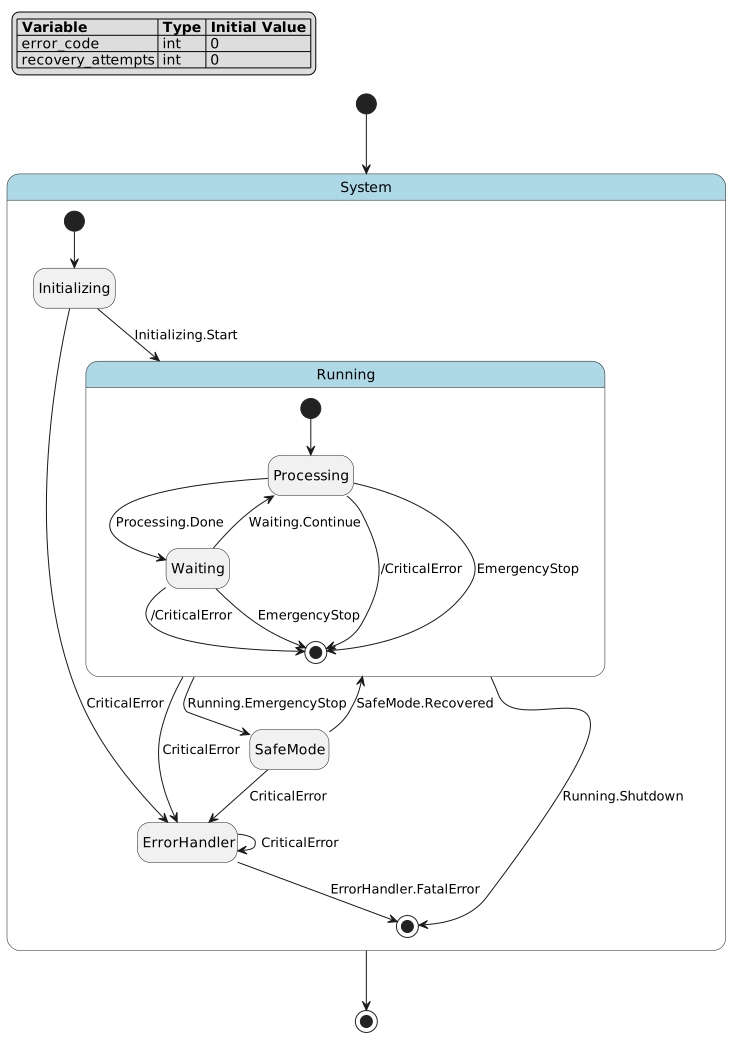
Expansion Behavior:
When ! * -> ErrorHandler :: CriticalError is defined in System, it expands to:
// From direct children
Running -> ErrorHandler :: CriticalError;
Idle -> ErrorHandler :: CriticalError;
SafeMode -> ErrorHandler :: CriticalError;
ErrorHandler -> ErrorHandler :: CriticalError;

// Propagates to nested children (Running.Processing, Running.Waiting)
// Inside Running state, generates:
Processing -> [*] : /CriticalError;  // Exit to parent, then parent transitions
Waiting -> [*] : /CriticalError;
Event Sharing:
All expanded transitions from a single forced transition definition share the same event object. This means:
state System {
    ! * -> ErrorHandler :: CriticalError;

    state A;
    state B;
    state C;
}

// All these transitions use the SAME event object:
// A -> ErrorHandler :: CriticalError
// B -> ErrorHandler :: CriticalError
// C -> ErrorHandler :: CriticalError
// When you trigger CriticalError, ALL matching transitions can fire
Warning
Normal Transitions: Expanded transitions are normal transitions - exit actions execute
Event Sharing: All expanded transitions share the same event object
No Effect Blocks: Forced transitions cannot have effect blocks (use target state’s enter action)
Scope Limitation:
! *applies to direct substates, but propagates recursivelyEvent Scoping: Event scoping rules (
:vs::) apply normally
Common Errors:
// ERROR: Cannot have effect block on forced transition
! * -> ErrorHandler :: Error effect {  // Syntax error
    error_code = 1;
};

// ERROR: Forced transition must reference existing states
! * -> NonExistentState :: Error;  // Semantic error
Correct Alternative:
// Use enter action in target state for initialization
state ErrorHandler {
    enter {
        error_code = 1;  // Initialize in target state
    }
}

! * -> ErrorHandler :: Error;  // Correct: no effect block
Event Definitions
Events are the core mechanism that triggers state transitions. In finite state machines, state transitions are typically driven by external events—such as user input, sensor signals, timer expiration, or system messages. Events provide the state machine with the ability to respond to external stimuli, enabling it to change behavior based on the current state and received events.
In the PyFCSTM DSL, events can be defined in two ways:
Implicit Definition: Events are automatically created when referenced directly in transitions
Explicit Definition: Events are pre-declared using the
eventkeyword, optionally with display names
Explicit Event Definitions
Events can be explicitly defined within a state scope using the event keyword:
Syntax:
event_definition ::= 'event' ID ('named' STRING)? ';'
Examples:
event StartEvent;                              // Simple event definition
event ErrorOccurred named "Error Occurred";    // Event with display name
event UserInput named "User Input Received";   // Event with descriptive name
Purpose of Explicit Event Definitions:
Explicit event definitions serve several important purposes:
Documentation: Explicitly declare events used within a state scope for better code clarity and maintainability
Visualization: The
namedattribute provides human-readable display names for PlantUML diagrams and documentation generationConsistency: Similar to state definitions with
named, event definitions support visualization and documentation tools
Important
Relationship with Transition Events:
Explicit event definitions and transition events are part of the same event system. When you define an event explicitly, it can be referenced in transitions within the same scope. The events are unified - there is no distinction between “explicitly defined events” and “transition events” at runtime.
Complete Example:
state System {
    // Explicit event definitions with display names
    event Start named "System Start";
    event Stop named "System Stop";
    event Pause named "System Pause";
    event Resume named "System Resume";

    state Idle;
    state Running;
    state Paused;

    [*] -> Idle;
    Idle -> Running : Start;      // References the explicitly defined Start event
    Running -> Idle : Stop;       // References the explicitly defined Stop event
    Running -> Paused : Pause;    // References the explicitly defined Pause event
    Paused -> Running : Resume;   // References the explicitly defined Resume event
}
Note
Key Points:
Explicit event definitions are optional - events can be used in transitions without explicit definition
The
namedattribute is the primary benefit, providing display names for visualization (PlantUML, state diagrams)Events defined explicitly follow the same scoping rules as transition events (see Event Scoping section below)
Explicit definitions improve code readability, self-documentation, and integration with visualization tools
The
namedattribute works exactly like thenamedattribute for states - it provides a human-readable label
Event Scoping
In hierarchical state machines, events need a namespace to avoid naming conflicts.
Important
Consider this scenario:
state Root {
    state A;
    state B;
    state C;

    [*] -> A;
    A -> B : Event;  // Which Event?
    B -> C : Event;  // Same Event or different?
}
Should both transitions use the same event or different events? The DSL provides three scoping mechanisms to handle this.
Scoping Mechanisms
The DSL supports three ways to specify event scope:
Local Events (
::): Scoped to the source state’s namespaceChain Events (
:): Scoped to the parent state’s namespaceAbsolute Events (
/): Scoped to the root state’s namespace
All three mechanisms are equivalent to using absolute paths, just with different starting points.
Local Events (:: operator)
Local events use the :: operator and are scoped to the source state’s namespace.
Syntax: StateA -> StateB :: EventName;
Note
The event is created in the source state’s namespace. Each source state gets its own event.
Example:
state Root {
    state A;
    state B;

    [*] -> A;
    A -> B :: E;     // Creates event: Root.A.E
    B -> A :: E;     // Creates event: Root.B.E (DIFFERENT from above)
}
Equivalent Absolute Path:
// A -> B :: E  is equivalent to:
A -> B : /A.E

// B -> A :: E  is equivalent to:
B -> A : /B.E
Tip
When to Use:
Each transition needs its own unique event
Avoid naming conflicts between similar transitions
State-specific events that shouldn’t be shared
Chain Events (: operator)
Chain events use the : operator and are scoped to the parent state’s namespace.
Syntax: StateA -> StateB : EventName;
Note
The event is created in the parent state’s namespace. Multiple transitions in the same scope can share the event.
Example:
state Root {
    state A;
    state B;
    state C;

    [*] -> A;
    A -> B : E;      // Creates event: Root.E
    B -> C : E;      // Uses SAME event: Root.E
}
Equivalent Absolute Path:
// A -> B : E  is equivalent to:
A -> B : /E

// B -> C : E  is equivalent to:
B -> C : /E
Tip
When to Use:
Multiple transitions should respond to the same event
Coordinating transitions across sibling states
Shared events within a scope
Absolute Events (/ prefix)
Absolute events use the / prefix and are scoped to the root state’s namespace.
Syntax: StateA -> StateB : /EventName; or StateA -> StateB : /Path.To.EventName;
Note
The event path is resolved from the root state, allowing explicit control over event location.
Example:
state Root {
    state ModuleA {
        state A1;
        state A2;

        [*] -> A1;
        A1 -> A2 : /GlobalEvent;  // Uses Root.GlobalEvent
    }

    state ModuleB {
        state B1;
        state B2;

        [*] -> B1;
        B1 -> B2 : /GlobalEvent;  // Uses SAME Root.GlobalEvent
    }

    [*] -> ModuleA;
}
Equivalent Absolute Path:
// Already absolute - no conversion needed
A1 -> A2 : /GlobalEvent  // Root.GlobalEvent
B1 -> B2 : /GlobalEvent  // Root.GlobalEvent (SAME event)
Tip
When to Use:
Cross-module communication
Global events that should be accessible from anywhere
Explicit control over event location
Avoiding ambiguity in deeply nested states
Complete Comparison Example
Here’s a comprehensive example demonstrating all three scoping mechanisms:
 1// Event Scoping Complete Example
 2// This example demonstrates all three event scoping mechanisms:
 3// 1. Local events (::) - scoped to source state
 4// 2. Chain events (:) - scoped to parent state
 5// 3. Absolute events (/) - scoped to root state
 6
 7def int counter = 0;
 8
 9state System {
10    state ModuleA {
11        state A1 {
12            during {
13                counter = counter + 1;
14            }
15        }
16
17        state A2 {
18            during {
19                counter = counter + 2;
20            }
21        }
22
23        [*] -> A1;
24
25        // Local event :: - scoped to source state (A1)
26        // Equivalent to: A1 -> A2 : /ModuleA.A1.LocalEvent
27        A1 -> A2 :: LocalEvent;
28
29        // Chain event : - scoped to parent state (ModuleA)
30        // Equivalent to: A2 -> A1 : /ModuleA.ChainEvent
31        A2 -> A1 : ChainEvent;
32    }
33
34    state ModuleB {
35        state B1 {
36            during {
37                counter = counter + 10;
38            }
39        }
40
41        state B2 {
42            during {
43                counter = counter + 20;
44            }
45        }
46
47        [*] -> B1;
48
49        // Local event :: - scoped to source state (B1)
50        // Equivalent to: B1 -> B2 : /ModuleB.B1.LocalEvent
51        // This is DIFFERENT from ModuleA.A1.LocalEvent
52        B1 -> B2 :: LocalEvent;
53
54        // Chain event : - scoped to parent state (ModuleB)
55        // Equivalent to: B2 -> B1 : /ModuleB.ChainEvent
56        // This is DIFFERENT from ModuleA.ChainEvent
57        B2 -> B1 : ChainEvent;
58    }
59
60    state SharedTarget {
61        during {
62            counter = counter + 100;
63        }
64    }
65
66    [*] -> ModuleA;
67
68    // Absolute event / - scoped to root state (System)
69    // Both transitions use the SAME event: System.GlobalEvent
70    ModuleA -> SharedTarget : /GlobalEvent;
71    ModuleB -> SharedTarget : /GlobalEvent;
72
73    // Absolute event can also be used within nested states
74    // This allows cross-module communication
75    SharedTarget -> ModuleA : /ResetToA;
76    SharedTarget -> ModuleB : /ResetToB;
77}
Visualization:
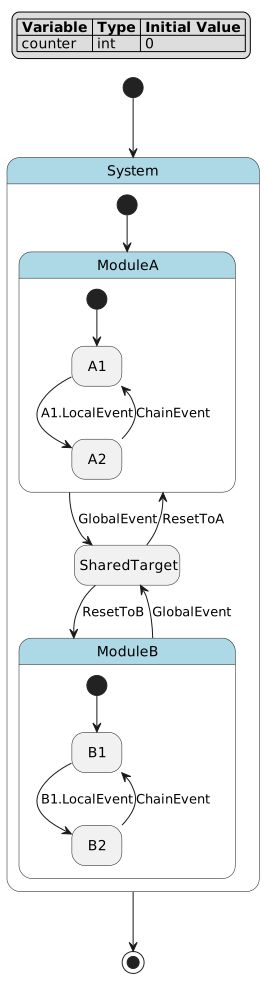
Event Resolution Table:
Transition Syntax |
Event Scope |
Absolute Path Equivalent |
|---|---|---|
|
Source state (A1) |
|
|
Parent state (ModuleA) |
|
|
Root state (System) |
Already absolute: |
|
Source state (B1) |
|
|
Parent state (ModuleB) |
|
|
Root state (System) |
Already absolute: |
Key Observations:
Local events (
::): Each source state gets its own event -ModuleA.A1.LocalEvent≠ModuleB.B1.LocalEventChain events (
:): Each parent scope gets its own event -ModuleA.ChainEvent≠ModuleB.ChainEventAbsolute events (
/): All transitions share the same event -ModuleA -> Target : /GlobalEvent=ModuleB -> Target : /GlobalEvent
See also
You can also use dot notation with absolute paths to reference events in specific states:
state Root {
    state A {
        state A1;
        state A2;

        [*] -> A1;
    }

    state B {
        state B1;
        state B2;

        [*] -> B1;
        // Reference event from A's namespace
        B1 -> B2 : /A.SpecificEvent;  // Uses Root.A.SpecificEvent
    }

    [*] -> A;
}
This allows fine-grained control over event location in the hierarchy.
Guard Conditions and Effects
Guard Conditions
Guard conditions are boolean expressions that control whether a transition can fire. They are enclosed in square brackets after the if keyword.
Syntax: StateA -> StateB : if [condition];
Supported Operators:
Comparison:
<,>,<=,>=,==,!=Logical:
&&,||,!,and,or,notBitwise:
&,|,^Arithmetic:
+,-,*,/,%,**
Examples:
// Simple comparison
Idle -> Active : if [counter >= 10];

// Logical AND
Normal -> Critical : if [battery_level < 10 && charging_state == 0];

// Logical OR
LowPower -> Critical : if [temperature > 80 || error_count > 5];

// Bitwise operations
Charging -> Normal : if [(battery_level >= 90) && (charging_state & 0x01)];

// Complex expression
StateA -> StateB : if [(temp > 25.0) && (flags & 0xFF) == 0x01];
Transition Effects
Transition effects are blocks of operations executed during a transition, after the source state exits but before the target state enters.
Syntax: StateA -> StateB effect { operations };
Examples:
// Simple effect
Idle -> Running effect {
    counter = 0;
};

// Multiple operations
Critical -> Charging effect {
    charging_state = 1;
    error_count = 0;
    temperature = 25;
};

// Complex expressions
Processing -> Complete effect {
    result = sin(angle) * radius;
    flags = flags | 0x01;
    counter = counter + 1;
};
Combined Guards and Effects
Transitions can have both guard conditions and effects:
// Guard and effect
Charging -> Normal : if [battery_level >= 100] effect {
    charging_state = 0;
    battery_level = 100;
};

// Complex guard and effect
Running -> Idle : if [(timeout > 100) && (error_count == 0)] effect {
    cleanup_flag = 1;
    status = 0;
};
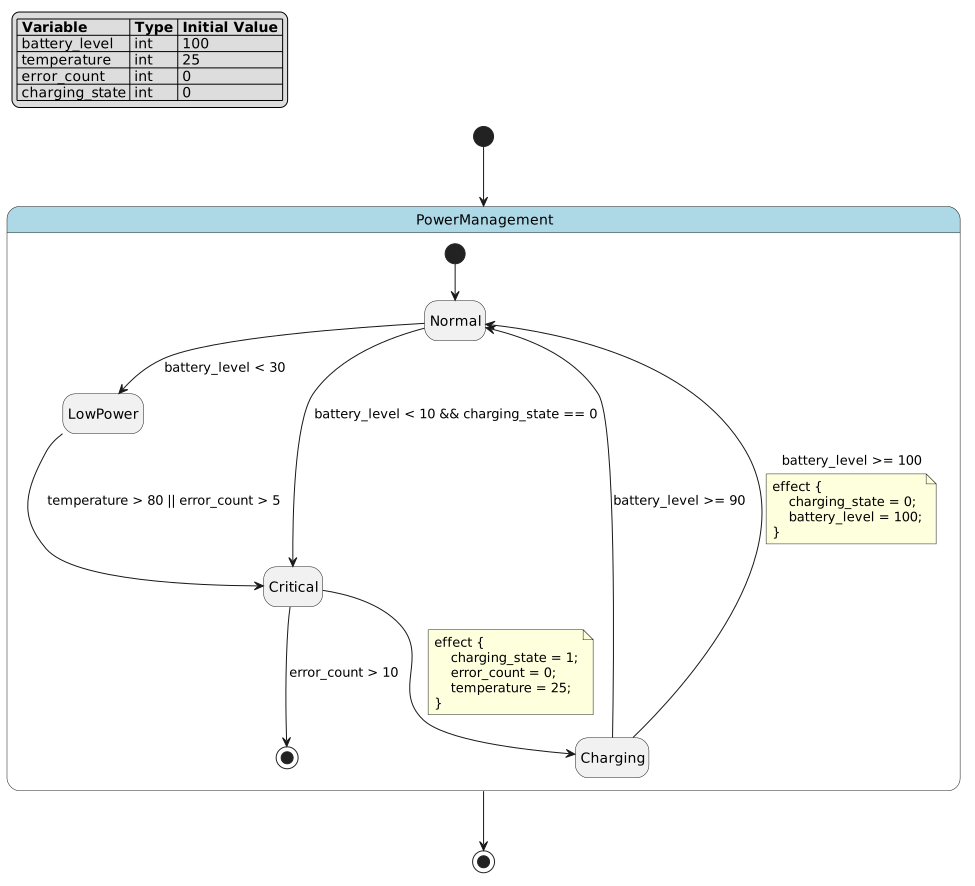
Complete Example
Here’s a comprehensive example demonstrating guards and effects:
 1// Guard Conditions and Effects Example
 2// This example demonstrates complex guard conditions and transition effects
 3
 4def int battery_level = 100;
 5def int temperature = 25;
 6def int error_count = 0;
 7def int charging_state = 0;
 8
 9state PowerManagement {
10    state Normal {
11        during {
12            battery_level = battery_level - 1;
13        }
14    }
15
16    state LowPower {
17        enter {
18            error_count = 0;
19        }
20
21        during {
22            battery_level = battery_level - 0;  // No drain in low power
23        }
24    }
25
26    state Charging {
27        during {
28            battery_level = battery_level + 2;
29        }
30    }
31
32    state Critical {
33        enter {
34            error_count = error_count + 1;
35        }
36    }
37
38    [*] -> Normal;
39
40    // Simple guard condition
41    Normal -> LowPower : if [battery_level < 30];
42
43    // Complex guard with logical AND
44    Normal -> Critical : if [battery_level < 10 && charging_state == 0];
45
46    // Complex guard with logical OR
47    LowPower -> Critical : if [temperature > 80 || error_count > 5];
48
49    // Guard with comparison
50    Charging -> Normal : if [battery_level >= 90];
51
52    // Transition with effect block
53    Critical -> Charging effect {
54        charging_state = 1;
55        error_count = 0;
56        temperature = 25;
57    };
58
59    // Guard and effect combined
60    Charging -> Normal : if [battery_level >= 100] effect {
61        charging_state = 0;
62        battery_level = 100;
63    };
64
65    Critical -> [*] : if [error_count > 10];
66}
Visualization:
Semantic Rules
Transitions must satisfy these semantic constraints:
State Existence: Both source and target states must exist in the current scope
Variable Validity: All variables in conditions and effects must be declared
Expression Types: Guard conditions must evaluate to boolean values
Entry Requirements: Composite states require at least one entry transition
Effect Scope: Effects can only assign to declared variables
Why These Rules?
State Existence: Prevents dangling transitions
Variable Validity: Ensures all references are resolvable
Expression Types: Maintains type safety in guard evaluation
Entry Requirements: Ensures deterministic composite state entry
Effect Scope: Prevents undefined behavior in generated code
Common Errors
Incorrect Usage:
// ERROR: References to undefined states
StateA -> UndefinedState :: Event;  // Semantic error

// ERROR: Missing entry transition
state Container {
    state A;
    state B;
    A -> B :: Event;  // No [*] -> A or [*] -> B
}

// ERROR: Invalid variable in guard
StateA -> StateB : if [undefined_var > 10];  // Semantic error

// ERROR: Non-boolean guard
StateA -> StateB : if [counter + 10];  // Semantic error: not boolean

// ERROR: Invalid assignment target
StateA -> StateB effect {
    undefined_var = 10;  // Semantic error
};
Correct Alternative:
// Define all states
state Root {
    state StateA;
    state StateB;
    [*] -> StateA;
    StateA -> StateB :: Event;
}

// Provide entry transition
state Container {
    state A;
    state B;
    [*] -> A;  // Required
    A -> B :: Event;
}

// Use declared variables
def int counter = 0;
state Root {
    state StateA;
    state StateB;
    [*] -> StateA;
    StateA -> StateB : if [counter > 10];  // Valid
}

// Use boolean expressions
StateA -> StateB : if [counter > 10];  // Valid: comparison returns boolean

// Assign to declared variables
def int result = 0;
state Root {
    state StateA;
    state StateB;
    [*] -> StateA;
    StateA -> StateB effect {
        result = 10;  // Valid
    };
}
Expression System
How Expressions Work:
The DSL provides a comprehensive expression system for mathematical computations, logical operations, and conditional logic. Expressions can appear in:
Variable initializations (
def int x = expression;)Guard conditions (
if [expression])Transition effects (
variable = expression;)Lifecycle actions (
variable = expression;)
Expression Hierarchy
The DSL supports comprehensive expression types for mathematical and logical operations:
init_expression ::= conditional_expression
num_expression ::= conditional_expression
cond_expression ::= conditional_expression
conditional_expression ::= logical_or_expression ['?' expression ':' expression]
logical_or_expression ::= logical_and_expression [('||' | 'or') logical_and_expression]*
logical_and_expression ::= bitwise_or_expression [('&&' | 'and') bitwise_or_expression]*
bitwise_or_expression ::= bitwise_xor_expression ['|' bitwise_xor_expression]*
bitwise_xor_expression ::= bitwise_and_expression ['^' bitwise_and_expression]*
bitwise_and_expression ::= equality_expression ['&' equality_expression]*
equality_expression ::= relational_expression [('==' | '!=') relational_expression]*
relational_expression ::= shift_expression [('<' | '>' | '<=' | '>=') shift_expression]*
shift_expression ::= additive_expression [('<<' | '>>') additive_expression]*
additive_expression ::= multiplicative_expression [('+' | '-') multiplicative_expression]*
multiplicative_expression ::= power_expression [('*' | '/' | '%') power_expression]*
power_expression ::= unary_expression ['**' unary_expression]*
unary_expression ::= ['+' | '-' | '!' | 'not'] primary_expression
primary_expression ::= literal | variable | function_call | '(' expression ')'
Literal Values
Integer Literals:
def int decimal = 42;           // Decimal notation
def int hex = 0xFF;             // Hexadecimal (0x prefix)
def int binary = 0b11110000;    // Binary (0b prefix)
def int octal = 0o755;          // Octal (0o prefix)
Float Literals:
def float standard = 3.14;      // Standard notation
def float scientific = 1.5e-3;  // Scientific notation (0.0015)
def float large = 1E10;         // Large numbers (10000000000)
def float pi_const = pi;        // Mathematical constant
def float e_const = E;          // Euler's number
def float tau_const = tau;      // Tau (2*pi)
Boolean Literals:
// True values (case-insensitive)
true, True, TRUE

// False values (case-insensitive)
false, False, FALSE
Operators
Arithmetic Operators (by precedence, highest to lowest):
Parentheses:
()- GroupingUnary:
+,-- Positive, negativePower:
**- ExponentiationMultiplicative:
*,/,%- Multiply, divide, moduloAdditive:
+,-- Addition, subtraction
Comparison Operators:
Relational:
<,>,<=,>=Equality:
==,!=
Logical Operators:
Unary:
!,not- Logical NOTBinary:
&&,and- Logical ANDBinary:
||,or- Logical OR
Bitwise Operators:
Bitwise AND:
&Bitwise OR:
|Bitwise XOR:
^Left Shift:
<<Right Shift:
>>
Operator Precedence Example:
// Without parentheses (follows precedence)
result = 2 + 3 * 4;              // Result: 14 (multiplication first)
result = 2 ** 3 + 1;             // Result: 9 (power first)
result = 10 / 2 + 3;             // Result: 8 (division first)

// With parentheses (overrides precedence)
result = (2 + 3) * 4;            // Result: 20
result = 2 ** (3 + 1);           // Result: 16
result = 10 / (2 + 3);           // Result: 2
Arithmetic vs Logical Expression Separation
Danger
The fcstm DSL strictly separates arithmetic expressions (num_expression) from logical/boolean expressions (cond_expression). Unlike common high-level languages, you cannot mix arithmetic and logical operations freely.
Key Rules:
Assignments require arithmetic expressions - You cannot assign boolean results directly
Guard conditions require boolean expressions - You cannot use arithmetic values as conditions
Comparison operators bridge the two - They take arithmetic operands and produce boolean results
Common Errors:
// ERROR: Cannot assign boolean expression to variable
result = (x > 10);               // Syntax error: boolean in arithmetic context
result = (flag1 && flag2);       // Syntax error: logical operation in assignment

// ERROR: Cannot use arithmetic expression as condition
StateA -> StateB : if [counter]; // Syntax error: arithmetic in boolean context
StateA -> StateB : if [x + 5];   // Syntax error: arithmetic in boolean context
Correct Usage:
// Use ternary operator to convert boolean to arithmetic
result = (x > 10) ? 1 : 0;       // Valid: ternary returns arithmetic value
result = (flag1 && flag2) ? 1 : 0;  // Valid: converts boolean to int

// Use comparison operators in guard conditions
StateA -> StateB : if [counter > 0];    // Valid: comparison returns boolean
StateA -> StateB : if [x + 5 > 10];     // Valid: arithmetic in comparison

// Bitwise operations work in arithmetic context
result = flags & 0x01;           // Valid: bitwise returns arithmetic value
StateA -> StateB : if [(flags & 0x01) != 0];  // Valid: compare bitwise result
Tip
Why This Matters:
This separation ensures type safety and prevents ambiguous expressions. In languages like C, if (x + 5) is valid (non-zero is true), but in fcstm DSL you must be explicit: if [x + 5 > 0]. This makes state machine logic clearer and prevents subtle bugs.
Mathematical Functions
The DSL provides extensive mathematical function support:
Trigonometric Functions:
// Basic trigonometry
result = sin(angle);             // Sine
result = cos(angle);             // Cosine
result = tan(angle);             // Tangent

// Inverse trigonometry
result = asin(value);            // Arcsine
result = acos(value);            // Arccosine
result = atan(value);            // Arctangent

// Hyperbolic functions
result = sinh(value);            // Hyperbolic sine
result = cosh(value);            // Hyperbolic cosine
result = tanh(value);            // Hyperbolic tangent
Exponential and Logarithmic:
result = exp(x);                 // e^x
result = log(x);                 // Natural logarithm (base e)
result = log10(x);               // Logarithm base 10
result = log2(x);                // Logarithm base 2
Other Mathematical Functions:
result = sqrt(x);                // Square root
result = abs(x);                 // Absolute value
result = ceil(x);                // Ceiling (round up)
result = floor(x);               // Floor (round down)
result = round(x);               // Round to nearest integer
Conditional Expressions
Conditional expressions use ternary operator syntax for inline conditional logic.
Syntax: (condition) ? true_value : false_value
Important
The condition MUST be enclosed in parentheses.
Examples:
// Simple conditional
result = (x > 0) ? 1 : -1;

// With variables
status = (temperature > 25.0) ? 1 : 0;

// Nested conditionals
level = (temp > 30) ? 3 : ((temp > 20) ? 2 : 1);

// With complex conditions
value = (counter >= 10 && flags & 0x01) ? 100 : 0;

// With expressions in branches
result = (mode == 1) ? (base * 2) : (base / 2);
Common Error:
Warning
// ERROR: Missing parentheses around condition
result = x > 0 ? 1 : -1;  // Syntax error

// CORRECT: Parentheses required
result = (x > 0) ? 1 : -1;
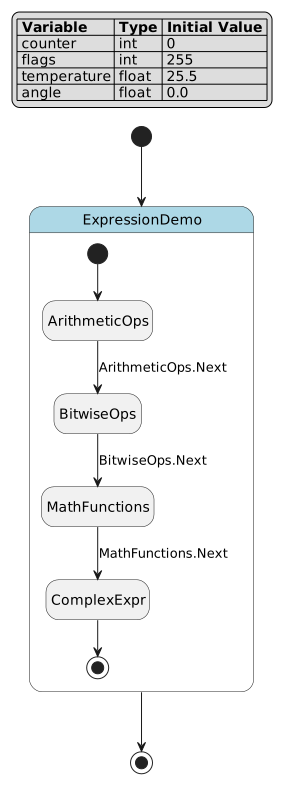
Complete Expression Example
Here’s a comprehensive example demonstrating all expression capabilities:
 1// Expression System Demonstration
 2// This example showcases the comprehensive expression capabilities
 3
 4def int counter = 0;
 5def int flags = 0xFF;
 6def float temperature = 25.5;
 7def float angle = 0.0;
 8
 9state ExpressionDemo {
10    state ArithmeticOps {
11        enter {
12            // Basic arithmetic
13            counter = 10 + 5 * 2;           // Result: 20 (precedence)
14            counter = (10 + 5) * 2;         // Result: 30 (parentheses)
15            counter = 2 ** 3;               // Result: 8 (power)
16            counter = 17 % 5;               // Result: 2 (modulo)
17        }
18    }
19
20    state BitwiseOps {
21        enter {
22            // Bitwise operations
23            flags = 0xFF & 0x0F;            // Result: 0x0F (AND)
24            flags = 0xF0 | 0x0F;            // Result: 0xFF (OR)
25            flags = 0xFF ^ 0x0F;            // Result: 0xF0 (XOR)
26            flags = 0x01 << 4;              // Result: 0x10 (left shift)
27            flags = 0x80 >> 2;              // Result: 0x20 (right shift)
28        }
29    }
30
31    state MathFunctions {
32        enter {
33            // Trigonometric functions
34            temperature = sin(angle) * 100.0;
35            temperature = cos(angle) + 1.0;
36            temperature = tan(angle);
37
38            // Other math functions
39            temperature = sqrt(16.0);        // Result: 4.0
40            temperature = abs(-5.5);         // Result: 5.5
41            temperature = ceil(3.2);         // Result: 4.0
42            temperature = floor(3.8);        // Result: 3.0
43            temperature = round(3.5);        // Result: 4.0
44        }
45    }
46
47    state ComplexExpr {
48        enter {
49            // Complex expressions combining multiple operations
50            counter = (10 + 5) * 2 - 3;      // Result: 27
51            flags = (0xFF & 0x0F) | 0x10;    // Result: 0x1F
52            temperature = sqrt(16.0) + 10.0; // Result: 14.0
53        }
54    }
55
56    [*] -> ArithmeticOps;
57    ArithmeticOps -> BitwiseOps :: Next;
58    BitwiseOps -> MathFunctions :: Next;
59    MathFunctions -> ComplexExpr :: Next;
60    ComplexExpr -> [*];
61}
Visualization:
Semantic Rules
Expressions must follow these semantic constraints:
Variable Declarations: All referenced variables must be declared
Type Consistency: Operations must be performed on compatible types
Function Arguments: Mathematical functions require appropriate argument types
Boolean Context: Conditional guards must evaluate to boolean values
Operator Compatibility: Operators must be used with compatible operand types
Why These Rules?
Variable Declarations: Prevents undefined behavior
Type Consistency: Ensures type safety in generated code
Function Arguments: Prevents runtime errors in mathematical operations
Boolean Context: Maintains semantic correctness in control flow
Operator Compatibility: Ensures meaningful operations
Common Errors
Incorrect Usage:
// ERROR: Undefined variable reference
result = unknown_var + 10;  // Semantic error

// ERROR: Type mismatch (mixing incompatible types)
// Note: DSL is dynamically typed, but some operations may fail

// ERROR: Invalid function arguments
result = sqrt(-1);  // May cause runtime error

// ERROR: Malformed conditional (missing parentheses)
result = x > 0 ? 1 : -1;  // Syntax error
Correct Alternative:
// Declare all variables
def int result = 0;
def int known_var = 10;

state Example {
    enter {
        result = known_var + 10;  // Valid
    }
}

// Use appropriate function arguments
def float value = 16.0;
state Example {
    enter {
        result = sqrt(value);  // Valid: positive argument
    }
}

// Use parentheses in conditionals
result = (x > 0) ? 1 : -1;  // Valid
Lifecycle Actions
Note
How Lifecycle Actions Work:
Lifecycle actions define behavior that executes at specific points in a state’s lifetime:
Enter Actions: Execute once when entering a state
During Actions: Execute repeatedly while a state is active
Exit Actions: Execute once when leaving a state
For composite states, lifecycle actions can have aspects (before/after) that control execution order relative to child states.
Action Types
States support three lifecycle phases with corresponding action definitions:
enter_definition ::= enterOperations | enterAbstractFunc | enterRefFunc
during_definition ::= duringOperations | duringAbstractFunc
exit_definition ::= exitOperations | exitAbstractFunc | exitRefFunc

enterOperations ::= 'enter' [ID] '{' operation* '}'
enterAbstractFunc ::= 'enter' 'abstract' ID [MULTILINE_COMMENT]
enterRefFunc ::= 'enter' [ID] 'ref' chain_id

duringOperations ::= 'during' ['before'|'after'] [ID] '{' operation* '}'
duringAbstractFunc ::= 'during' ['before'|'after'] 'abstract' ID [MULTILINE_COMMENT]

exitOperations ::= 'exit' [ID] '{' operation* '}'
exitAbstractFunc ::= 'exit' 'abstract' ID [MULTILINE_COMMENT]
exitRefFunc ::= 'exit' [ID] 'ref' chain_id
Enter Actions
Enter actions execute when a state is entered from outside.
Concrete Operations:
state Active {
    // Simple enter action
    enter {
        counter = 0;
        status_flag = 0x1;
    }

    // Named enter action (for reference)
    enter InitializeSystem {
        counter = 0;
        flags = 0xFF;
        temperature = 25.0;
    }
}
Abstract Functions:
Abstract enter actions declare functions that must be implemented in generated code:
state Active {
    // Simple abstract enter
    enter abstract initialize_system;

    // Abstract enter with documentation
    enter abstract setup_resources /*
        Initialize system resources and peripherals.
        This function must allocate memory, open files,
        and configure hardware interfaces.
        TODO: Implement in generated code framework
    */
}
Reference Actions:
Reference actions reuse enter actions from other states:
state BaseState {
    enter CommonInit {
        counter = 0;
        flags = 0xFF;
    }
}

state DerivedState {
    // Reuse BaseState's enter action
    enter ref BaseState.CommonInit;

    // Can also reference global actions
    enter ref /GlobalInit;
}
Important
ref is an action reuse mechanism, not a state reference and not an event reference.
It resolves to a previously named lifecycle action under a state scope. The target may be a
named enter, during, exit, or >> during action, including an abstract action.
Relative paths are resolved from the current state path, while / starts from the root state.
Tip
Use ref when several states should share the same lifecycle behavior and you want one source
of truth for that action body or abstract hook. Prefer absolute paths for cross-state reuse to
avoid ambiguity. Use abstract instead when the action is only a contract to be implemented in
generated code rather than a reuse of an existing named action.
During Actions
During actions execute while a state is active. The behavior differs between leaf and composite states.
Leaf State During Actions:
Leaf states use plain during without aspect keywords:
state Running {
    // Executes every cycle while Running is active
    during {
        heartbeat_counter = heartbeat_counter + 1;
        temperature = temperature + 0.1;
    }
}
Composite State During Actions:
Composite states MUST use before or after aspects:
state Parent {
    // Executes when entering a child from outside
    // NOT during child-to-child transitions
    during before {
        monitor_counter = monitor_counter + 1;
    }

    // Executes when exiting to outside from a child
    // NOT during child-to-child transitions
    during after {
        cleanup_flag = 1;
    }

    state Child1;
    state Child2;

    [*] -> Child1;
    Child1 -> Child2 :: Switch;  // during before/after NOT triggered
    Child2 -> [*];
}
Abstract During Actions:
state Processing {
    // Leaf state abstract during
    during abstract process_data;

    // With documentation
    during abstract process_data /*
        Process incoming data packets.
        TODO: Implement data processing logic
    */
}

state Container {
    // Composite state abstract during with aspect
    during before abstract pre_process /*
        Pre-processing before child state execution.
        TODO: Implement pre-processing logic
    */

    during after abstract post_process;

    state Child;
    [*] -> Child;
}
Exit Actions
Exit actions execute when leaving a state to outside.
Concrete Operations:
state Active {
    exit {
        save_state = current_value;
        cleanup_flag = 0x1;
        status = 0;
    }

    // Named exit action
    exit CleanupResources {
        flags = 0x00;
        counter = 0;
    }
}
Abstract Functions:
state Active {
    exit abstract cleanup_resources;

    exit abstract finalize_operations /*
        Clean up resources before exit.
        Release memory, close files, and shutdown hardware.
        TODO: Implement in generated code framework
    */
}
Reference Actions:
state BaseState {
    exit CommonCleanup {
        cleanup_flag = 1;
        counter = 0;
    }
}

state DerivedState {
    exit ref BaseState.CommonCleanup;
}
Aspect Actions
Aspect actions apply to all descendant leaf states using the >> prefix.
Syntax:
state Root {
    // Executes before EVERY descendant leaf state's during action
    >> during before {
        global_counter = global_counter + 1;
    }

    // Executes after EVERY descendant leaf state's during action
    >> during after {
        global_counter = global_counter + 100;
    }

    state Child {
        state GrandChild {
            during {
                local_counter = local_counter + 10;
            }
        }

        [*] -> GrandChild;
    }

    [*] -> Child;
}
Execution Order for GrandChild:
Root >> during before(global_counter += 1)GrandChild.during(local_counter += 10)Root >> during after(global_counter += 100)
Hierarchical Execution Order
Understanding execution order in hierarchical state machines is crucial. Here’s a complete example:
 1// Hierarchical Execution Order Example
 2// This example demonstrates how aspect actions execute in hierarchical state machines
 3
 4def int execution_log = 0;
 5
 6state HierarchyDemo {
 7    // Root-level aspect actions apply to ALL descendant leaf states
 8    >> during before {
 9        execution_log = execution_log + 1000;  // Step 1: Root aspect before
10    }
11
12    >> during after {
13        execution_log = execution_log + 9000;  // Step 5: Root aspect after
14    }
15
16    state Parent {
17        // Composite state's during before/after execute ONLY on entry/exit
18        // NOT during child-to-child transitions!
19        during before {
20            execution_log = execution_log + 100;  // Only on [*] -> Child entry
21        }
22
23        during after {
24            execution_log = execution_log + 900;  // Only on Child -> [*] exit
25        }
26
27        // Parent-level aspect actions also apply to all descendant leaf states
28        >> during before {
29            execution_log = execution_log + 10;  // Step 2: Parent aspect before
30        }
31
32        >> during after {
33            execution_log = execution_log + 90;  // Step 4: Parent aspect after
34        }
35
36        state ChildA {
37            // Leaf state's during action
38            during {
39                execution_log = execution_log + 1;  // Step 3: Leaf during
40            }
41        }
42
43        state ChildB {
44            during {
45                execution_log = execution_log + 2;
46            }
47        }
48
49        [*] -> ChildA;
50        ChildA -> ChildB :: Switch;  // during before/after NOT triggered
51        ChildB -> [*] :: Exit;
52    }
53
54    [*] -> Parent;
55    Parent -> [*];
56}
Visualization:
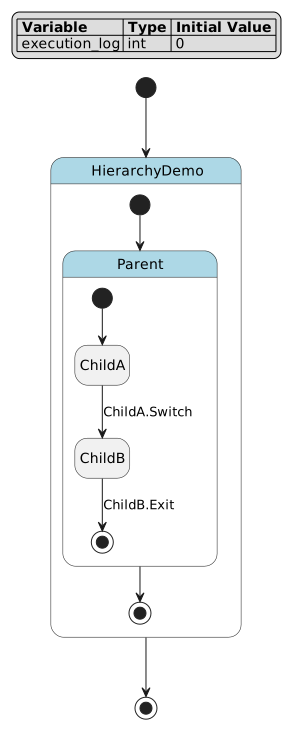
Important
Execution Scenarios:
Scenario 1: Initial Entry (HierarchyDemo -> Parent -> ChildA)
HierarchyDemo.enter(if defined)Parent.enter(if defined)Parent.during beforeexecutes (execution_log += 100)ChildA.enter(if defined)
Scenario 2: During Phase (while ChildA is active, each cycle)
HierarchyDemo >> during before(execution_log += 1000)Parent >> during before(execution_log += 10)ChildA.during(execution_log += 1)Parent >> during after(execution_log += 90)HierarchyDemo >> during after(execution_log += 9000)
Total per cycle: 10101
Scenario 3: Child-to-Child Transition (ChildA -> ChildB :: Switch)
ChildA.exit(if defined)Transition effect (if any)
ChildB.enter(if defined)
CRITICAL: Parent.during before/after are NOT executed!
Scenario 4: Exit from Composite State (ChildB -> [*] :: Exit)
ChildB.exit(if defined)Parent.during afterexecutes (execution_log += 900)Parent.exit(if defined)HierarchyDemo.exit(if defined)
Lifecycle Flow Diagrams:
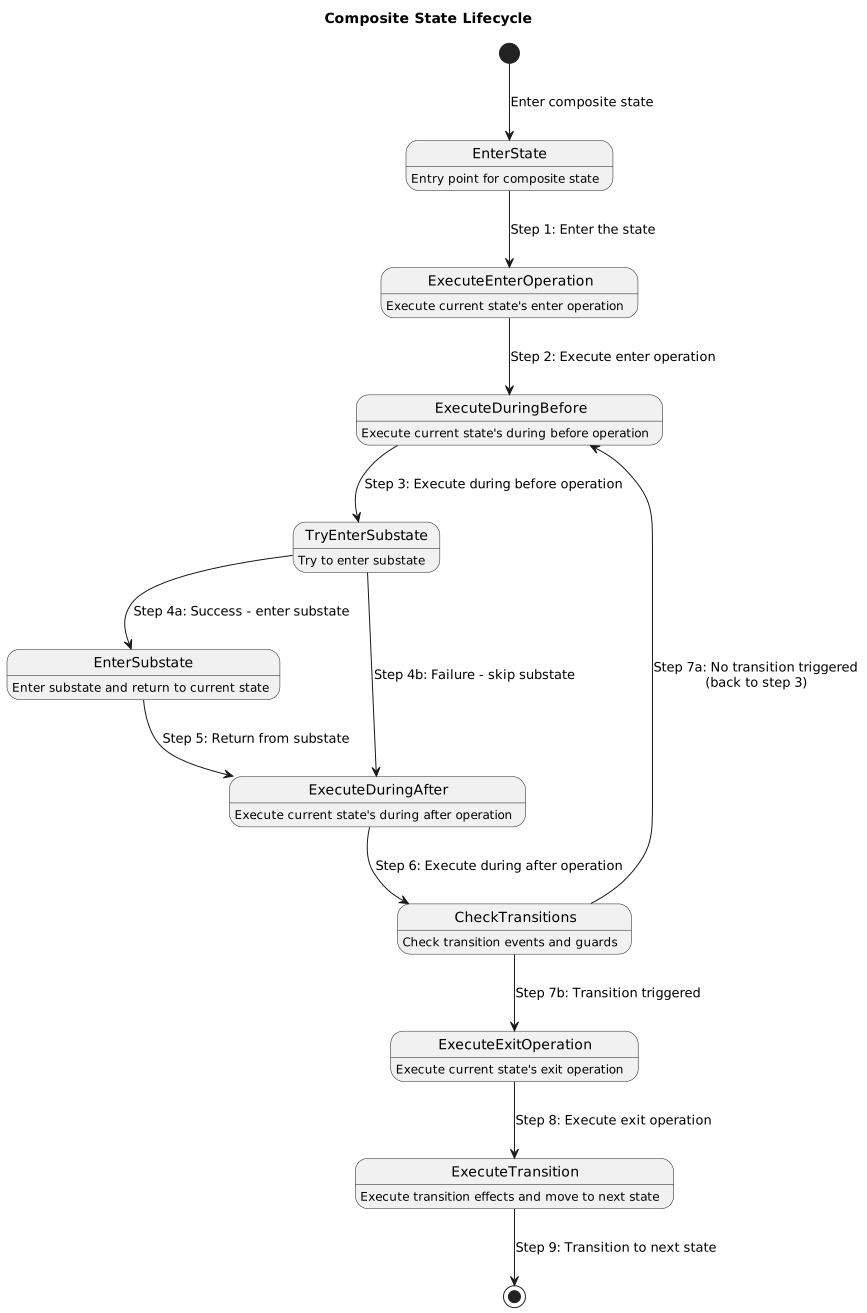
|
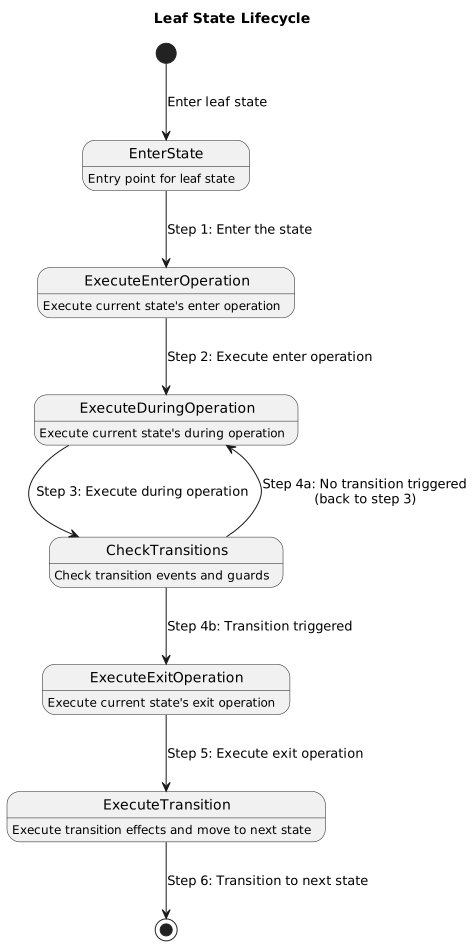
|
Abstract and Reference Actions Example
Here’s a complete example demonstrating abstract functions and action references:
 1// Abstract and Reference Actions Example
 2// This example demonstrates abstract function declarations and action references
 3
 4def int init_flag = 0;
 5def int cleanup_flag = 0;
 6
 7state AbstractReferenceDemo {
 8    // Root-level abstract functions that can be referenced
 9    enter abstract GlobalInit /*
10        Global initialization function.
11        TODO: Implement in generated code framework
12    */
13
14    exit abstract GlobalCleanup /*
15        Global cleanup function.
16        TODO: Implement in generated code framework
17    */
18
19    state BaseState {
20        // Abstract actions - must be implemented in generated code
21        enter abstract HardwareInit /*
22            Initialize hardware peripherals and sensors.
23            This function must be implemented in the target platform.
24            TODO: Implement in generated code framework
25        */
26
27        enter {
28            init_flag = 1;
29            cleanup_flag = 0;
30        }
31
32        exit abstract HardwareCleanup /*
33            Clean up hardware resources before exit.
34            TODO: Implement in generated code framework
35        */
36
37        exit {
38            cleanup_flag = 1;
39            init_flag = 0;
40        }
41    }
42
43    state DerivedState1 {
44        // Reference global abstract functions
45        enter ref /GlobalInit;
46        exit ref /GlobalCleanup;
47
48        // Can also have its own abstract actions
49        during abstract ProcessData /*
50            Process sensor data in DerivedState1.
51            TODO: Implement in generated code framework
52        */
53    }
54
55    state DerivedState2 {
56        // Can reference the same global functions
57        enter ref /GlobalInit;
58        exit ref /GlobalCleanup;
59
60        during abstract ProcessData /*
61            Process sensor data in DerivedState2.
62            Different implementation from DerivedState1.
63            TODO: Implement in generated code framework
64        */
65    }
66
67    [*] -> BaseState;
68    BaseState -> DerivedState1 :: Start;
69    DerivedState1 -> DerivedState2 :: Switch;
70    DerivedState2 -> [*];
71}
Visualization:
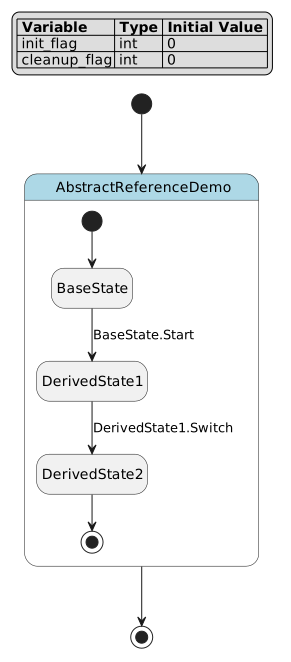
Semantic Rules
Lifecycle actions must adhere to these constraints:
Variable Validity: All referenced variables must be declared
Aspect Restrictions:
beforeandafteraspects only apply to composite statesAssignment Targets: Only declared variables can be assigned values
Expression Types: Assignment expressions must be type-compatible
Reference Validity: Referenced actions must exist in the specified state
Tip
Why These Rules?
Variable Validity: Prevents undefined behavior
Aspect Restrictions: Enforces correct lifecycle semantics
Assignment Targets: Ensures all assignments are valid
Expression Types: Maintains type safety
Reference Validity: Prevents dangling references
Common Errors
Warning
Incorrect Usage:
// ERROR: Undefined variable in action
state Example {
    enter {
        undefined_var = 10;  // Semantic error
    }
}

// ERROR: Aspect on leaf state
state LeafState {
    during before {  // Semantic error: leaf states can't have aspects
        x = 1;
    }
}

// ERROR: Plain during on composite state
state CompositeState {
    state Child;
    [*] -> Child;

    during {  // Semantic error: composite states need before/after
        x = 1;
    }
}

// ERROR: Invalid reference
state Example {
    enter ref NonExistentState.Action;  // Semantic error
}
Correct Alternative:
// Declare all variables
def int result = 0;

state Example {
    enter {
        result = 10;  // Valid
    }
}

// Use plain during for leaf states
state LeafState {
    during {  // Correct
        result = 1;
    }
}

// Use aspects for composite states
state CompositeState {
    state Child;
    [*] -> Child;

    during before {  // Correct
        result = 1;
    }
}

// Reference existing actions
state BaseState {
    enter CommonInit {
        result = 0;
    }
}

state DerivedState {
    enter ref BaseState.CommonInit;  // Valid
}
Real-World Example: Smart Thermostat
To demonstrate all DSL features in a realistic context, here’s a comprehensive smart thermostat controller implementation:
  1// Real-World Example: Smart Thermostat Controller
  2// This comprehensive example demonstrates a realistic state machine
  3// for a smart thermostat with multiple operational modes
  4
  5// System variables
  6def int current_temp = 20;          // Current temperature in Celsius
  7def int target_temp = 22;           // Target temperature
  8def int heating_power = 0;          // Heating power level (0-100)
  9def int cooling_power = 0;          // Cooling power level (0-100)
 10def int fan_speed = 0;              // Fan speed (0-3)
 11def int error_code = 0;             // Error code for diagnostics
 12def int runtime_hours = 0;          // Total runtime in hours
 13def int maintenance_counter = 0;    // Maintenance cycle counter
 14
 15state ThermostatController {
 16    // Global aspect actions for monitoring and logging
 17    >> during before abstract LogSystemState /*
 18        Log current system state for diagnostics.
 19        Called before every state's during action.
 20        TODO: Implement logging mechanism
 21    */
 22
 23    >> during after abstract UpdateDisplay /*
 24        Update user interface display.
 25        Called after every state's during action.
 26        TODO: Implement display update
 27    */
 28
 29    state Initializing {
 30        enter {
 31            // Reset all system variables
 32            heating_power = 0;
 33            cooling_power = 0;
 34            fan_speed = 0;
 35            error_code = 0;
 36        }
 37
 38        enter abstract SystemSelfTest /*
 39            Perform hardware self-test on startup.
 40            Check sensors, actuators, and communication.
 41            TODO: Implement self-test procedure
 42        */
 43
 44        exit {
 45            maintenance_counter = 0;
 46        }
 47    }
 48
 49    state OperationalMode {
 50        // Composite state lifecycle actions
 51        during before {
 52            // Executed when entering from Initializing
 53            runtime_hours = runtime_hours + 1;
 54        }
 55
 56        during after {
 57            // Executed when exiting to Maintenance or Error
 58            fan_speed = 0;
 59        }
 60
 61        state Idle {
 62            enter {
 63                heating_power = 0;
 64                cooling_power = 0;
 65                fan_speed = 1;  // Low fan for circulation
 66            }
 67
 68            during {
 69                maintenance_counter = maintenance_counter + 1;
 70            }
 71        }
 72
 73        state Heating {
 74            enter {
 75                cooling_power = 0;
 76                fan_speed = 2;
 77            }
 78
 79            during {
 80                // Proportional heating control
 81                heating_power = (target_temp - current_temp) * 10;
 82                maintenance_counter = maintenance_counter + 1;
 83            }
 84
 85            exit {
 86                heating_power = 0;
 87            }
 88        }
 89
 90        state Cooling {
 91            enter {
 92                heating_power = 0;
 93                fan_speed = 3;
 94            }
 95
 96            during {
 97                // Proportional cooling control
 98                cooling_power = (current_temp - target_temp) * 10;
 99                maintenance_counter = maintenance_counter + 1;
100            }
101
102            exit {
103                cooling_power = 0;
104            }
105        }
106
107        state AutoMode {
108            // Automatic mode with intelligent switching
109            during before abstract AnalyzeEnvironment /*
110                Analyze environmental conditions.
111                TODO: Implement environment analysis
112            */
113
114            state AutoHeating {
115                during {
116                    heating_power = (target_temp - current_temp) * 10;
117                }
118            }
119
120            state AutoCooling {
121                during {
122                    cooling_power = (current_temp - target_temp) * 10;
123                }
124            }
125
126            state AutoIdle {
127                during {
128                    heating_power = 0;
129                    cooling_power = 0;
130                }
131            }
132
133            [*] -> AutoIdle;
134
135            // Automatic transitions based on temperature
136            AutoIdle -> AutoHeating : if [current_temp < target_temp - 2];
137            AutoIdle -> AutoCooling : if [current_temp > target_temp + 2];
138            AutoHeating -> AutoIdle : if [current_temp >= target_temp];
139            AutoCooling -> AutoIdle : if [current_temp <= target_temp];
140        }
141
142        [*] -> Idle;
143
144        // Mode transitions with guards
145        Idle -> Heating : if [current_temp < target_temp - 1] effect {
146            fan_speed = 2;
147        };
148
149        Idle -> Cooling : if [current_temp > target_temp + 1] effect {
150            fan_speed = 3;
151        };
152
153        Heating -> Idle : if [current_temp >= target_temp] effect {
154            fan_speed = 1;
155        };
156
157        Cooling -> Idle : if [current_temp <= target_temp] effect {
158            fan_speed = 1;
159        };
160
161        // Switch to auto mode
162        Idle -> AutoMode :: EnableAuto;
163        Heating -> AutoMode :: EnableAuto;
164        Cooling -> AutoMode :: EnableAuto;
165
166        // Exit auto mode
167        AutoMode -> Idle :: DisableAuto effect {
168            heating_power = 0;
169            cooling_power = 0;
170        };
171
172        // Emergency transitions
173        Heating -> Idle : if [heating_power > 100] effect {
174            error_code = 1;
175        };
176
177        Cooling -> Idle : if [cooling_power > 100] effect {
178            error_code = 2;
179        };
180    }
181
182    state Maintenance {
183        enter {
184            // Safe state for maintenance
185            heating_power = 0;
186            cooling_power = 0;
187            fan_speed = 0;
188        }
189
190        enter abstract EnterMaintenanceMode /*
191            Prepare system for maintenance.
192            Lock out user controls and disable actuators.
193            TODO: Implement maintenance mode entry
194        */
195
196        exit abstract ExitMaintenanceMode /*
197            Exit maintenance mode and restore normal operation.
198            TODO: Implement maintenance mode exit
199        */
200    }
201
202    state ErrorState {
203        enter {
204            // Emergency shutdown
205            heating_power = 0;
206            cooling_power = 0;
207            fan_speed = 0;
208        }
209
210        enter abstract LogError /*
211            Log error details for diagnostics.
212            TODO: Implement error logging
213        */
214
215        during abstract DiagnoseError /*
216            Attempt to diagnose and recover from error.
217            TODO: Implement error diagnosis
218        */
219    }
220
221    // Initial transition
222    [*] -> Initializing;
223
224    // Normal operation flow
225    Initializing -> OperationalMode : if [error_code == 0];
226
227    // Maintenance transitions
228    OperationalMode -> Maintenance :: MaintenanceRequest;
229    Maintenance -> OperationalMode :: MaintenanceComplete;
230
231    // Error handling
232    Initializing -> ErrorState : if [error_code != 0];
233    OperationalMode -> ErrorState : if [error_code != 0];
234    ErrorState -> Initializing :: Reset effect {
235        error_code = 0;
236    };
237
238    // Scheduled maintenance
239    OperationalMode -> Maintenance : if [maintenance_counter > 1000] effect {
240        maintenance_counter = 0;
241    };
242
243    // Shutdown
244    OperationalMode -> [*] :: Shutdown;
245    Maintenance -> [*] :: Shutdown;
246    ErrorState -> [*] :: ForcedShutdown;
247}
Visualization:
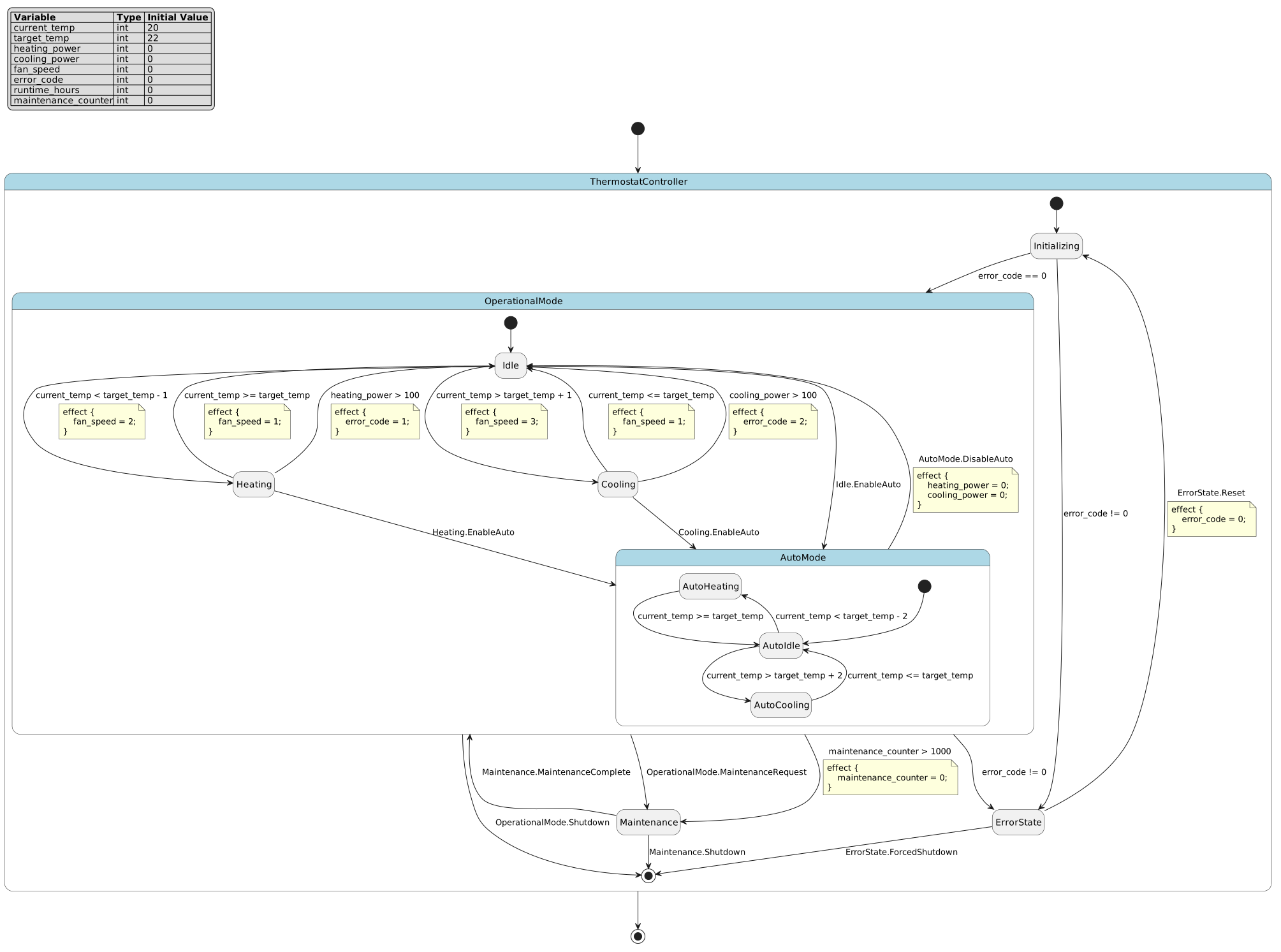
Tip
Key Design Patterns Demonstrated:
Hierarchical Decomposition:
OperationalModecontains multiple sub-modes (Idle, Heating, Cooling, AutoMode)Aspect-Oriented Programming: Global
>> during before/afterfor logging and display updatesProportional Control: Heating/cooling power calculated based on temperature difference
Automatic Mode Switching:
AutoModeintelligently switches between heating, cooling, and idleError Handling: Transitions to
ErrorStateon abnormal conditionsMaintenance Scheduling: Automatic transition to maintenance after 1000 cycles
Abstract Functions: Hardware-specific operations declared as abstract for platform implementation
Execution Flow Example:
Starting from Initializing:
System performs self-test (abstract function)
If
error_code == 0, transitions toOperationalMode.IdleOperationalMode.during beforeexecutes (incrementsruntime_hours)While in
Idle: - Global>> during beforelogs system state -Idle.duringincrementsmaintenance_counter- Global>> during afterupdates displayIf
current_temp < target_temp - 1, transitions toHeatingWhile in
Heating: -Heating.duringcalculates proportional heating power - Ifcurrent_temp >= target_temp, transitions back toIdleAfter 1000 cycles, transitions to
Maintenance
Documentation Best Practices
Variable Documentation:
// System state variables
def int system_state = 0;         // 0=init, 1=running, 2=error
def int error_count = 0;          // Number of errors since startup

// Sensor readings (in SI units)
def float temperature = 20.0;     // Temperature in Celsius
def float pressure = 101.325;     // Pressure in kPa

// Control outputs (0-100 range)
def int heating_power = 0;        // Heating power percentage
def int cooling_power = 0;        // Cooling power percentage
State Documentation:
state System {
    // Initialization phase - runs once at startup
    state Initializing {
        enter {
            // Reset all system variables to safe defaults
            error_count = 0;
            system_state = 0;
        }
    }

    // Normal operation - main system loop
    state Running {
        // Active processing state
        state Active {
            during {
                // Increment heartbeat counter for watchdog
                heartbeat = heartbeat + 1;
            }
        }

        // Idle state - low power mode
        state Idle;

        [*] -> Active;
    }

    [*] -> Initializing;
    Initializing -> Running : if [error_count == 0];
}
Transition Documentation:
// Transition to low power mode when battery is low
// and no critical tasks are active
Normal -> LowPower : if [
    (battery_level < 30) &&
    (charging_state == 0) &&
    (critical_task_active == 0)
] effect {
    // Reduce system clock frequency
    clock_divider = 8;
    // Disable non-essential peripherals
    peripheral_enable = 0x01;
};
Semantic Validation Rules
Comprehensive Validation
The DSL parser performs extensive semantic validation during the parsing process:
Variable Validation:
Unique variable names across the program
All referenced variables must be declared
Type consistency in assignments and expressions
Valid initialization expressions
State Validation:
Unique state names within each scope
Valid state references in all transitions
Required entry transitions for composite states
Proper hierarchical nesting
Expression Validation:
Well-formed mathematical and logical expressions
Valid function calls with appropriate arguments
Proper operator precedence and associativity
Type compatibility in operations
Structural Validation:
Proper nesting of composite states
Valid lifecycle action placement
Correct transition connectivity
Aspect action restrictions
Error Handling
The parser provides detailed error messages for common mistakes:
Syntax Errors:
Malformed expressions and statements
Missing punctuation and keywords
Invalid token sequences
Incorrect operator usage
Semantic Errors:
Undefined variable or state references
Type mismatches in operations
Structural inconsistencies
Invalid lifecycle action placement
Example Error Messages:
Error: Undefined variable 'unknown_var' at line 15
Error: Duplicate state name 'Active' in scope 'System' at line 23
Error: Missing entry transition for composite state 'Container' at line 45
Error: Invalid aspect 'before' on leaf state 'Running' at line 67
Summary
This tutorial has covered the complete PyFCSTM DSL syntax, including:
Variable Definitions: Typed variables with initialization expressions
State Definitions: Leaf states, composite states, pseudo states, and named states
Transitions: Entry, normal, exit, and forced transitions with guards and effects
Forced Transitions: Syntactic sugar that expands to multiple normal transitions with shared events
Event Scoping: Three mechanisms - local events (
::), chain events (:), and absolute events (/)Event Namespaces: Understanding how events are resolved in hierarchical state machines
Expressions: Comprehensive operator support and mathematical functions
Lifecycle Actions: Enter, during, and exit actions with aspect-oriented programming
Hierarchical Execution: Execution order in nested states with composite and leaf states
Abstract Functions: Declaring platform-specific implementations
Reference Actions: Reusing actions across states
Comments: Line and block comments for documentation
Important
Key Concepts:
Hierarchical State Machines: States can contain nested substates, enabling modular design
Aspect-Oriented Programming:
>> during before/afteractions apply to all descendant leaf statesComposite State Lifecycle:
during before/afterexecute only on entry/exit, not during child-to-child transitionsEvent Namespacing: Three scoping mechanisms (
::for local,:for chain,/for absolute)Event Resolution: All event scoping mechanisms are equivalent to absolute paths with different starting points
Semantic Validation: Comprehensive validation ensures correct state machine definitions
See also
Additional Resources:
Grammar definition:
pyfcstm/dsl/grammar/Grammar.g4Parser implementation:
pyfcstm/dsl/parse.pyModel system:
pyfcstm/model/model.pyTest suite:
test/testfile/sample_codes/
For implementation details, refer to the grammar definition, parsing pipeline, and model system documentation. The test suite provides additional examples and validation patterns for complex use cases.
Comment Styles
The DSL supports multiple comment formats for documentation:
Line Comments:
Block Comments:
Abstract Function Documentation: