PyFCSTM Command Line Interface Guide
pyfcstm is a powerful state machine DSL tool that provides a command-line interface for parsing, visualizing, and generating code from hierarchical finite state machines.
The most common documentation-facing commands are:
pyfcstm plantuml: Generate raw PlantUML textpyfcstm visualize: Render a final diagram file directlypyfcstm generate: Generate source code from templates
Installation
Installation Methods
1. pip Installation (Recommended):
pip install pyfcstm
After installation, you can use the pyfcstm command directly.
2. Module Execution:
python -m pyfcstm
3. Pre-compiled Executable:
Download pre-compiled versions from GitHub Releases: https://github.com/HansBug/pyfcstm/releases
Verifying Installation
Check the installed version:
#!/bin/bash

# Check pyfcstm version
pyfcstm --version
Output:
Pyfcstm, version 0.3.0.
Developed by HansBug (hansbug@buaa.edu.cn).
Getting Help
The CLI provides comprehensive help for all commands:
#!/bin/bash

# Show main help
echo "=== Main Help ==="
pyfcstm --help

echo ""
echo "=== PlantUML Command Help ==="
pyfcstm plantuml --help

echo ""
echo "=== Generate Command Help ==="
pyfcstm generate --help
This will show:
=== Main Help ===
Usage: pyfcstm [OPTIONS] COMMAND [ARGS]...

  A Python framework for parsing finite state machine DSL and generating
  executable code in multiple target languages.

Options:
  -v, --version  Show pyfcstm's version information.
  -h, --help     Show this message and exit.

Commands:
  generate   Generate code with template of a given state machine DSL code.
  plantuml   Create Plantuml code of a given state machine DSL code.
  simulate   Interactive state machine simulator
  visualize  Render a state machine DSL file into a diagram and...

=== PlantUML Command Help ===
Usage: pyfcstm plantuml [OPTIONS]

  Create Plantuml code of a given state machine DSL code.

Options:
  -i, --input-code TEXT           Input code file of state machine DSL.
                                  [required]
  -o, --output TEXT               Output file for PlantUML code, output to
                                  stdout when not assigned.
  -l, --level [minimal|normal|full]
                                  Detail level preset (minimal/normal/full).
                                  Default: normal.
  -c, --config TEXT               Configuration options in key=value format.
                                  Can be specified multiple times. Example: -c
                                  show_events=true -c max_depth=2
  -h, --help                      Show this message and exit.

=== Generate Command Help ===
Usage: pyfcstm generate [OPTIONS]

  Generate code with template of a given state machine DSL code.

Options:
  -i, --input-code TEXT         Input code file of state machine DSL.
                                [required]
  -t, --template-dir TEXT       Template directory of the code generation.
  --template [c|c_poll|python]  Built-in template name of the code generation.
  -o, --output-dir TEXT         Output directory of the code generation.
                                [required]
  --clear, --clear-directory    Clear the destination directory of the output
                                directory.
  -h, --help                    Show this message and exit.
Command Reference
plantuml Command
Convert state machine DSL code to PlantUML format for visualization.
Syntax:
pyfcstm plantuml -i <input_file> [-o <output_file>]
Parameters:
-i, --input-code: Path to input state machine DSL file (required)-o, --output: Path to output PlantUML file (optional, outputs to stdout if not specified)
Example 1: Simple State Machine
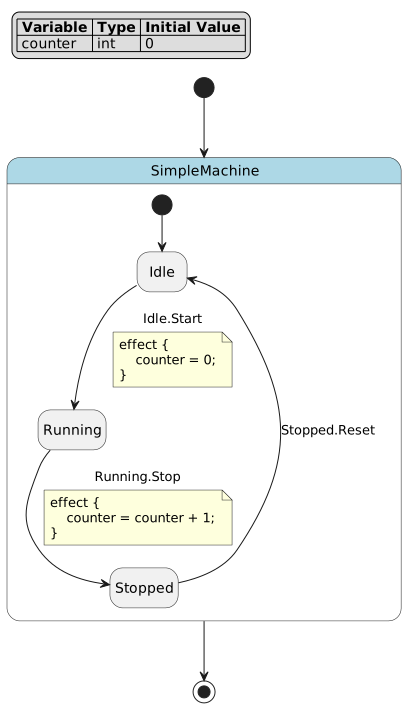
Let’s start with a simple state machine:
def int counter = 0;

state SimpleMachine {
    state Idle;
    state Running;
    state Stopped;

    [*] -> Idle;

    Idle -> Running :: Start effect {
        counter = 0;
    };

    Running -> Stopped :: Stop effect {
        counter = counter + 1;
    };

    Stopped -> Idle :: Reset;
}
Generate PlantUML diagram:
pyfcstm plantuml -i simple_machine.fcstm -o simple_machine.puml
The generated PlantUML file can be rendered using:
Online: Visit https://www.plantuml.com/plantuml/uml/ and paste the code
Local: Install PlantUML (https://plantuml.com/) and run:
plantuml simple_machine.puml
Generated State Diagram:
Example 2: File Download Manager
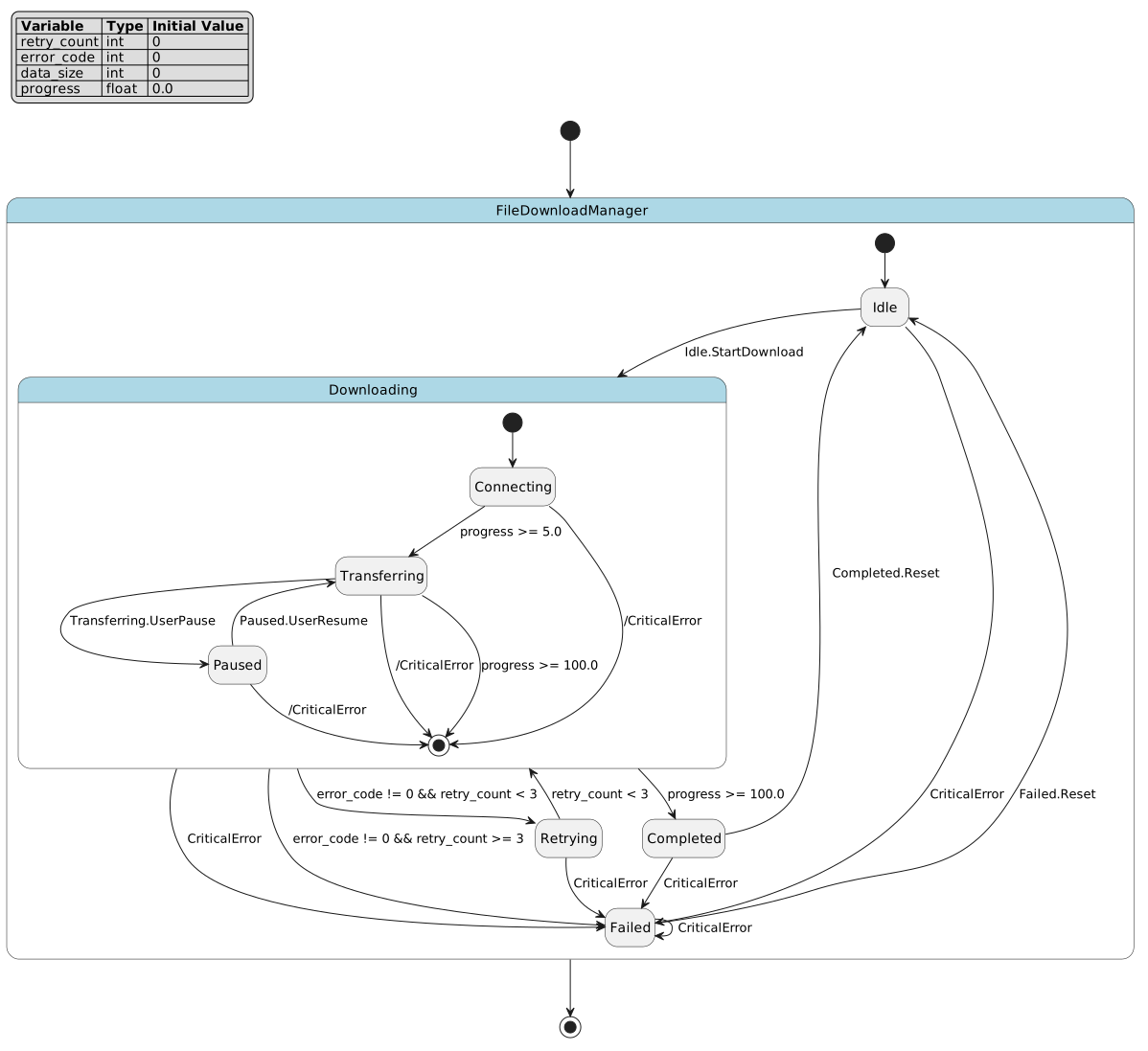
Here’s a more complex example with hierarchical states, retry logic, and error handling:
def int retry_count = 0;
def int error_code = 0;
def int data_size = 0;
def float progress = 0.0;

state FileDownloadManager {
    state Idle {
        enter {
            retry_count = 0;
            error_code = 0;
            data_size = 0;
            progress = 0.0;
        }
    }

    state Downloading {
        state Connecting {
            enter {
                progress = 0.0;
            }

            during {
                progress = progress + 0.1;
            }
        }

        state Transferring {
            during {
                data_size = data_size + 1024;
                progress = progress + 1.0;
            }
        }

        state Paused {
            enter {
                error_code = 0;
            }
        }

        [*] -> Connecting;
        Connecting -> Transferring : if [progress >= 5.0];
        Transferring -> Paused :: UserPause;
        Paused -> Transferring :: UserResume;
        Transferring -> [*] : if [progress >= 100.0];
    }

    state Retrying {
        enter {
            retry_count = retry_count + 1;
            error_code = 0;
        }
    }

    state Completed {
        enter {
            progress = 100.0;
        }
    }

    state Failed {
        enter {
            error_code = 1;
        }
    }

    [*] -> Idle;
    Idle -> Downloading :: StartDownload;

    Downloading -> Retrying : if [error_code != 0 && retry_count < 3];
    Downloading -> Failed : if [error_code != 0 && retry_count >= 3];

    Retrying -> Downloading : if [retry_count < 3];
    Downloading -> Completed : if [progress >= 100.0];

    Completed -> Idle :: Reset;
    Failed -> Idle :: Reset;

    !* -> Failed :: CriticalError;
}
This example demonstrates:
Hierarchical states:
Downloadingcontains nested substates (Connecting,Transferring,Paused)Retry logic: Automatic retry with counter tracking when errors occur
Guard conditions:
Downloading -> Retrying : if [error_code != 0 && retry_count < 3]with complex conditional logicLifecycle actions:
enterandduringactions for state initialization and continuous processingForced transitions:
!* -> Failed :: CriticalErrorcreates emergency exit paths from all substatesProgress tracking: Variables track download progress, data size, and error states
Generate the diagram:
pyfcstm plantuml -i file_download.fcstm -o file_download.puml
Generated State Diagram:
Output to Console
You can also output PlantUML directly to the console for quick inspection:
pyfcstm plantuml -i simple_machine.fcstm
This is useful for:
Quick verification of DSL syntax
Piping output to other tools
Integration with CI/CD pipelines
visualize Command
Render a state machine DSL file directly into a final diagram file and optionally open it with the system default viewer.
Compared with plantuml:
pyfcstm plantumlemits PlantUML source text and is better when you want to inspect, version, or post-process the.pumloutputpyfcstm visualizerenders the final artifact directly throughplantumlcliand is better for local preview or quick export to images and PDF
Syntax:
pyfcstm visualize -i <input_file> [-o <output_file>] [-t png|svg|pdf] \
  [--renderer auto|local|remote] [--open/--no-open] [--check]
Parameters:
-i, --input-code: Path to input state machine DSL file (required unless--checkis used)-o, --output: Rendered diagram output path (optional, uses a cache directory when omitted)-l, --level: PlantUML detail preset shared withplantuml(minimal/normal/full)-c, --config: PlantUML option overrides inkey=valueformat, can be specified multiple times-t, --type: Rendered output type, one ofpng,svg, orpdf--renderer: Backend selection, one ofauto,local, orremote--check: Check backend availability and exit without rendering--open/--no-open: Enable or disable automatic opening after rendering--strict-open: Treat viewer launch failure as an error-j, --java: Java executable path for the local renderer-p, --plantuml-jar: PlantUML jar path for the local renderer, also readable fromPLANTUML_JAR-r, --remote-host: Remote PlantUML service host, also readable fromPLANTUML_HOST
Examples:
# Render a PNG and let pyfcstm open it when GUI is available
pyfcstm visualize -i simple_machine.fcstm

# Export an SVG file without opening a viewer
pyfcstm visualize -i simple_machine.fcstm -t svg -o simple_machine.svg --no-open

# Check whether local or remote backends are available
pyfcstm visualize --check --renderer auto
Renderer behavior
autotries the local PlantUML backend first and falls back to the remote backendlocaluses Java plus a PlantUML jar fileremoteuses a PlantUML server, which is useful on machines without Java
If the process runs in a headless environment such as CI, rendering still works but automatic viewer launch is skipped.
visualize reuses the same -l/--level and -c/--config PlantUML output configuration as plantuml. For the full option reference and rendered examples, see FCSTM Visualization Guide.
generate Command
Generate executable code from state machine DSL using customizable templates.
Syntax:
pyfcstm generate -i <input_file> -t <template_dir> -o <output_dir> [--clear]
Parameters:
-i, --input-code: Path to input state machine DSL file (required)-t, --template-dir: Path to template directory (required)-o, --output-dir: Output directory for generated code (required)--clear: Clear output directory before generation (optional)
How It Works
The generate command uses a template-based code generation system:
Parse DSL: Reads and parses the
.fcstmfile into an internal modelLoad Templates: Reads Jinja2 templates from the template directory
Render Code: Processes templates with the state machine model as context
Output Files: Writes generated code to the output directory
Template Structure
A template directory must contain:
config.yaml: Configuration file defining expression styles, filters, and globals*.j2: Jinja2 template files for code generationStatic files: Copied directly to output (preserve directory structure)
Example: Generating C Code
# Generate C code from traffic light state machine
pyfcstm generate -i traffic_light.fcstm -t ./templates/c -o ./output

# Clear output directory before generating
pyfcstm generate -i traffic_light.fcstm -t ./templates/c -o ./output --clear
Example: Generating Python Code
# Generate Python code
pyfcstm generate -i simple_machine.fcstm -t ./templates/python -o ./output
Example: Generating from a Multi-file Import Project
The public command line interface does not change when your DSL project starts using imports. You still pass one entry file, and pyfcstm assembles the imported modules automatically.
# Entry file imports other FCSTM files or an import directory with main.fcstm
pyfcstm generate -i ./docs/source/tutorials/dsl/import_host_directory.fcstm \
  -t ./templates/python -o ./output --clear
Template Context
Templates have access to the complete state machine model:
model: Root state machine objectmodel.variables: Variable definitionsmodel.walk_states(): Iterator over all statesstate.name,state.is_leaf_state,state.transitionstransition.from_state,transition.to_state,transition.guard
Expression Rendering
Use the expr_render filter to convert DSL expressions to target language syntax:
// C-style expression
{{ expr | expr_render(style='c') }}

# Python-style expression
{{ expr | expr_render(style='python') }}
Common Use Cases
Workflow 1: DSL to Diagram
Visualize your state machine design:
# 1. Write your state machine DSL
vim my_machine.fcstm

# 2. Render a preview directly
pyfcstm visualize -i my_machine.fcstm -t svg -o my_machine.svg --no-open

# 3. Or generate raw PlantUML when you need the source text
pyfcstm plantuml -i my_machine.fcstm -o my_machine.puml
The same workflow also applies to multi-file machines:
pyfcstm plantuml -i ./docs/source/tutorials/dsl/import_host_mapped.fcstm \
  -o import_host_mapped.puml
Workflow 2: DSL to Code
Generate executable code for embedded systems:
# 1. Design state machine
vim controller.fcstm

# 2. Generate C code
pyfcstm generate -i controller.fcstm -t ./templates/c -o ./src/generated --clear

# 3. Integrate with your project
make build
Workflow 3: Validation and Testing
Validate DSL syntax before committing:
# Quick syntax check (generates PlantUML)
pyfcstm plantuml -i machine.fcstm > /dev/null && echo "Syntax OK"

# Generate test code
pyfcstm generate -i machine.fcstm -t ./templates/test -o ./tests/generated
For import-based projects, validate the entry file only:
pyfcstm plantuml -i ./docs/source/tutorials/dsl/import_host_directory.fcstm \
  > /dev/null && echo "Import project syntax OK"
Workflow 4: CI/CD Integration
Automate code generation in your build pipeline:
#!/bin/bash
# build.sh

# Validate all DSL files
for file in src/machines/*.fcstm; do
    echo "Validating $file..."
    pyfcstm plantuml -i "$file" > /dev/null || exit 1
done

# Generate code
pyfcstm generate -i src/machines/main.fcstm -t templates/ -o generated/ --clear

# Build project
make all
Best Practices
DSL File Organization
Use descriptive filenames:
traffic_light.fcstm,user_auth.fcstmKeep related state machines in a dedicated directory:
src/machines/Version control your
.fcstmfiles alongside code
Template Management
Maintain separate template directories for each target language
Use
config.yamlto define language-specific expression stylesTest templates with sample state machines before production use
Code Generation
Always use
--clearflag in automated builds to ensure clean outputReview generated code before committing (add to
.gitignoreif regenerated)Document which DSL files generate which output files